Ir para o conteúdo principal

Garmin Fenix 2 Display Replacement

O que você precisa

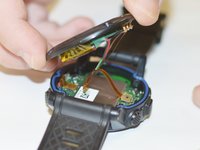
  1. Garmin Fenix 2 Display Replacement, Battery: passo 1, imagem 1 %32 Garmin Fenix 2 Display Replacement, Battery: passo 1, imagem 2 %32 Garmin Fenix 2 Display Replacement, Battery: passo 1, imagem 3 %32
    • Use a Torx T9 screwdriver to remove these four .8mm screws and seperate the housing.

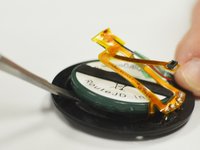
  2. Garmin Fenix 2 Display Replacement: passo 2, imagem 1 %32 Garmin Fenix 2 Display Replacement: passo 2, imagem 2 %32
    • Use a spudger tool to disengage the power ribbon from the main board. Once the ribbon is disconnected you can separate the bottom piece of the housing that holds the battery.

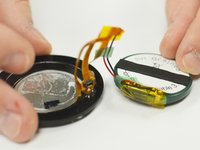
  3. Garmin Fenix 2 Display Replacement: passo 3, imagem 1 %32 Garmin Fenix 2 Display Replacement: passo 3, imagem 2 %32
    • Use the spudger tool again and wedge it in between the battery and the housing, pry until the battery starts to separate from the adhesive holding it in place. Once you have the battery disconnected you are ready to replace it.

    • Despite the fact that the metal spudger is shown being used in this step, make sure to use a plastic opening tool or nylon spudger to pry up the battery. The metal spudger has a much larger chance of puncturing the battery, and thus should not be used.

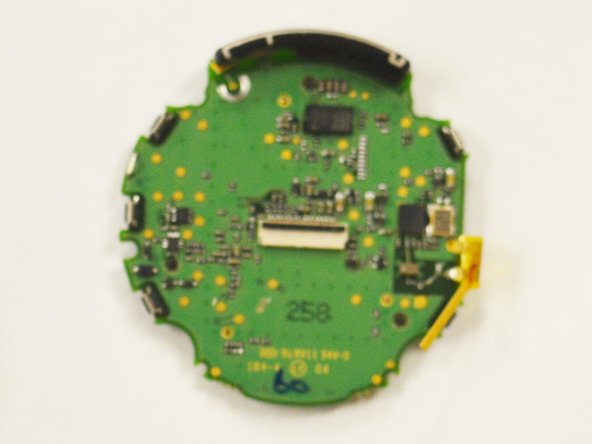
  4. Garmin Fenix 2 Display Replacement, Motherboard: passo 4, imagem 1 %32
    • Use a spudger to pry open the power ribbon from the main board.

  5. Garmin Fenix 2 Display Replacement: passo 5, imagem 1 %32
    • Use your Torx T9 screwdriver to remove the one .8mm screw that holds the main board to the watch housing.

  6. Garmin Fenix 2 Display Replacement: passo 6, imagem 1 %32
    • Use the spudger to pry the motherboard out of the housing.

  7. Garmin Fenix 2 Display Replacement: passo 7, imagem 1 %32
    • Once removed simply separate the digitizer from the main board.

  8. Garmin Fenix 2 Display Replacement: passo 8, imagem 1 %32 Garmin Fenix 2 Display Replacement: passo 8, imagem 2 %32
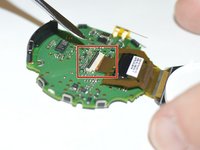
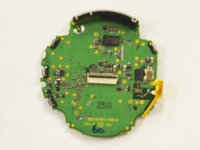
    • Lastly use your spudger tool to pry the data ribbon open from the motherboard. Once the ribbon is removed the board will be free and you can replace the board.

  9. Garmin Fenix 2 Display Replacement, Display: passo 9, imagem 1 %32
    • The display is also ready to be replaced.

Conclusão

To reassemble your device, follow these instructions in reverse order.

Uma outra pessoa concluiu este guia.

Brandon Barger

Membro desde: 02/13/16

1.219 Reputação

Autoria de 5 guias

Equipe

IUPUI, Team 54-4, Wilson Spring 2016 Membro de IUPUI, Team 54-4, Wilson Spring 2016

IUPUI-WILSON-S16S54G4

3 Membros

Autoria de 7 guias

2Comentários do guia

Do you know where I can buy a new screen?

Grzegorz Strzelecki - Responder

θέλω να πάρω καινούρια οθονη. ξέρετε απο που μπορώ να παραγγείλω?

ntinis xatz - Responder

Comentar

Visualizações:

Últimas 24 horas: 2

Últimos 7 dias: 4

Últimos 30 dias: 25

Ao todo: 3,066