Ir para o conteúdo principal
Participe da comunidade de reparos - Criar conta

Dell Inspiron 15-5552 Hard Drive Replacement

O que você precisa

  1. Dell Inspiron 15-5552 Hard Drive Replacement, Battery: passo 1, imagem 1 %32
    • Make sure the laptop is powered down before you remove the battery.

    Pergunte ao FixBot

    Comentar

  2. Dell Inspiron 15-5552 Hard Drive Replacement: passo 2, imagem 1 %32
    • Locate the battery release switch on the bottom of the laptop.

    Pergunte ao FixBot

    Comentar

  3. Dell Inspiron 15-5552 Hard Drive Replacement: passo 3, imagem 1 %32
    • Slide the battery release switch away from the lock symbol towards the “unlock” position.

    • You can tell that the battery is unlocked once you hear a "click."

    Pergunte ao FixBot

    Comentar

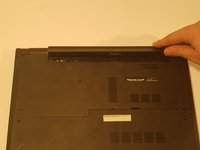
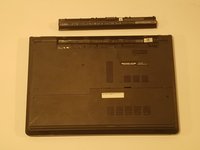
  4. Dell Inspiron 15-5552 Hard Drive Replacement: passo 4, imagem 1 %32 Dell Inspiron 15-5552 Hard Drive Replacement: passo 4, imagem 2 %32
    • Rotate the battery outward by lifting the bottom lip that pops out.

    • Continue rotating the battery towards the top of the laptop until the battery is completely removed.

    Pergunte ao FixBot

    Comentar

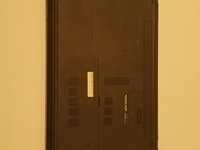
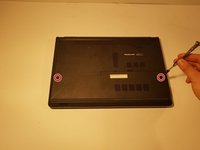
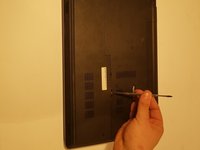
  5. Dell Inspiron 15-5552 Hard Drive Replacement, Hard Drive: passo 5, imagem 1 %32 Dell Inspiron 15-5552 Hard Drive Replacement, Hard Drive: passo 5, imagem 2 %32
    • Use a JIS #0 screwdriver to unscrew the two 6 mm screws from the back panel.

    • Make sure your device is powered down and unplugged before beginning the replacement.

    Pergunte ao FixBot

    Comentar

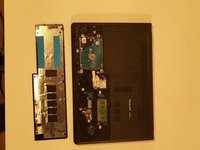
  6. Dell Inspiron 15-5552 Hard Drive Replacement: passo 6, imagem 1 %32 Dell Inspiron 15-5552 Hard Drive Replacement: passo 6, imagem 2 %32
    • Using a spudger, lightly lift the RAM cover up and at an angle, away from the computer.

    Pergunte ao FixBot

    Comentar

  7. Dell Inspiron 15-5552 Hard Drive Replacement: passo 7, imagem 1 %32
    • Remove the four 6 mm JIS #0 screws from the hard drive.

    Pergunte ao FixBot

    Comentar

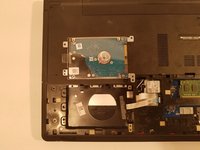
  8. Dell Inspiron 15-5552 Hard Drive Replacement: passo 8, imagem 1 %32
    • Lift hard drive out of the computer slightly.

    • Be careful not to tear the ribbon that attaches the hard drive to the computer when lifting it.

    Pergunte ao FixBot

    Comentar

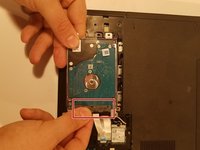
  9. Dell Inspiron 15-5552 Hard Drive Replacement: passo 9, imagem 1 %32 Dell Inspiron 15-5552 Hard Drive Replacement: passo 9, imagem 2 %32
    • Using two fingers, grab the black connector on the ribbon, and pull until detached.

    Pergunte ao FixBot

    Comentar

Conclusão

To reassemble your device, follow these instructions in reverse order.

Cancelar: não concluí este guia.

2 outras pessoas executaram este guia.

0Comentários do guia

Comentar

Visualizações:

Últimas 24 horas: 5

Últimos 7 dias: 9

Últimos 30 dias: 29

Ao todo: 826