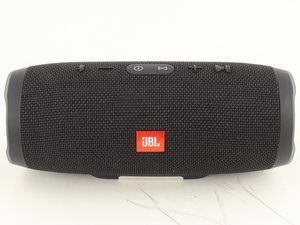
A sua caixa de som JBL Charge 3 não liga mais? Ela não reproduz sons ou as luzes não acendem? As caixas de som JBL Charge 3 são suscetíveis a uma série de problemas que podem impedir que o aparelho ligue. Verifique as possíveis causas a seguir para identificar e resolver o problema.
O dispositivo está desligado
Primeiro, tente ligar seu JBL Charge 3 pressionando o botão LIGA/DESLIGA na parte superior do aparelho. As luzes na parte frontal da caixa de som devem acender quando ela estiver ligada.
A bateria não está carregada
Se a caixa de som JBL Charge 3 não estiver carregada, ela não ligará. Conecte sua caixa de som a uma tomada usando o cabo de carregamento. Certifique-se de que as luzes frontais acendam, indicando que a caixa de som está carregando. Se as luzes não acenderem, o JBL Charge 3 pode estar com uma bateria defeituosa. Use o guia de substituição da bateria do JBL Charge 3 para substituir a bateria defeituosa da caixa de som.
O Bluetooth não está conectado
Se sua caixa de som não estiver pareada com outro dispositivo via Bluetooth, ela pode não apresentar sinais de vida. Desconecte seu dispositivo e a caixa de som do Bluetooth e tente reconectá-los. Assim que o dispositivo e a caixa de som estiverem pareados, verifique se o volume está alto tanto no dispositivo quanto na caixa de som. Se você não conseguir conectar o Bluetooth, tente reiniciar a caixa de som. Em seguida, faça o pareamento Bluetooth como de costume.
Se a caixa de som ainda não conectar ao Bluetooth, talvez seja necessário resetá-la. Ligue o aparelho e pressione e segure os botões de “aumentar volume” e “reproduzir/pausar” simultaneamente até que o botão LIGA/DESLIGA brilhe.
Chip Bluetooth defeituoso
Se o seu dispositivo ainda não conectar à caixa de som, você pode estar com um chip Bluetooth defeituoso e talvez precise substituir a placa-mãe da caixa de som. Consulte o guia de substituição da placa-mãe do JBL Charge 3 para substituir a placa-mãe defeituosa.
Botão LIGA/DESLIGA defeituoso
Verifique se a sua caixa de som JBL Charge 3 está carregada. Se ela estiver totalmente carregada e ainda assim não ligar, o mecanismo do botão LIGA/DESLIGA da caixa de som pode estar desgastado ou quebrado. Use o guia de substituição de botões do JBL Charge 3 para substituir qualquer botão defeituoso na caixa de som.
Perguntas frequentes sobre este problema
- Only turning on while plugged in
- Why won't it work without the battery.
- My JBL charge 3 won't turn on and not showing any light


8 comentários
My jbl i connect power cord .and power light turn white. And orange and turn off .can't please help me
Ernesto Huerta - Responder Compartilhar
When I turn on my Flip speaker the 5 lights blink and go off, no power up. My nephew was playing with the speaker pushing all the buttons and after that it would no longer power up. The speaker worked great up until the time the buttons were randomly pressed. It has a full charge and all the buttons work properly.
I hope you can help with this situation.... I really like this speaker.
Chris Knisely - Responder Compartilhar
When your JBL is on demo mode, it starts only with charger and without it, it just shows the battery level.
Solution found : "Press and hold simultaneously, The JBL CONNECT button < and the VOLUME UP + button for over 10 seconds. The first battery LED on the bottom right will turn RED. This confirms the device is Reset."
There are other modes that can be triggered if I remember correctly...
Fabien - Responder Compartilhar
I have a Jbl 3. It will not power on and when you plug it in only the bottom charging light will blink. No matter how long you leave it plugged in the bottom light is the only one that blinks. Other then that will not turn on whether plugged in or not
danielpeterson - Responder Compartilhar
Same issue also replaced the battery.only red led blink when carger is connected.left it on charge for 4 hrs, no difference
Dries Kruger - Responder Compartilhar