Ir para o conteúdo principal
Participe da comunidade de reparos - Criar conta

iPhone 7 Plus Wi-Fi Diversity Antenna Replacement

O que você precisa

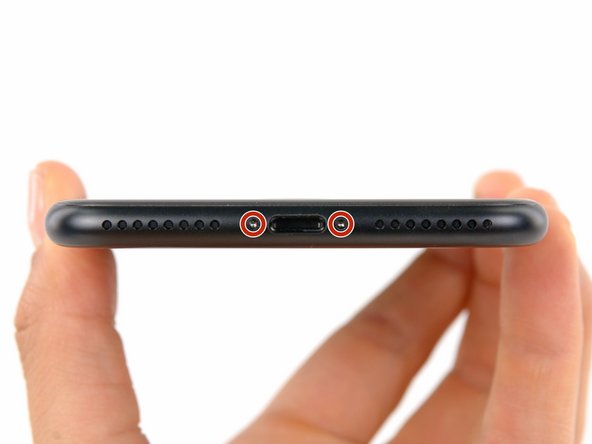
  1. iPhone 7 Plus Wi-Fi Diversity Antenna Replacement, Pentalobe Screws: passo 1, imagem 1 %32
    • Before you begin, discharge your iPhone battery below 25%. A charged lithium-ion battery can catch fire and/or explode if accidentally punctured.

    • Power off your iPhone before beginning disassembly.

    • Remove the two 3.4 mm pentalobe screws at the bottom edge of the iPhone (using a P2 screw bit, if you have a set of bits).

    • Opening the iPhone's display will compromise its waterproof seals. Have replacement seals ready before you proceed past this step, or take care to avoid liquid exposure if you reassemble your iPhone without replacing the seals.

    Pergunte ao FixBot

    Comentar

  2. iPhone 7 Plus Wi-Fi Diversity Antenna Replacement, Mark your opening picks: passo 2, imagem 1 %32 iPhone 7 Plus Wi-Fi Diversity Antenna Replacement, Mark your opening picks: passo 2, imagem 2 %32 iPhone 7 Plus Wi-Fi Diversity Antenna Replacement, Mark your opening picks: passo 2, imagem 3 %32
    • If inserted too far, an opening pick can damage your device. Follow this step to mark your pick and prevent damage.

    • Measure 3 mm from the tip and mark the opening pick with a permanent marker.

    • You can also mark the other corners of the pick with different measurements.

    • Alternatively, tape a coin to a pick 3 mm from the tip.

    Pergunte ao FixBot

    Comentar

  3. iPhone 7 Plus Wi-Fi Diversity Antenna Replacement, Anti-Clamp instructions: passo 3, imagem 1 %32 iPhone 7 Plus Wi-Fi Diversity Antenna Replacement, Anti-Clamp instructions: passo 3, imagem 2 %32 iPhone 7 Plus Wi-Fi Diversity Antenna Replacement, Anti-Clamp instructions: passo 3, imagem 3 %32
    Ferramenta utilizada neste passo:
    Clampy - Anti-Clamp
    $24.95
    • The next three steps demonstrate the Anti-Clamp, a tool we designed to make the opening procedure easier. If you aren't using the Anti-Clamp, skip down three steps for an alternate method.

    • For complete instructions on how to use the Anti-Clamp, check out this guide.

    • Pull the blue handle backwards to unlock the Anti-Clamp's arms.

    • Slide the arms over either the left or right edge of your iPhone.

    • Position the suction cups near the bottom edge of the iPhone just above the home button—one on the front, and one on the back.

    • Squeeze the cups together to apply suction to the desired area.

    • If you find that the surface of your iPhone is too slippery for the Anti-Clamp to hold onto, you can use tape to create a grippier surface.

    Pergunte ao FixBot

    Comentar

  4. iPhone 7 Plus Wi-Fi Diversity Antenna Replacement: passo 4, imagem 1 %32 iPhone 7 Plus Wi-Fi Diversity Antenna Replacement: passo 4, imagem 2 %32 iPhone 7 Plus Wi-Fi Diversity Antenna Replacement: passo 4, imagem 3 %32
    • Pull the blue handle forwards to lock the arms.

    • Turn the handle clockwise 360 degrees or until the cups start to stretch.

    • Make sure the suction cups remain aligned with each other. If they begin to slip out of alignment, loosen the suction cups slightly and realign the arms.

    Pergunte ao FixBot

    Comentar

  5. iPhone 7 Plus Wi-Fi Diversity Antenna Replacement: passo 5, imagem 1 %32 iPhone 7 Plus Wi-Fi Diversity Antenna Replacement: passo 5, imagem 2 %32
    • Heat an iOpener and thread it through the arms of the Anti-Clamp.

    • You can also use a hair dryer, heat gun, or hot plate—but extreme heat can damage the display and/or internal battery, so proceed with care.

    • Fold the iOpener so it lays on the bottom edge of the iPhone.

    • Wait one minute to give the adhesive a chance to release and present an opening gap.

    • Insert an opening pick into the gap.

    • If the Anti-Clamp doesn't create a sufficient gap, apply more heat to the area and rotate the handle a quarter turn.

    • Don't crank more than a quarter turn at a time, and wait one minute between turns. Let the Anti-Clamp and time do the work for you.

    • Skip the next three steps.

    Pergunte ao FixBot

    Comentar

  6. iPhone 7 Plus Wi-Fi Diversity Antenna Replacement, Heat the display: passo 6, imagem 1 %32
    • The next three steps show how to separate the screen using a suction cup.

    • Heating the lower edge of the iPhone will help soften the adhesive securing the display, making it easier to open.

    • Use a hairdryer or prepare an iOpener and apply it to the lower edge of the phone for about 90 seconds in order to soften up the adhesive underneath.

    Pergunte ao FixBot

    Comentar

  7. iPhone 7 Plus Wi-Fi Diversity Antenna Replacement, Separate the display: passo 7, imagem 1 %32 iPhone 7 Plus Wi-Fi Diversity Antenna Replacement, Separate the display: passo 7, imagem 2 %32
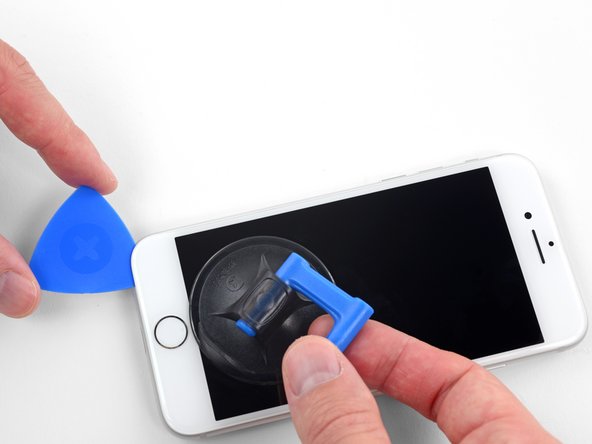
    • Apply a suction cup to the lower half of the front panel, just above the home button.

    • Be sure the suction cup does not overlap with the home button, as this will prevent a seal from forming between the suction cup and front glass.

    Pergunte ao FixBot

    Comentar

  8. iPhone 7 Plus Wi-Fi Diversity Antenna Replacement: passo 8, imagem 1 %32 iPhone 7 Plus Wi-Fi Diversity Antenna Replacement: passo 8, imagem 2 %32 iPhone 7 Plus Wi-Fi Diversity Antenna Replacement: passo 8, imagem 3 %32
    • Pull up on the suction cup with firm, constant pressure to create a slight gap between the screen and the frame.

    • Insert an opening pick into the gap.

    • The watertight adhesive holding the screen in place is very strong; creating this initial gap takes a significant amount of force. If you're having a hard time opening a gap, apply more heat, and gently rock the screen up and down to weaken the adhesive until you create enough of a gap to insert your tool.

    Pergunte ao FixBot

    Comentar

  9. iPhone 7 Plus Wi-Fi Diversity Antenna Replacement: passo 9, imagem 1 %32 iPhone 7 Plus Wi-Fi Diversity Antenna Replacement: passo 9, imagem 2 %32 iPhone 7 Plus Wi-Fi Diversity Antenna Replacement: passo 9, imagem 3 %32
    • Slide the opening pick up the left edge of the phone starting at the lower edge and moving towards the volume control buttons and silent switch, breaking up the adhesive holding the display in place.

    • Stop near the top left corner of the display.

    • Do not try to pry the top edge of the display away from the rear case, as it is held in place by plastic clips that may break.

    Pergunte ao FixBot

    Comentar

  10. iPhone 7 Plus Wi-Fi Diversity Antenna Replacement, Screen information: passo 10, imagem 1 %32
    • There are delicate cables along the right edge of your iPhone. Don't insert your pick here, as you may damage the cables.

    Pergunte ao FixBot

    Comentar

  11. iPhone 7 Plus Wi-Fi Diversity Antenna Replacement: passo 11, imagem 1 %32 iPhone 7 Plus Wi-Fi Diversity Antenna Replacement: passo 11, imagem 2 %32 iPhone 7 Plus Wi-Fi Diversity Antenna Replacement: passo 11, imagem 3 %32
    • Re-insert your tool at the lower right corner of the iPhone, and slide it around the corner and up the right side of the phone to separate the adhesive.

    • Don't insert your pick more than 3 mm, as you may damage the display cables.

    Pergunte ao FixBot

    Comentar

  12. iPhone 7 Plus Wi-Fi Diversity Antenna Replacement: passo 12, imagem 1 %32 iPhone 7 Plus Wi-Fi Diversity Antenna Replacement: passo 12, imagem 2 %32
    • Gently pull up on the suction cup to lift up the bottom edge of the display.

    • Do not raise the display more than 15º or you'll risk straining or tearing the ribbon cables connecting the display.

    • Pull on the small nub on the suction cup to remove it from the front panel.

    Pergunte ao FixBot

    Comentar

  13. iPhone 7 Plus Wi-Fi Diversity Antenna Replacement: passo 13, imagem 1 %32 iPhone 7 Plus Wi-Fi Diversity Antenna Replacement: passo 13, imagem 2 %32 iPhone 7 Plus Wi-Fi Diversity Antenna Replacement: passo 13, imagem 3 %32
    • Slide an opening pick underneath the display around the top left corner and along the top edge of the phone to loosen the last of the adhesive.

    Pergunte ao FixBot

    Comentar

  14. iPhone 7 Plus Wi-Fi Diversity Antenna Replacement: passo 14, imagem 1 %32 iPhone 7 Plus Wi-Fi Diversity Antenna Replacement: passo 14, imagem 2 %32
    • Slide the display assembly slightly down (away from the top edge of the phone) to disengage the clips holding it to the rear case.

    Pergunte ao FixBot

    Comentar

  15. iPhone 7 Plus Wi-Fi Diversity Antenna Replacement: passo 15, imagem 1 %32 iPhone 7 Plus Wi-Fi Diversity Antenna Replacement: passo 15, imagem 2 %32 iPhone 7 Plus Wi-Fi Diversity Antenna Replacement: passo 15, imagem 3 %32
    • Open the iPhone by swinging the display up from the left side, like the back cover of a book.

    • Don't try to fully separate the display yet, as several fragile ribbon cables still connect it to the iPhone's logic board.

    • Lean the display against something to keep it propped up while you're working on the phone.

    Pergunte ao FixBot

    Comentar

  16. iPhone 7 Plus Wi-Fi Diversity Antenna Replacement, Battery Disconnection: passo 16, imagem 1 %32
    • Remove the following four tri-point Y000 screws securing the lower display cable bracket to the logic board:

    • Three 1.2 mm screws

    • One 2.6 mm screw

    Pergunte ao FixBot

    Comentar

  17. iPhone 7 Plus Wi-Fi Diversity Antenna Replacement: passo 17, imagem 1 %32 iPhone 7 Plus Wi-Fi Diversity Antenna Replacement: passo 17, imagem 2 %32
    • Remove the lower display cable bracket.

    Pergunte ao FixBot

    Comentar

  18. iPhone 7 Plus Wi-Fi Diversity Antenna Replacement: passo 18, imagem 1 %32 iPhone 7 Plus Wi-Fi Diversity Antenna Replacement: passo 18, imagem 2 %32 iPhone 7 Plus Wi-Fi Diversity Antenna Replacement: passo 18, imagem 3 %32
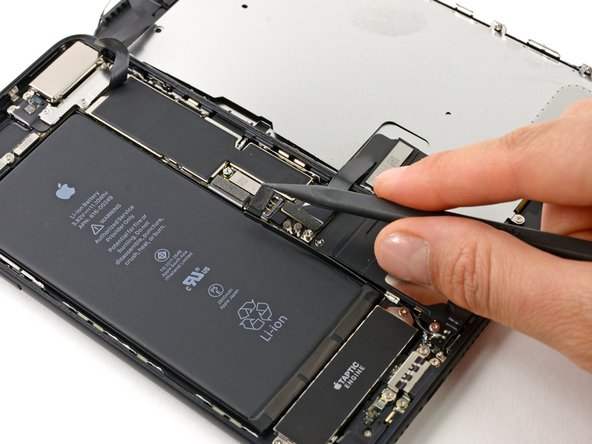
    • Use the point of a spudger to lift the battery connector out of its socket on the logic board.

    • Bend the connector cable up slightly to prevent it from making contact with the socket and providing power to the phone.

    Pergunte ao FixBot

    Comentar

  19. iPhone 7 Plus Wi-Fi Diversity Antenna Replacement, Display Assembly: passo 19, imagem 1 %32 iPhone 7 Plus Wi-Fi Diversity Antenna Replacement, Display Assembly: passo 19, imagem 2 %32 iPhone 7 Plus Wi-Fi Diversity Antenna Replacement, Display Assembly: passo 19, imagem 3 %32
    • Make sure the battery is disconnected before you disconnect or reconnect the cables in this step.

    • Use the flat end of a spudger or a fingernail to disconnect the two lower display connectors by prying them straight up from their sockets on the logic board.

    • To re-attach press connectors, press down on one end until it clicks into place, then repeat on the other end. Do not press down on the middle. If the connector is even slightly misaligned, the connector can bend, causing permanent damage.

    • If you have a blank screen, white lines on the display, or partial or complete lack of touch response after reassembling your phone, try disconnecting and carefully reconnecting both of these cables and make sure they are fully seated.

    Pergunte ao FixBot

    Comentar

  20. iPhone 7 Plus Wi-Fi Diversity Antenna Replacement: passo 20, imagem 1 %32 iPhone 7 Plus Wi-Fi Diversity Antenna Replacement: passo 20, imagem 2 %32 iPhone 7 Plus Wi-Fi Diversity Antenna Replacement: passo 20, imagem 3 %32
    • Remove the three tri-point Y000 screws securing the bracket over the front panel sensor assembly connector:

    • One 1.3 mm screw

    • Two 1.0 mm screws

    • Remove the bracket.

    Pergunte ao FixBot

    Comentar

  21. iPhone 7 Plus Wi-Fi Diversity Antenna Replacement: passo 21, imagem 1 %32 iPhone 7 Plus Wi-Fi Diversity Antenna Replacement: passo 21, imagem 2 %32
    • Disconnect the front panel sensor assembly connector from its socket on the logic board.

    • This press connector should also be reconnected one end at a time to minimize the risk of bending.

    Pergunte ao FixBot

    Comentar

  22. iPhone 7 Plus Wi-Fi Diversity Antenna Replacement: passo 22, imagem 1 %32
    Pergunte ao FixBot

    Comentar

  23. iPhone 7 Plus Wi-Fi Diversity Antenna Replacement, Speaker: passo 23, imagem 1 %32 iPhone 7 Plus Wi-Fi Diversity Antenna Replacement, Speaker: passo 23, imagem 2 %32
    Ferramenta utilizada neste passo:
    Tweezers
    $4.99
    • Use a thin pry tool or tweezers to carefully pry up and disconnect the upper coaxial cable connector from the logic board.

    • There are two coaxial connectors in close proximity. Disconnect the one nearest the battery connector.

    • During reassembly, this can be tricky to reconnect. Hold the connector in place over its socket and press down with the flat of your spudger. The connector should snap into place.

    Pergunte ao FixBot

    Comentar

  24. iPhone 7 Plus Wi-Fi Diversity Antenna Replacement: passo 24, imagem 1 %32 iPhone 7 Plus Wi-Fi Diversity Antenna Replacement: passo 24, imagem 2 %32
    • Carefully de-route the coaxial cable you just disconnected from the small metal clip holding it to the logic board.

    Pergunte ao FixBot

    Comentar

  25. iPhone 7 Plus Wi-Fi Diversity Antenna Replacement: passo 25, imagem 1 %32 iPhone 7 Plus Wi-Fi Diversity Antenna Replacement: passo 25, imagem 2 %32
    • Use tweezers or the point of your spudger to pry both coaxial cables out of the metal clip holding them on the side of the speaker.

    Pergunte ao FixBot

    Comentar

  26. iPhone 7 Plus Wi-Fi Diversity Antenna Replacement: passo 26, imagem 1 %32
    • Remove the five Phillips screws securing the speaker:

    • Three 1.3 mm screws

    • One 2.3 mm screw

    • One 3.3 mm screw

    Pergunte ao FixBot

    Comentar

  27. iPhone 7 Plus Wi-Fi Diversity Antenna Replacement: passo 27, imagem 1 %32
    Pergunte ao FixBot

    Comentar

  28. iPhone 7 Plus Wi-Fi Diversity Antenna Replacement, Wi-Fi Diversity Antenna: passo 28, imagem 1 %32
    • Warm the lower speaker area where the antenna is adhered with an iOpener, hair dryer, or heat gun, until it's slightly too hot to touch.

    • Heat helps soften the adhesive securing the antenna.

    Pergunte ao FixBot

    Comentar

  29. iPhone 7 Plus Wi-Fi Diversity Antenna Replacement: passo 29, imagem 1 %32 iPhone 7 Plus Wi-Fi Diversity Antenna Replacement: passo 29, imagem 2 %32 iPhone 7 Plus Wi-Fi Diversity Antenna Replacement: passo 29, imagem 3 %32
    • Slide an opening pick between the antenna and the speaker on the right side, and carefully separate the adhesive underneath.

    Pergunte ao FixBot

    Comentar

  30. iPhone 7 Plus Wi-Fi Diversity Antenna Replacement: passo 30, imagem 1 %32
    • Rotate the speaker and re-insert your opening pick on the opposite side.

    • Separate any remaining adhesive securing the antenna.

    • If necessary, re-heat the adhesive until it separates easily.

    Pergunte ao FixBot

    Comentar

  31. iPhone 7 Plus Wi-Fi Diversity Antenna Replacement: passo 31, imagem 1 %32
    • Remove the Wi-Fi diversity antenna from the speaker.

    Pergunte ao FixBot

    Comentar

Conclusão

Compare your new replacement part to the original part—you may need to transfer remaining components or remove adhesive backings from the new part before installing.

To reassemble your device, follow the above steps in reverse order.

Take your e-waste to an R2 or e-Stewards certified recycler.

Repair didn’t go as planned? Check out our Answers community for troubleshooting help.

Cancelar: não concluí este guia.

16 outras pessoas executaram este guia.

Jeff Suovanen

Membro desde: 08/06/13

452.773 Reputação

Autoria de 259 guias

Equipe

iFixit Membro de iFixit

Staff

122 Membros

Autoria de 25.862 guias

0Comentários do guia

Comentar

Visualizações:

Últimas 24 horas: 6

Últimos 7 dias: 78

Últimos 30 dias: 225

Ao todo: 23,208