Essa tradução foi gerada por um programa e ainda não foi revisada por uma pessoa. Falas essa língua? Dá uma olhada.
Introdução
Siga este guia para ajustar as configurações e atualizar o firmware da sua estação de energia portátil FixHub usando um computador.
-
-
-
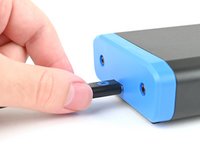
Conecte a estação de energia portátil FixHub ao seu computador, certificando-se de que o cabo esteja conectado à porta traseira da estação de energia (o lado oposto à tela).
-
Navegue até iFixit.com/FixHub/console
 Pergunte ao FixBot
-
-
-
Clique em Connect my device.
-
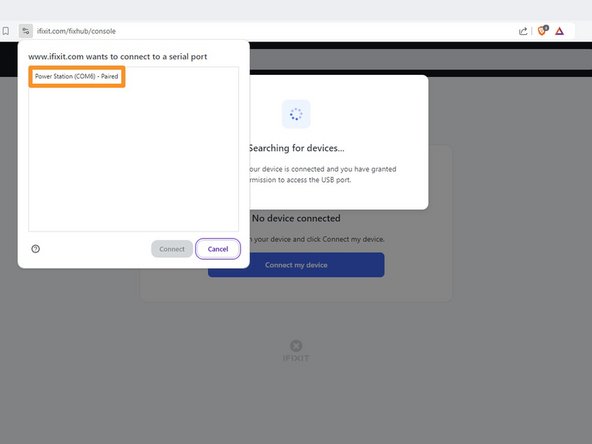
Selecione a sua Central de Energia Portátil na janela pop-up que solicita a conexão de uma porta serial.
-
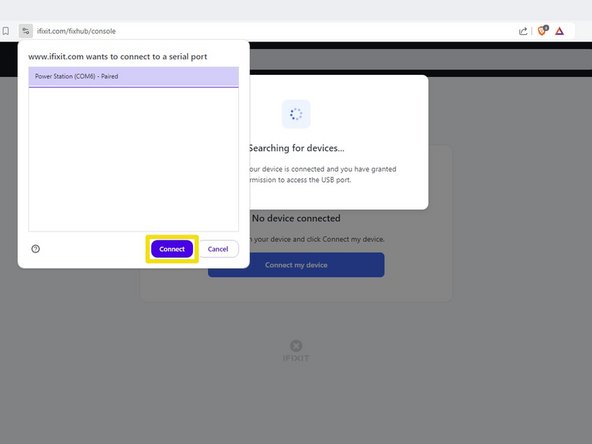
Clique em Connect.
-
-
-
-
USB 1 mostra informações sobre o dispositivo conectado à porta USB-C frontal esquerda da estação de energia.
-
USB 2 mostra informações sobre o dispositivo conectado à porta USB-C frontal direita da estação de energia.
-
Battery (Bateria) mostra a porcentagem da bateria em tempo real.
-
Serial number (Número de série) mostra o número de série da estação de energia.
-
Version (Versão) mostra a versão do firmware e as atualizações para a estação de energia.
-
-
-
Selecione a caixa Versão.
-
Clique em Atualizar agora e aguarde a conclusão da atualização do firmware. Não desconecte sua estação de solda nem feche a janela durante a atualização do firmware.
-
-
-
Desconecte a estação de energia do computador.
-
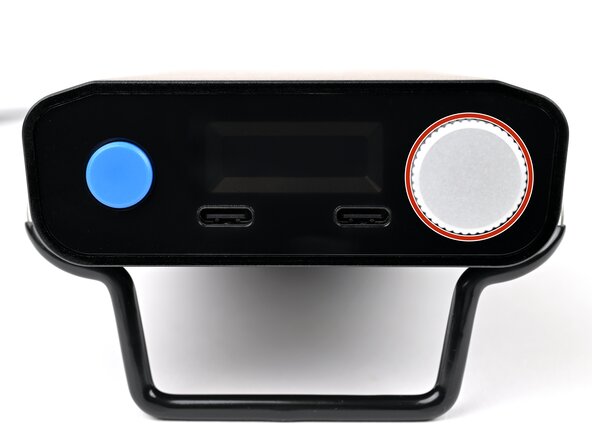
Pressione e segure o botão de ajuste.
-
Conecte a estação de energia de volta ao computador e solte o botão de ajuste.
-
Use o console web para atualizar manualmente o firmware.
-
-








Pronto!
Ainda precisa de ajuda? Pergunte em nosso fórum de Respostas, ou tente uma resolução de problemas básica.
Cancelar: não concluí este guia.
20 outras pessoas executaram este guia.


8Comentários do guia
Can you update the app or website to display the latest firmware release information for this device? When I plug in my hub, it only shows the current firmware version on the device but doesn't indicate if it's the latest. Unlike other options, I can't click on the box for more details. Additionally, I couldn't find any information on your website about the current firmware version or its release notes.
The web console page is: https://www.ifixit.com/fixhub/console
This is where you can browse through the current and prior firmware versions. However, I don't believe the packaged firmware (at least with CI/CD) is currently open-source at the time of writing. Yet you can see what is currently available here on GitHub: https://github.com/ifixit/fixhub (The commands here work if you're able to access the FixHub with either minicomp on Linux or PuTTY on Windows; you can determine which TTY device the FixHub is assigned to with the help of the FixHub web console, which reliably picks out the correct low-level serial device name for the FixHub.)
Settings tab is missing in the FixHub page for the Ifix-it portable power station. I am unable to reset battery health Calibration data for the PPS so i can perform initial battery calibration. is this a glitch? any suggestions?
Same the settings tab is missing for me with no option to reset battery health calibration data after updating the firmware on the power station.
il manque le boutons settings, il y a un autre moyen de recalibrer la batterie ?
