Ir para o conteúdo principal
Participe da comunidade de reparos - Criar conta

How to Reinstall the iFixit Digital Multimeter Outer Cover

  1. How to Reinstall the iFixit Digital Multimeter Outer Cover, Install the outer cover: passo 1, imagem 1 %32 How to Reinstall the iFixit Digital Multimeter Outer Cover, Install the outer cover: passo 1, imagem 2 %32
    • Firmly push the top edge of the multimeter into the cover's top cutout.

    • Try to get the top edge well aligned and seated. This will give you enough room to pull the cover's bottom edge in place.

    Pergunte ao FixBot

    Comentar

  2. How to Reinstall the iFixit Digital Multimeter Outer Cover: passo 2, imagem 1 %32 How to Reinstall the iFixit Digital Multimeter Outer Cover: passo 2, imagem 2 %32 How to Reinstall the iFixit Digital Multimeter Outer Cover: passo 2, imagem 3 %32
    • Flip the multimeter over.

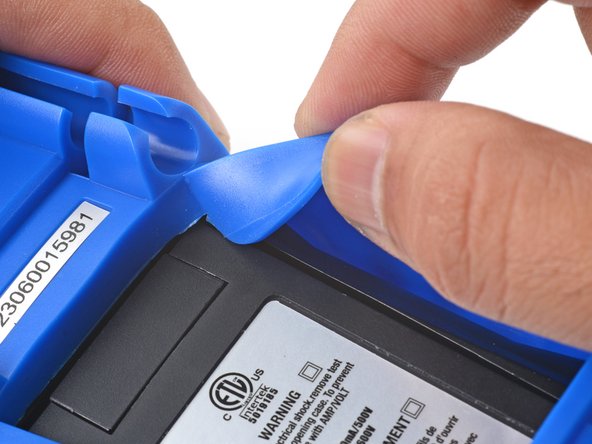
    • The cover has a lip that needs to seat into the groove around the multimeter's kickstand.

    • Align and press the cover lip into the groove above the kickstand.

    Pergunte ao FixBot

    Comentar

  3. How to Reinstall the iFixit Digital Multimeter Outer Cover: passo 3, imagem 1 %32 How to Reinstall the iFixit Digital Multimeter Outer Cover: passo 3, imagem 2 %32 How to Reinstall the iFixit Digital Multimeter Outer Cover: passo 3, imagem 3 %32
    • Lift and tuck the cover lip into the groove near the top right corner of the kickstand.

    • Repeat the procedure for the top left corner of the kickstand.

    Pergunte ao FixBot

    Comentar

  4. How to Reinstall the iFixit Digital Multimeter Outer Cover: passo 4, imagem 1 %32 How to Reinstall the iFixit Digital Multimeter Outer Cover: passo 4, imagem 2 %32
    • Guide and press the cover lip into the grooves along the sides of the kickstand.

    • Pull the cover over the bottom edge of the multimeter and press the bottom lip into the groove under the kickstand.

    • Carefully check to make sure the cover lip sits completely in the groove around the kickstand.

    Pergunte ao FixBot

    Comentar

  5. How to Reinstall the iFixit Digital Multimeter Outer Cover: passo 5, imagem 1 %32 How to Reinstall the iFixit Digital Multimeter Outer Cover: passo 5, imagem 2 %32 How to Reinstall the iFixit Digital Multimeter Outer Cover: passo 5, imagem 3 %32
    • Flip the multimeter over so that the front is facing up.

    • Squeeze the cover along the right edge to pop the cover lip into the groove along the side of the multimeter.

    • Repeat the process along the left edge of the multimeter.

    • Carefully check to make sure the cover is properly seated along the perimeter of the multimeter.

    Pergunte ao FixBot

    Comentar

Conclusão

For more information on how to use your iFixit multimeter, check out this page.

Cancelar: não concluí este guia.

Arthur Shi

Membro desde: 01/03/18

341.199 Reputação

Autoria de 899 guias

Equipe

iFixit Membro de iFixit

Staff

122 Membros

Autoria de 26.665 guias

0Comentários do guia

Comentar

Visualizações:

Últimas 24 horas: 0

Últimos 7 dias: 4

Últimos 30 dias: 26

Ao todo: 189