Introdução
Do you need to replace the joystick module on your 8BitDo Ultimate Wireless? If so, this guide will show you how to correctly and safely do so!
With that said, please make sure to check our Troubleshooting Guides first. Often times, there is no need to go as far as replacing the joystick module entirely.
Before beginning, turn off the controller and ensure it will not accidentally reconnect during the repair.
This guide requires soldering. Be sure that you have all of the necessary equipment and knowledge before beginning.
O que você precisa
-
-
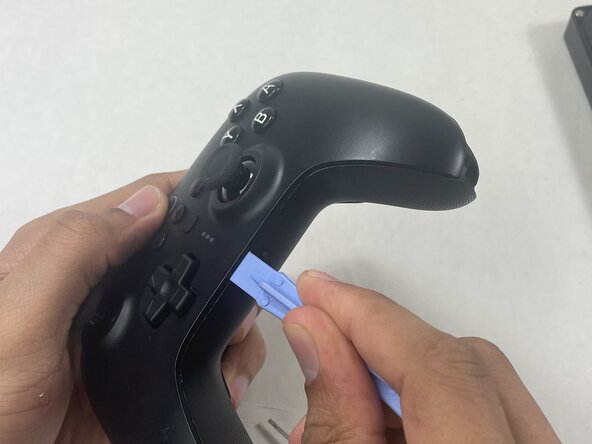
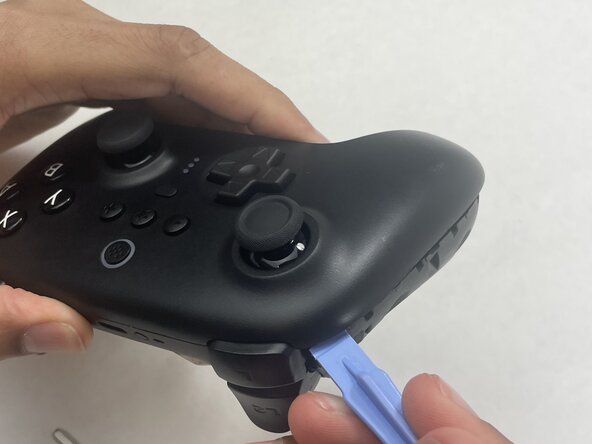
Insert an opening pick into the seam between the left controller grip and main controller body.
-
Pry the grip off.
-
Repeat for the right grip.
 Pergunte ao FixBot
-
-
-
Remove the six 8 mm T6 Torx screws securing the rear case to the front case.
-
-
-
Insert an opening tool into seam at the bottom of the device and carefully pry the front and back shells apart.
-
Set the halves next to each other with care not to strain the connected ribbon cables.
-
-
-
-
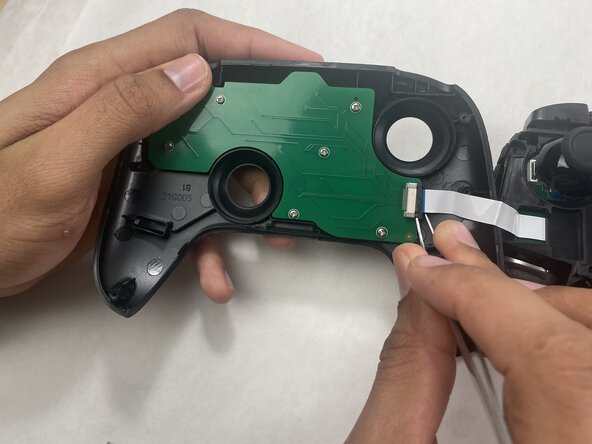
The ribbon cable is secured with a locking tab connector.
-
Use tweezers to unlock the locking tab on the ribbon cable connector, then gently disconnect the ribbon cable.
-
-
-
Grip each analog stick cap firmly and pull straight up to remove them.
-
-
-
Remove the three 5 mm Phillips #00 screws securing the midframe to the back shell, then lift it straight out.
-
-
-
Turn to the backside of the circuit board for clear access to the solder joints.
-
Desolder all of the outlined solder joints.
-
Refer to the following solder guide if necessary: How To Solder and Desolder Connections
-








To reassemble your device, follow the above steps in reverse order.
Take your e-waste to an R2 or e-Stewards certified recycler.
Repair didn’t go as planned? Try some basic troubleshooting or ask our Answers community for help.

Equipe

UMass Dartmouth, Team 1-3, Biswokarma Spring 2026 Membro de UMass Dartmouth, Team 1-3, Biswokarma Spring 2026
UMASSD-BISWOKARMA-S26S1G3
5 Membros
Autoria de 5 guias
