Ir para o conteúdo principal
Participe da comunidade de reparos - Criar conta

Um notebook gamer produzido pela Asus da linha de produtos ROG. Esta página o ajudará a reparar/substituir peças do seu notebook ROG Strix G16.

New Laptop - Second HD Inaccessible

I purchased ROG Strix G16 and realized the hard drive was too small to install all of my games onto. I contacted the seller and they recommended buying a 1T internal hard drive along with instructions since there was an extra slot available. I have the extra drive installed, but it's not registering. What do I need to do so it's recognized and functional?

Responder a esta pergunta Também tenho esse problema

Esta é uma boa pergunta?

Pontuação 0
3 comentários

It's not registering as in you can't see it in File Explorer? Or it's not showing in BIOS?

por

I can't see it in explorer - It's there in device manager, but cannot access it normally

por

I have the answer to my question using these links provided by a friend - in case anyone else has the same issue: https://learn.microsoft.com/en-us/window..., https://learn.microsoft.com/en-us/troubl..., and https://learn.microsoft.com/en-us/troubl...

por

Adicionar um comentário

2 respostas

Pergunta mais útil

I have the answer to my question using these links provided by a friend - in case anyone else has the same issue: https://learn.microsoft.com/en-us/window..., https://learn.microsoft.com/en-us/troubl..., and https://learn.microsoft.com/en-us/troubl...

Esta resposta foi útil?

Pontuação 1

1 comentário:

You beat me to the punch! Glad you got it figured out.

por

Adicionar um comentário

Based on your previous comment. I would wager the disk hasn't been initialized. It's something I have seen commonly with new drives because they leave them that way so you can format it the way you want.

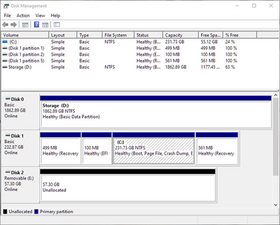
Check to see if it's visible in Disk Management. In Windows 10/11 you can see that by right clicking on the Start button (or pressing Win + X).

Once you Disk Management you'll get a visual of what physical storage devices are connected. My guess is that One of them will show like the below image as "Unallocated." You can right click on the drive and select "New Simple Volume" specify what size and format you want (for Windows you'll most likely want to use NTFS) and it will ask what drive letter you want to assign, though not necessarily in that order.

Imagem

Once you get through that, you should be able to see the Volume you created in File Explorer.

Esta resposta foi útil?

Pontuação 1
Adicionar um comentário

Adicionar a sua resposta

Brenda Gray será eternamente grato(a).
Visualizações:

Últimas 24 horas: 0

Últimos 7 dias: 4

Últimos 30 dias: 23

Ao todo: 382