Introdução
If your camera isn’t powering on, the culprit may be a faulty battery. The battery must also be removed as a prerequisite in some replacement guides. This guide will provide step-by-step instructions on how to remove and replace the battery. This replacement guide requires no tools.
O que você precisa
-
-
-
Verify the camera is powered off by setting the switch to OFF.
 Pergunte ao FixBot
-
-
-
Flip the camera upside down.
-
Slide the battery compartment lock to OPEN to unlock it.
-
-
-


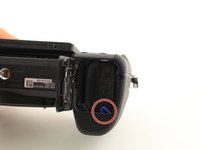
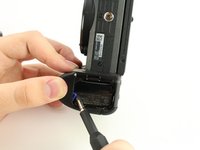

To reinsert the battery, follow these instructions in reverse order.
Cancelar: não concluí este guia.
Uma outra pessoa concluiu este guia.

Equipe

University of South Florida St. Petersburg, Team S1-G1, Stowe Fall 2018 Membro de University of South Florida St. Petersburg, Team S1-G1, Stowe Fall 2018
USFSP-STOWE-F18S1G1
4 Membros
Autoria de 4 guias
