Ir para o conteúdo principal
Participe da comunidade de reparos - Criar conta

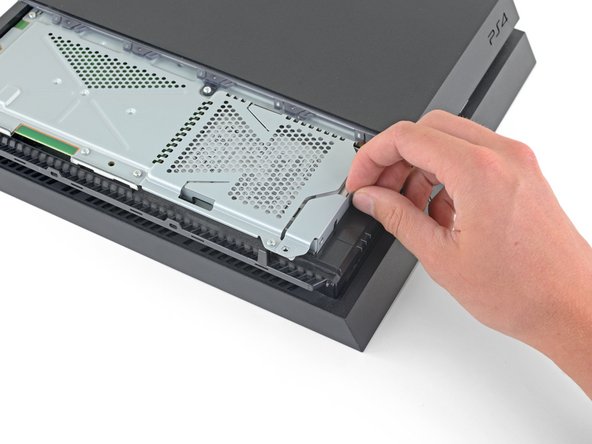
PlayStation 4 Motherboard Replacement

O que você precisa

  1. PlayStation 4 Motherboard Replacement, Remove the hard drive cover: passo 1, imagem 1 %32 PlayStation 4 Motherboard Replacement, Remove the hard drive cover: passo 1, imagem 2 %32 PlayStation 4 Motherboard Replacement, Remove the hard drive cover: passo 1, imagem 3 %32
    • Grip the PS4 with both hands along the gap in the top cover.

    • Push the glossy side of the top cover with your thumbs until it pops to the side.

    • Lift the glossy top cover up and back to remove it from the PS4.

    Pergunte ao FixBot
  2. PlayStation 4 Motherboard Replacement, Remove the hard drive bracket screw: passo 2, imagem 1 %32 PlayStation 4 Motherboard Replacement, Remove the hard drive bracket screw: passo 2, imagem 2 %32
    • Use a Phillips screwdriver to remove the 6.5 mm screw securing the hard drive bracket to the enclosure.

    Pergunte ao FixBot
  3. PlayStation 4 Motherboard Replacement, Remove the hard drive bracket: passo 3, imagem 1 %32 PlayStation 4 Motherboard Replacement, Remove the hard drive bracket: passo 3, imagem 2 %32 PlayStation 4 Motherboard Replacement, Remove the hard drive bracket: passo 3, imagem 3 %32
    • Pull the hard drive bracket out of the enclosure.

    • Be careful not to drop the hard drive. The internal components are fragile and are susceptible to damage by sudden shock.

    Pergunte ao FixBot
  4. PlayStation 4 Motherboard Replacement, Flip over the PS4: passo 4, imagem 1 %32
    • Flip the PS4 upside-down with the back side facing towards you.

    Pergunte ao FixBot
  5. PlayStation 4 Motherboard Replacement, Remove the warranty stickers: passo 5, imagem 1 %32 PlayStation 4 Motherboard Replacement, Remove the warranty stickers: passo 5, imagem 2 %32 PlayStation 4 Motherboard Replacement, Remove the warranty stickers: passo 5, imagem 3 %32
    Ferramenta utilizada neste passo:
    Tweezers
    $4.99
    • Use tweezers to remove the two stickers in the center of the back of the PS4 exposing two case screws.

    Pergunte ao FixBot
  6. PlayStation 4 Motherboard Replacement, Remove the plastic screw covers: passo 6, imagem 1 %32 PlayStation 4 Motherboard Replacement, Remove the plastic screw covers: passo 6, imagem 2 %32
    • Use tweezers to carefully remove the plastic screw covers in each corner, exposing two more case screws.

    Pergunte ao FixBot
  7. PlayStation 4 Motherboard Replacement, Remove the rear case screws: passo 7, imagem 1 %32 PlayStation 4 Motherboard Replacement, Remove the rear case screws: passo 7, imagem 2 %32
    • Remove the four 7.2 mm T8 Torx security screws on the back of the PS4.

    Pergunte ao FixBot
  8. PlayStation 4 Motherboard Replacement, Remove the lower case: passo 8, imagem 1 %32 PlayStation 4 Motherboard Replacement, Remove the lower case: passo 8, imagem 2 %32
    • Use your thumbs to lift the lower case up and off the PS4.

    • The lower case is held into place by plastic clips. You may need to use significant force to release the lower case.

    Pergunte ao FixBot
  9. PlayStation 4 Motherboard Replacement: passo 9, imagem 1 %32 PlayStation 4 Motherboard Replacement: passo 9, imagem 2 %32
    • Use a pair of tweezers to pull the power supply cable straight out and disconnect the power supply unit from the motherboard.

    • If your connector feels stuck, use a spudger to gently pry the connector out.

    Pergunte ao FixBot
  10. PlayStation 4 Motherboard Replacement, Remove the power supply unit: passo 10, imagem 1 %32 PlayStation 4 Motherboard Replacement, Remove the power supply unit: passo 10, imagem 2 %32
    • Remove three 9.7 mm-long TR8 Torx security screws.

    • Remove two 41 mm-long Phillips screws and brackets.

    Pergunte ao FixBot
  11. PlayStation 4 Motherboard Replacement: passo 11, imagem 1 %32 PlayStation 4 Motherboard Replacement: passo 11, imagem 2 %32 PlayStation 4 Motherboard Replacement: passo 11, imagem 3 %32
    • Lift the power supply straight up and out of the PS4.

    • The power supply is held firmly in place by prongs on the left side. It may take multiple attempts to remove it.

    • During reassembly, ensure the prongs are aligned, then press the power supply into place.

    Pergunte ao FixBot
  12. PlayStation 4 Motherboard Replacement, Remove the Wi-Fi antenna: passo 12, imagem 1 %32 PlayStation 4 Motherboard Replacement, Remove the Wi-Fi antenna: passo 12, imagem 2 %32
    • Use the tip of a spudger to disconnect the antenna cable from the motherboard.

    Pergunte ao FixBot
  13. PlayStation 4 Motherboard Replacement: passo 13, imagem 1 %32 PlayStation 4 Motherboard Replacement: passo 13, imagem 2 %32 PlayStation 4 Motherboard Replacement: passo 13, imagem 3 %32
    Ferramenta utilizada neste passo:
    Tweezers
    $4.99
    • Use a pair of tweezers or your fingers to grab the antenna cable and move it out from the cable guides.

    Pergunte ao FixBot
  14. PlayStation 4 Motherboard Replacement: passo 14, imagem 1 %32 PlayStation 4 Motherboard Replacement: passo 14, imagem 2 %32 PlayStation 4 Motherboard Replacement: passo 14, imagem 3 %32
    • Use a pair of tweezers or your fingers to thread the antenna cable out from underneath the optical drive cable.

    Pergunte ao FixBot
  15. PlayStation 4 Motherboard Replacement: passo 15, imagem 1 %32 PlayStation 4 Motherboard Replacement: passo 15, imagem 2 %32
    • Remove the 9.7 mm Torx security screw securing the antenna.

    Pergunte ao FixBot
  16. PlayStation 4 Motherboard Replacement: passo 16, imagem 1 %32 PlayStation 4 Motherboard Replacement: passo 16, imagem 2 %32
    • Remove the Wi-Fi antenna.

    Pergunte ao FixBot
  17. PlayStation 4 Motherboard Replacement, Disconnect the optical drive: passo 17, imagem 1 %32 PlayStation 4 Motherboard Replacement, Disconnect the optical drive: passo 17, imagem 2 %32 PlayStation 4 Motherboard Replacement, Disconnect the optical drive: passo 17, imagem 3 %32
    Ferramenta utilizada neste passo:
    Tweezers
    $4.99
    • Use your fingernail to press down on the metal release lever of the ribbon cable on top of the optical drive.

    • Use your fingers or a pair of tweezers to disconnect the ribbon cable by pulling on the black tab.

    • You do not need to press the metal lever when inserting the ribbon cable back in. You will hear a click once it is fully inserted.

    Pergunte ao FixBot
  18. PlayStation 4 Motherboard Replacement: passo 18, imagem 1 %32 PlayStation 4 Motherboard Replacement: passo 18, imagem 2 %32 PlayStation 4 Motherboard Replacement: passo 18, imagem 3 %32
    • Use your fingernail to press down the metal release lever for the ribbon cable connected to the motherboard.

    • Use your fingers or a pair of tweezers to disconnect the ribbon cable by pulling on the black tab.

    • Set the ribbon cable aside for reassembly.

    • You do not need to press the metal lever when inserting the ribbon cable back in. You will hear a click once it is fully inserted.

    Pergunte ao FixBot
  19. PlayStation 4 Motherboard Replacement: passo 19, imagem 1 %32 PlayStation 4 Motherboard Replacement: passo 19, imagem 2 %32
    • Use your fingers or a pair of tweezers to disconnect the optical drive cable from the motherboard.

    Pergunte ao FixBot
  20. PlayStation 4 Motherboard Replacement: passo 20, imagem 1 %32 PlayStation 4 Motherboard Replacement: passo 20, imagem 2 %32 PlayStation 4 Motherboard Replacement: passo 20, imagem 3 %32
    • Use your fingers or a pair of tweezers to remove the optical drive cable from the cable guides that hold it in place.

    Pergunte ao FixBot
  21. PlayStation 4 Motherboard Replacement, Remove the optical drive: passo 21, imagem 1 %32 PlayStation 4 Motherboard Replacement, Remove the optical drive: passo 21, imagem 2 %32
    • Remove the four screws securing the optical drive.

    • Three 9.7 mm Torx screws

    • One 6.2 mm Phillips screw

    Pergunte ao FixBot
  22. PlayStation 4 Motherboard Replacement: passo 22, imagem 1 %32 PlayStation 4 Motherboard Replacement: passo 22, imagem 2 %32
    • Lift the optical drive straight up and out of the PS4.

    Pergunte ao FixBot
  23. PlayStation 4 Motherboard Replacement, Remove the upper case: passo 23, imagem 1 %32 PlayStation 4 Motherboard Replacement, Remove the upper case: passo 23, imagem 2 %32
    • Remove the two 9.7 mm Torx screws securing the upper case.

    Pergunte ao FixBot
  24. PlayStation 4 Motherboard Replacement: passo 24, imagem 1 %32 PlayStation 4 Motherboard Replacement: passo 24, imagem 2 %32 PlayStation 4 Motherboard Replacement: passo 24, imagem 3 %32
    • Lift the upper case up and back to remove it from the PS4.

    • The upper case in held in place by plastic tabs on the front side. It will take significant force to separate them.

    Pergunte ao FixBot
  25. PlayStation 4 Motherboard Replacement, Remove the upper EMI shield: passo 25, imagem 1 %32 PlayStation 4 Motherboard Replacement, Remove the upper EMI shield: passo 25, imagem 2 %32
    • Remove the twelve 9.7 mm Torx screws securing the upper EMI shield.

    Pergunte ao FixBot
  26. PlayStation 4 Motherboard Replacement: passo 26, imagem 1 %32 PlayStation 4 Motherboard Replacement: passo 26, imagem 2 %32 PlayStation 4 Motherboard Replacement: passo 26, imagem 3 %32
    • This step shows you how to properly unscrew the pressure plate.

    • Remove the two 15.6 mm Phillips screws.

    • Gradually unscrew the pressure plate by turning each screw one half turn at a time.

    • Alternate between the two screws to maintain even pressure on the pressure plate.

    • Do not unscrew one side completely before unscrewing the other side or you may damage the processor.

    Pergunte ao FixBot
  27. PlayStation 4 Motherboard Replacement: passo 27, imagem 1 %32
    • Remove the pressure plate.

    Pergunte ao FixBot
  28. PlayStation 4 Motherboard Replacement: passo 28, imagem 1 %32 PlayStation 4 Motherboard Replacement: passo 28, imagem 2 %32
    • Remove the upper EMI shield.

    Pergunte ao FixBot
  29. PlayStation 4 Motherboard Replacement, Remove the motherboard: passo 29, imagem 1 %32 PlayStation 4 Motherboard Replacement, Remove the motherboard: passo 29, imagem 2 %32
    • Insert the flat end of a spudger in between the fan cable and the motherboard.

    • Twist the spudger to lift the connector straight up and disconnect it from the motherboard.

    Pergunte ao FixBot
  30. PlayStation 4 Motherboard Replacement: passo 30, imagem 1 %32 PlayStation 4 Motherboard Replacement: passo 30, imagem 2 %32
    • Grab the edge of the motherboard on the front of the PS4.

    • Lift the motherboard until the USB ports clear the PS4 case.

    Pergunte ao FixBot
  31. PlayStation 4 Motherboard Replacement: passo 31, imagem 1 %32 PlayStation 4 Motherboard Replacement: passo 31, imagem 2 %32 PlayStation 4 Motherboard Replacement: passo 31, imagem 3 %32
    • Lift the motherboard out from the PS4.

    • Apply a new layer of thermal paste to the processor before installing a motherboard using this guide.

    • Failure to properly install new thermal paste will cause your PS4 to overheat.

    • Insert the I/O side of the Motherboard in first, then lower the other side in.

    Pergunte ao FixBot
Conclusão

To reassemble your device, follow the above steps in reverse order.

Take your e-waste to an R2 or e-Stewards certified recycler.

Repair didn’t go as planned? Check out our Answers community for troubleshooting help.

Compare your new replacement part to the original part—you may need to transfer remaining components or remove adhesive backings from the new part before installing.

219 outras pessoas executaram este guia.

Sam Omiotek

Membro desde: 02/25/19

98.462 Reputação

Autoria de 290 guias

19Comentários do guia

Regarding the three wire plug in step 20 - is there a good way to repair this piece if, say, you pulled the wires out of the connector by accident? is there a place to get a replacement part?

Ryan Statz - Responder Compartilhar

I have tried to replace the hdmi port however being somewhat of an idiot I slipped and knocked off onto the little black squares just behind the port on the left hand side. Does anyone know what these are?

Geoff Parker - Responder Compartilhar

contacts of the motherboard

lillarrypimp1993 - Responder Compartilhar

You may be talking about capacitors that are critically important for the unit to function.

South30 - Responder Compartilhar

Comentar

Visualizações:

Últimas 24 horas: 24

Últimos 7 dias: 224

Últimos 30 dias: 1,071

Ao todo: 340,316