Ir para o conteúdo principal
Participe da comunidade de reparos - Criar conta

OBSOLETE - Battery Bulge Inspection

Visualizações: 7,8 mil

Visualizar Estatísticas:

Últimas 24 horas:
3
Últimos 7 dias:
20
Últimos 30 dias:
107
Ao todo:
7.771
Comentários: 0

Ninguém deixou comentários sobre este guia. Você será o primeiro?

Go to guide comments
Concluído: 16

16 pessoas marcaram este guia como "concluído". Será você o próximo?

Favorites: 31

31 pessoas favoritaram (e se inscreveram) neste guia. Você será o próximo?

Tempo necessário: Nenhuma estimativa
Dificuldade: Fácil
Guia colaborativo

Foi um incrível membro de nossa comunidade quem criou este guia. Não foi ninguém da equipe iFixit, não.

OBSOLETE - Battery Bulge Inspection

Introdução

Ir para o passo 1 ↓

IMPORTANT: AS OF ~7/2/2023 (archived years prior), THIS GUIDE IS NO LONGER UPDATED BY THE AUTHOR. This guide was made around the iPhone 4 which hasn't worked on US carriers for at least 10+ years due to a lack of 4G or VoLTE. This guide may apply to other devices, but they often have such stark differences it is unlikely this approach will work for you. These are also prone to repair cost issue as parts can be as much as the entire phone.

Are you concerned your iPhone 4 may have a bulged battery after many years of use? Here are some basic ways you can see, short of opening the phone.

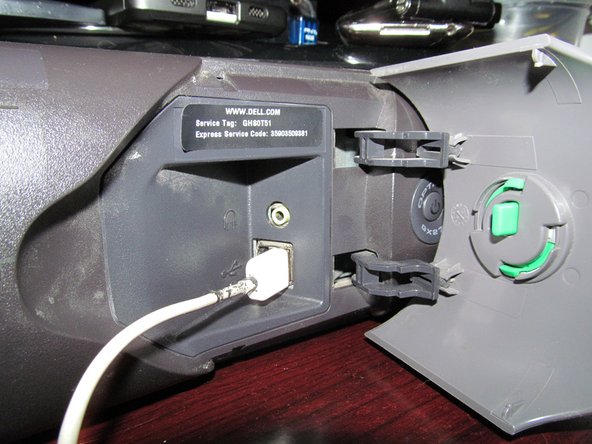
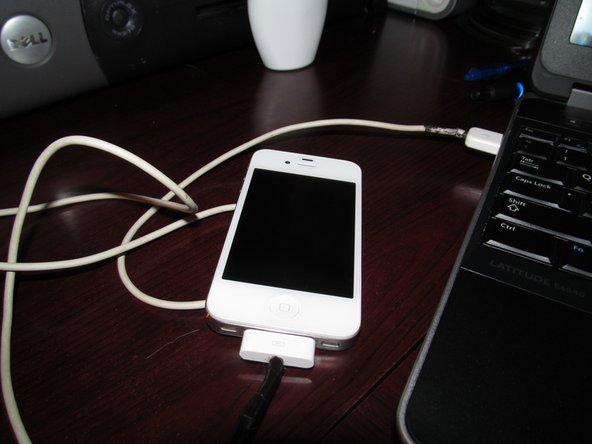
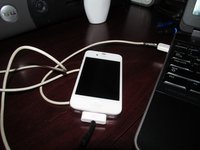
    1. OBSOLETE - Battery Bulge Inspection, Check for power on a iPod dock: passo 1, imagem 1 %32 OBSOLETE - Battery Bulge Inspection, Check for power on a iPod dock: passo 1, imagem 2 %32
      • Plug the iPhone into a compatible iPod dock or charger with 30-pin cable. If you do not find the phone turns on in a reasonable amount of time, you may want to supervise the phone. If the phone still has problems, further inspection is required.

      • If your phone feels "bubbled", the battery may explode. Stop the tests and replace the battery. Continuing beyond this point runs the risk of the phone exploding.

      Pergunte ao FixBot

      Comentar

    2. OBSOLETE - Battery Bulge Inspection, Try resetting your phone: passo 2, imagem 1 %32
      • Try to reset the phone. Do this by holding the power and home buttons together for around 30 seconds.

      Pergunte ao FixBot

      Comentar

    3. OBSOLETE - Battery Bulge Inspection, Check with a computer: passo 3, imagem 1 %32 OBSOLETE - Battery Bulge Inspection, Check with a computer: passo 3, imagem 2 %32 OBSOLETE - Battery Bulge Inspection, Check with a computer: passo 3, imagem 3 %32
      • Plug the phone into a computer and see how it responds. If the phone works on a computer but not a charger the battery is shot. At this point, it's a matter of checking if the phone has a bulged battery or not.

      Pergunte ao FixBot

      Comentar

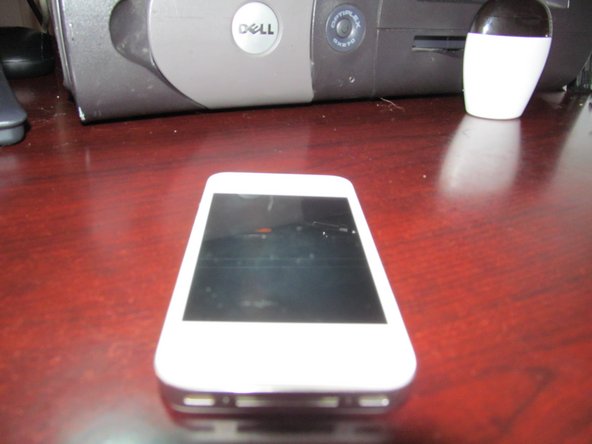
    4. OBSOLETE - Battery Bulge Inspection, The table test: passo 4, imagem 1 %32 OBSOLETE - Battery Bulge Inspection, The table test: passo 4, imagem 2 %32
      • Put the phone on a flat table. Check if the display has a bump. If the display has a bump, it's safe to assume you may need a new battery. The battery is on the right side of the phone, so focus on this side of the phone. You may not notice this if you do not know what to look for. You need a keen eye to notice this unless it is obvious.

      • If you still are not sure, spin the phone on a table to see how bulged it is. If the phone spins without stopping quickly, the battery is bulged. Light bulges may cause the phone to be unstable, but it is not as likely to spin or show as a bulge on the LCD.

      Pergunte ao FixBot

      Comentar

      • Put the phone on a table and see if it spins. If it does, the battery is bulged.

      • It will not spin in every single case of a bulge, but larger bulges will spin.

      Pergunte ao FixBot

      Comentar

    5. OBSOLETE - Battery Bulge Inspection, Press the right side to check for a bump: passo 6, imagem 1 %32
      • This should be simple. Press down on the LCD on the right side of the phone. If the phone feels like it has a soft area, the phone needs to be taken apart for inspection. Phones that do not have a bulge on the battery side of the phone are probably fine. However, it may still be a good idea to open the phone to be sure.

      • Do not use too much pressure for this. Using too much pressure can damage the LCD. If you break the display, it usually ends up costing more then a replacement display. Breaking it is basically a death sentence to the phone.

      Pergunte ao FixBot

      Comentar

Conclusão

To reassemble your device, follow these instructions in reverse order.

Cancelar: não concluí este guia.

16 outras pessoas executaram este guia.

Nick

Membro desde: 11/10/09

106.431 Reputação

Autoria de 72 guias

Equipe

Master Techs Membro de Master Techs

Community

336 Membros

Autoria de 8.282 guias

0Comentários do guia

Comentar

Visualizações:

Últimas 24 horas: 3

Últimos 7 dias: 20

Últimos 30 dias: 107

Ao todo: 7,771