Essa tradução foi gerada por um programa e ainda não foi revisada por uma pessoa. Falas essa língua? Dá uma olhada.

Substituição do leitor de disco do Nintendo Wii mini

Kristin Anderson e 6 outros colaboradores
Última atualização em 27 de jul de 2026
Visualizações: 6,5 mil
Visualizar Estatísticas:
- Últimas 24 horas:
- 4
- Últimos 7 dias:
- 28
- Últimos 30 dias:
- 137
- Ao todo:
- 6.490
Comentários: 2
1 comment on steps, 1 guide comment.
Go to guide commentsConcluído: 4 5
4 pessoas marcaram este guia como "concluído". Será você o próximo?
5· pessoas marcaram este guia como "concluído". Incluindo você — ótimo trabalho!
Favorites: 1 2
1 pessoa favoritou (e se inscreveu) neste guia. Você será o próximo?
2 pessoas marcaram como favorito (e assinaram) este guia - incluindo você!
Introdução
Ir para o passo 1 ↓Este guia fornecerá instruções para substituir o leitor de disco no seu Nintendo Wii mini para que discos de jogo possam ser inseridos. Além do leitor de disco ser incapaz de aceitar um disco, outros motivos são sujeira no disco e arranhões que podem, em última análise, tornar o jogo instável ou com aparência pouco clara. Você pode precisar substituir o disco. A página de resolução de problemas lhe dará mais informações sobre problemas adicionais.
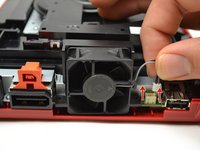
O uso de uma pinça para manusear objetos pequenos, como parafusos, é sugerido para evitar a perda de componentes. Para evitar problemas adicionais relacionados ao hardware, não mexa no conector ou nos cabos ao desconectar a ventoinha, pois isso pode fazer com que o conector se solte.
O que você precisa
Peças

Ferramentas


-
-
-
Remova os dois pés de borracha na parte traseira do console para revelar os parafusos ocultos.
-
Remova os quatro parafusos Phillips de 6 mm.
 Pergunte ao FixBot
-
-
-
Vire o Wii mini com o lado certo para cima. Em seguida, passe uma Ferramenta de abertura de plástico ao redor da borda central do console para soltar a tampa superior.
-
Levante delicadamente a tampa superior do console e coloque-a de lado.
-
-
-
-
Ferramenta utilizada neste passo:Tweezers$4.99
-
Vire o Wii mini de forma que a parte traseira do dispositivo esteja voltada para você.
-
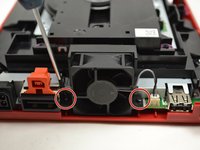
Com uma chave Phillips #0, desparafuse os dois parafusos Phillips de 6 mm em cada lado da ventoinha.
-
-
-
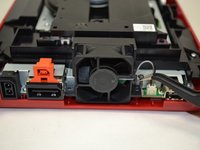
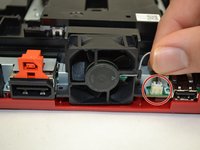
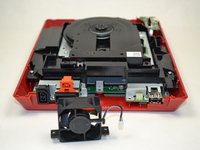
Com os dedos, puxe suavemente a parte superior do conector de pinos para cima para desconectar a ventoinha do console.
-
Remova a peça da ventoinha e coloque-a de lado.
-
-
-
-
-
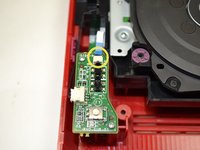
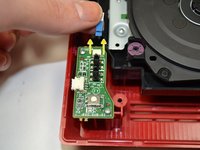
Com os dedos, deslize o cabo plano azul para fora da parte superior da placa de alimentação.
-
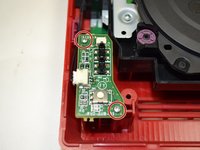
Com uma chave Phillips #0, desaparafuse os dois parafusos Phillips de 4 mm na parte superior e inferior da placa de alimentação.
-
-
-
Com os dedos, puxe suavemente o conector de pino para desconectar a placa de conexões do leitor de disco.
-
-
-
-
-
-
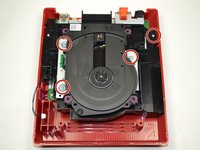
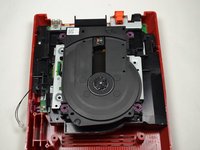
Com uma chave Phillips #0, desparafuse os quatro parafusos de 6 mm.
-
-
-
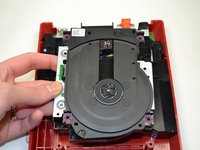
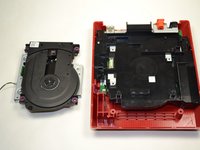
Levante a unidade de disco para fora do console e coloque-a de lado.
-
-








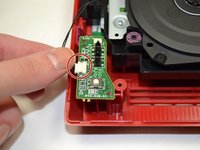
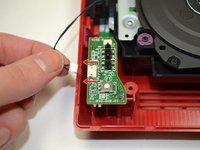


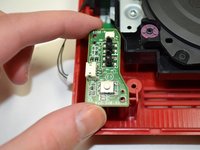
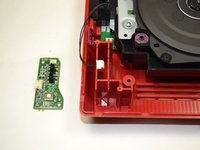




Para a remontagem de seu dispositivo, siga estas instruções na ordem inversa.
Cancelar: não concluí este guia.
4 outras pessoas executaram este guia.

Equipe

1Comentário do guia
i even took apart the disk drive. turns out it wasn't working because the lid was missing one of the plastic parts that pushes the sensor in the disk drive that indicates that the lid is closed
