Ir para o conteúdo principal
Participe da comunidade de reparos - Criar conta

Nintendo GameCube Controller Buttons Replacement

O que você precisa

  1. Nintendo GameCube Controller Buttons Replacement, Back Panel: passo 1, imagem 1 %32
    • Place the controller (buttons down) on a solid surface.

    • Remove the six 9.2mm Tri-wing Y0 screws that hold the back panel in place.

    Pergunte ao FixBot

    Comentar

  2. Nintendo GameCube Controller Buttons Replacement: passo 2, imagem 1 %32
    • Gently lift the back panel up, separating it from the front panel.

    • Some of the buttons may fall out if they are knocked around.

    Pergunte ao FixBot

    Comentar

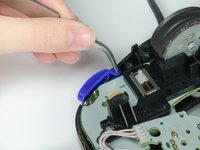
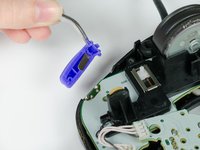
  3. Nintendo GameCube Controller Buttons Replacement, Z Button: passo 3, imagem 1 %32 Nintendo GameCube Controller Buttons Replacement, Z Button: passo 3, imagem 2 %32
    • Grab the Z-button by the peg with tweezers and lift it out of the controller.

    • During re-assembly, make sure the plastic rim and spring fit into the slot provided, or else the case will not shut.

    Pergunte ao FixBot

    Comentar

  4. Nintendo GameCube Controller Buttons Replacement, Circuit Board: passo 4, imagem 1 %32
    • Carefully unhook the cable that is looped around the peg.

    Pergunte ao FixBot

    Comentar

  5. Nintendo GameCube Controller Buttons Replacement: passo 5, imagem 1 %32
    • Lift the circuit board out of the controller.

    • Do not grab the rumble motor to lift the circuit board as shown in the picture. It will in many cases just remove the rumble motor. Instead, grab the edges of the board.

    Pergunte ao FixBot

    Comentar

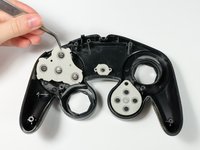
  6. Nintendo GameCube Controller Buttons Replacement, Buttons: passo 6, imagem 1 %32 Nintendo GameCube Controller Buttons Replacement, Buttons: passo 6, imagem 2 %32
    • Remove the rubber backing that covers the buttons.

    Pergunte ao FixBot

    Comentar

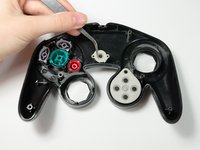
  7. Nintendo GameCube Controller Buttons Replacement: passo 7, imagem 1 %32 Nintendo GameCube Controller Buttons Replacement: passo 7, imagem 2 %32 Nintendo GameCube Controller Buttons Replacement: passo 7, imagem 3 %32
    Ferramenta utilizada neste passo:
    Tweezers
    $4.99
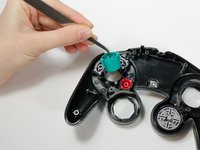
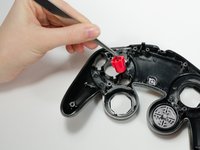
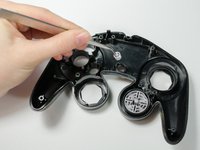
    • Use tweezers to lift buttons out of their sockets.

    • When putting the buttons back, make sure the slots properly fit back together.

    Pergunte ao FixBot

    Comentar

Conclusão

To reassemble your device, follow these instructions in reverse order.

Cancelar: não concluí este guia.

20 outras pessoas executaram este guia.

Sean Michel

Membro desde: 01/14/13

2.750 Reputação

Autoria de 8 guias

Equipe

Cal Poly, Team 19-44, Regan Winter 2013 Membro de Cal Poly, Team 19-44, Regan Winter 2013

CPSU-REGAN-W13S19G44

4 Membros

Autoria de 34 guias

3Comentários do guia

Is there a way I can buy the buttons separably? I lost a the X button and it's gone missing and i wanna buy one :(

tp4yourbunghole - Responder Compartilhar

u can either get a 2 dollar full button set on ebay by searching ngc buttons or u can buy from battle beaver customs for 1 dollar

dariuscorrfz - Responder Compartilhar

How do you put the back back on?

Steven Enns - Responder Compartilhar

Comentar

Visualizações:

Últimas 24 horas: 11

Últimos 7 dias: 39

Últimos 30 dias: 208

Ao todo: 32,842