Introdução
The Nikon Coolpix P90 is a high-quality compact digicam with a magic zoom. It was originally released in 2009 and is now archived by Nikon. Unfortunately, the camera’s flash may wear out or break due to mini-cracks in the flash tubes, exploding bulbs, or other wear and tear. If your Nikon Coolpix P90 flash does not fire correctly, it is most likely time to replace the flash bulb.
This repair requires you to remove the solder connecting the wires to the light bulb. Desoldering the wires is the most involved task of this repair, but iFixit believes in you. For additional support, follow the IFixit soldering instructions to avoid burning yourself or damaging the camera.
O que você precisa
-
-
-
Use your finger to push the latch of the compartment door to the center of the camera body, per image 1.
-
Push the door open, and remove the existing battery with your fingers, per images 2-3.
 Pergunte ao FixBot
-
-
-
-
-
Press the button on the side of the body to open the flash compartment.
-
-
-
Using a Phillips #000 Precision Screwdriver, remove the two 3.0 mm screws from inside the compartment.
-
-
-
-
Place the plastic opening tool along the crack on the side of the flash compartment cover and pry open and detach the cover.
-
-
-
Using a Phillips #000 Precision Screwdriver, remove the 4.0 mm screw from the plastic cover.
-
Detach the plastic cover.
-
-
-
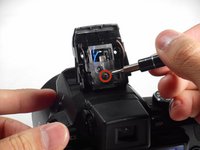
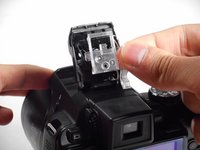
Using the plastic opening tool, pry the metal bulb frame out of the socket.
-
-
-
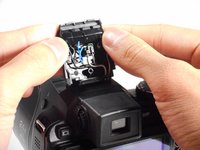
Remove the plastic stoppers on either side of the metal flash bulb tray.
-
-
-
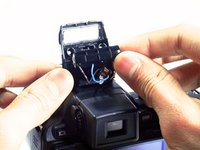
Using a soldering iron, desolder each of the wires connected to the light bulb.
-
-






To reassemble your device, follow these instructions in reverse order.

Equipe

Cal Poly, Team 20-14, Maness Winter 2015 Membro de Cal Poly, Team 20-14, Maness Winter 2015
CPSU-MANESS-W15S20G14
4 Membros
Autoria de 7 guias
