Introdução
The entirety of the Moto 360 is very fragile. Take extreme caution when using tools.
O que você precisa
-
-
-
Set the watch face down on a flat surface.
-
Place the heated iOpener on the face of the rear cover to loosen the adhesive underneath.
 Pergunte ao FixBot
-
-
-
Follow the instructions here to remove the back cover without force by using some needles in the right places:
-
Then continue with step 5. Or don't use needles and just continue with the next steps.
-
-
-
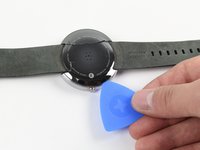
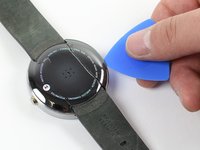
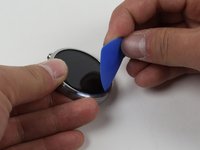
Gently slide the blue opening pick between the rear cover and the metal casing.
-
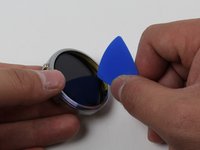
Work your way entirely around the rear cover.
-
-
-
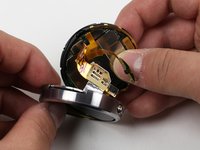
Once the adhesive has been successfully loosened, gently pull the rear cover off.
-
-
-
-
-
-
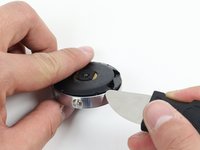
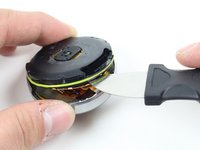
To get to the O-Ring, use the Jimmy to gently pry off the rear housing.
-
-
-
-
-
Set the Moto 360 face up on a flat surface.
-
Place the iOpener on the face of the device screen.
-
-
-
Gently slide the opening pick between the screen and the metal casing.
-
Work your way around the face of the screen, loosening the adhesive.
-
-
-
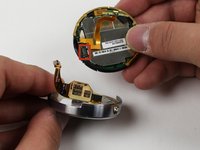
Detach the copper ribbon connecting the motherboard to the display.
-
For reassembly, attach copper ribbon where it is marked.
-
-









To reassemble your device, follow these instructions in reverse order.
Cancelar: não concluí este guia.
15 outras pessoas executaram este guia.

Equipe

Cal Poly, Team 17-32, Amido Winter 2015 Membro de Cal Poly, Team 17-32, Amido Winter 2015
CPSU-AMIDO-W15S17G32
4 Membros
Autoria de 18 guias
7Comentários do guia
Good morning,
It is possible to replace the display unit for the Moto 360 2nd with 1.56" display?
Thanks in advance and best regards,
Stephan
Were could i buy a new lcd screen for the moto 360 1st gen??
hey mate you can buy one from aliexpress aliexpress moto 360 screen see link below
Where can I get a LCD display for a Moto 360 2 gen 42mm. Thanks hope you can help
Bonjour,
Où est-il possible de trouver des pièces détachées ?
Le fond du boitier.
Merci de votre réponse.
