Ir para o conteúdo principal
Participe da comunidade de reparos - Criar conta

Motorola Edge Interconnect Cable Replacement

O que você precisa

  1. Motorola  Edge Interconnect Cable Replacement, Heat the bottom edge: passo 1, imagem 1 %32
    • Completely power off your phone before you begin.

    • Heat an iOpener, then apply it along the bottom edge of the back cover for two minutes.

    • A hair dryer, heat gun, or hot plate may also be used, but be careful not to overheat the phone because the display and internal battery are both susceptible to heat damage.

    Pergunte ao FixBot
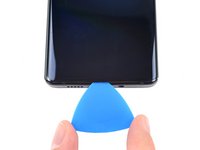
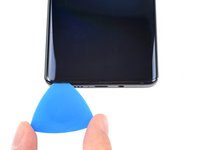
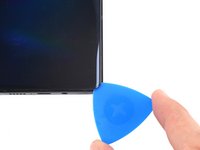
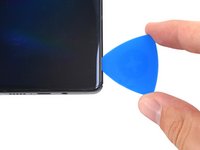
  2. Motorola  Edge Interconnect Cable Replacement, Separate the bottom adhesive: passo 2, imagem 1 %32 Motorola  Edge Interconnect Cable Replacement, Separate the bottom adhesive: passo 2, imagem 2 %32 Motorola  Edge Interconnect Cable Replacement, Separate the bottom adhesive: passo 2, imagem 3 %32
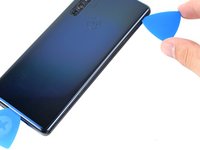
    • Apply a suction cup to the back of the phone, as close to the center of the bottom edge as possible.

    • Pull up on the suction cup with strong, steady force to create a gap between the back cover and the frame.

    • Depending on the age of your phone, this may be difficult. If you're having trouble, apply more heat to the edge and try again.

    • Insert an opening pick into the gap.

    Pergunte ao FixBot
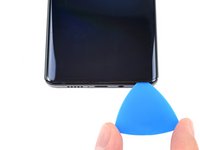
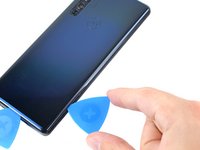
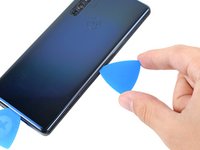
  3. Motorola  Edge Interconnect Cable Replacement, Slice the bottom adhesive: passo 3, imagem 1 %32 Motorola  Edge Interconnect Cable Replacement, Slice the bottom adhesive: passo 3, imagem 2 %32 Motorola  Edge Interconnect Cable Replacement, Slice the bottom adhesive: passo 3, imagem 3 %32
    • Slide the pick back and forth along the bottom edge to slice through the adhesive.

    • Leave the pick in to prevent the adhesive from resealing.

    Pergunte ao FixBot
  4. Motorola  Edge Interconnect Cable Replacement, Heat the right edge: passo 4, imagem 1 %32
    • Apply a heated iOpener to the back cover's right edge for two minutes.

    Pergunte ao FixBot
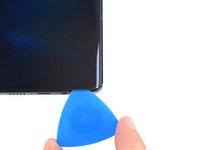
  5. Motorola  Edge Interconnect Cable Replacement, Separate the corner adhesive: passo 5, imagem 1 %32 Motorola  Edge Interconnect Cable Replacement, Separate the corner adhesive: passo 5, imagem 2 %32 Motorola  Edge Interconnect Cable Replacement, Separate the corner adhesive: passo 5, imagem 3 %32
    • Rotate the opening pick around the bottom-right corner of the phone.

    Pergunte ao FixBot
  6. Motorola  Edge Interconnect Cable Replacement, Separate the right adhesive: passo 6, imagem 1 %32 Motorola  Edge Interconnect Cable Replacement, Separate the right adhesive: passo 6, imagem 2 %32 Motorola  Edge Interconnect Cable Replacement, Separate the right adhesive: passo 6, imagem 3 %32
    • Insert a new opening pick into the gap you just created.

    • Slide the pick along the right edge of the phone to separate the adhesive.

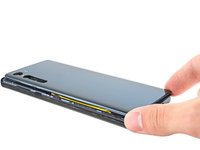
    • Repeat the heating, slicing, and leaving opening picks for the remaining edges of the device.

    Pergunte ao FixBot
  7. Motorola  Edge Interconnect Cable Replacement, Remove the back cover: passo 7, imagem 1 %32 Motorola  Edge Interconnect Cable Replacement, Remove the back cover: passo 7, imagem 2 %32 Motorola  Edge Interconnect Cable Replacement, Remove the back cover: passo 7, imagem 3 %32
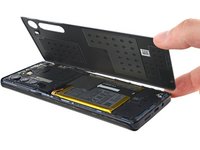
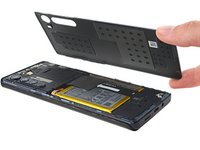
    • Remove the back cover, taking care not to damage the components inside the phone.

    Pergunte ao FixBot
  8. Motorola  Edge Interconnect Cable Replacement, Remove the motherboard's screws: passo 8, imagem 1 %32
    • Use a T5 Torx screwdriver to remove the twelve 3.4 mm-long screws securing the motherboard cover.

    Pergunte ao FixBot
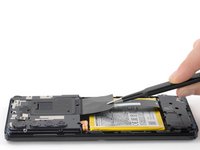
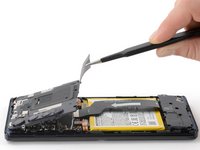
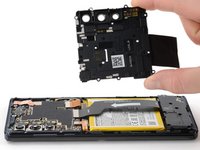
  9. Motorola  Edge Interconnect Cable Replacement, Remove the motherboard cover: passo 9, imagem 1 %32 Motorola  Edge Interconnect Cable Replacement, Remove the motherboard cover: passo 9, imagem 2 %32 Motorola  Edge Interconnect Cable Replacement, Remove the motherboard cover: passo 9, imagem 3 %32
    Ferramenta utilizada neste passo:
    Tweezers
    $4.99
    • Use a pair of blunt tweezers or your fingers to lift up and remove the motherboard cover.

    • The motherboard cover also contains the phone's flash.

    Pergunte ao FixBot
  10. Motorola  Edge Interconnect Cable Replacement, Disconnect the battery cable's press connector: passo 10, imagem 1 %32 Motorola  Edge Interconnect Cable Replacement, Disconnect the battery cable's press connector: passo 10, imagem 2 %32
    • Use a spudger to pry up and disconnect the battery cable's press connector from the motherboard.

    • To re-attach press connectors like this one, carefully align and press down on one side until it clicks into place, then repeat on the other side. Don't press down on the middle. If the connector is misaligned, the pins can bend, causing permanent damage.

    Pergunte ao FixBot
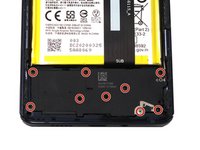
  11. Motorola  Edge Interconnect Cable Replacement, Remove the daughterboard's t5 screws: passo 11, imagem 1 %32 Motorola  Edge Interconnect Cable Replacement, Remove the daughterboard's t5 screws: passo 11, imagem 2 %32
    • Use a T5 Torx screwdriver to remove the nine 3.4 mm screws securing the daughterboard.

    Pergunte ao FixBot
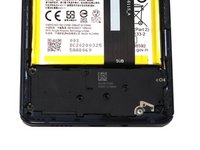
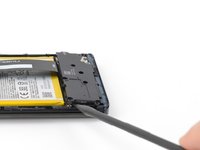
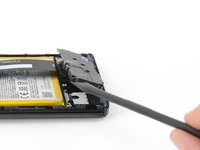
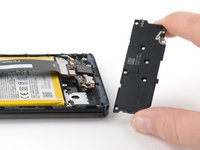
  12. Motorola  Edge Interconnect Cable Replacement, Remove the daughterboard cover: passo 12, imagem 1 %32 Motorola  Edge Interconnect Cable Replacement, Remove the daughterboard cover: passo 12, imagem 2 %32 Motorola  Edge Interconnect Cable Replacement, Remove the daughterboard cover: passo 12, imagem 3 %32
    • Use a spudger to pry up the plastic daughterboard cover and disconnect it from the rest of the phone.

    Pergunte ao FixBot
  13. Motorola  Edge Interconnect Cable Replacement, Disconnect the interconnect cable from the motherboard: passo 13, imagem 1 %32 Motorola  Edge Interconnect Cable Replacement, Disconnect the interconnect cable from the motherboard: passo 13, imagem 2 %32
    • Use a spudger to pry up and disconnect the interconnect cable's press connector from the motherboard.

    Pergunte ao FixBot
  14. Motorola  Edge Interconnect Cable Replacement, Disconnect the interconnect cable from the daughterboard: passo 14, imagem 1 %32 Motorola  Edge Interconnect Cable Replacement, Disconnect the interconnect cable from the daughterboard: passo 14, imagem 2 %32
    • Use a spudger to pry up and disconnect the interconnect cable's press connector from the daughterboard.

    Pergunte ao FixBot
  15. Motorola  Edge Interconnect Cable Replacement, Remove the interconnect cable: passo 15, imagem 1 %32 Motorola  Edge Interconnect Cable Replacement, Remove the interconnect cable: passo 15, imagem 2 %32
    • Use your fingers to remove the interconnect cable after it has been disconnected from both the motherboard and daughterboard.

    Pergunte ao FixBot
Conclusão

To reassemble your device, follow these instructions in reverse order.

For optimal performance, calibrate your newly installed battery after completing this guide.

Take your e-waste to an R2 or e-Stewards certified recycler.

Repair didn’t go as planned? Try some basic troubleshooting, or ask our Answers Community for help.

Jennifer Berg

Membro desde: 03/21/22

2.869 Reputação

Autoria de 24 guias

0Comentários do guia

Comentar

Visualizações:

Últimas 24 horas: 1

Últimos 7 dias: 7

Últimos 30 dias: 42

Ao todo: 337