Ir para o conteúdo principal
Participe da comunidade de reparos - Criar conta

Lite-On iHAS324 Eject Button and Power LED Light Replacement

O que você precisa

    1. Lite-On iHAS324 Eject Button and Power LED Light Replacement, Chassis: passo 1, imagem 1 %32 Lite-On iHAS324 Eject Button and Power LED Light Replacement, Chassis: passo 1, imagem 2 %32
      • Insert a paper clip into a small hole on the right side of the faceplate bellow the disc tray.

      • There may be resistance, do not be afraid to use force.

      • The tray should then pop open.

      • Pull out the tray so that it is fully extended.

      Pergunte ao FixBot

      Comentar

    2. Lite-On iHAS324 Eject Button and Power LED Light Replacement: passo 2, imagem 1 %32 Lite-On iHAS324 Eject Button and Power LED Light Replacement: passo 2, imagem 2 %32 Lite-On iHAS324 Eject Button and Power LED Light Replacement: passo 2, imagem 3 %32
      • Use a plastic opening tool to push the three tabs located on the right, left, and bottom side of the outer chassis to loosen the faceplate off.

      Pergunte ao FixBot

      Comentar

    3. Lite-On iHAS324 Eject Button and Power LED Light Replacement: passo 3, imagem 1 %32
      • Pull the faceplate off the chassis.

      • Do NOT pull the faceplate all the way off the disc tray, because doing so can cause damage to the faceplate.

      • There may be resistance, do not be afraid to use force.

      Pergunte ao FixBot

      Comentar

    4. Lite-On iHAS324 Eject Button and Power LED Light Replacement: passo 4, imagem 1 %32
      • Using the Phillips Head #2 screwdriver, unscrew the two 8.5 mm screws located on the bottom back of the chassis.

      Pergunte ao FixBot

      Comentar

    5. Lite-On iHAS324 Eject Button and Power LED Light Replacement: passo 5, imagem 1 %32
      • Remove the bottom plate by lifting it off the device.

      Pergunte ao FixBot

      Comentar

    6. Lite-On iHAS324 Eject Button and Power LED Light Replacement: passo 6, imagem 1 %32
      • Turn the device over.

      • Remove the top plate by pulling the sides and lifting the plate off.

      Pergunte ao FixBot

      Comentar

    1. Lite-On iHAS324 Eject Button and Power LED Light Replacement, Disc Tray: passo 7, imagem 1 %32 Lite-On iHAS324 Eject Button and Power LED Light Replacement, Disc Tray: passo 7, imagem 2 %32
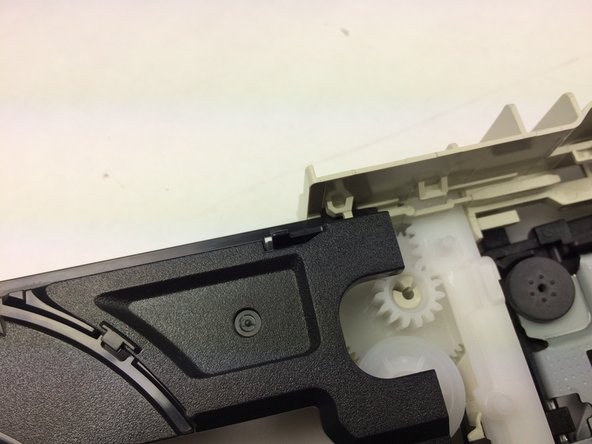
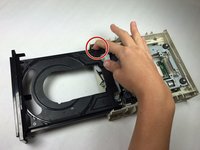
      • Push the left tab in and slide the tray out on the left side.

      • Pull the gray plastic casing on the right side away from the tray.

      • Slide the right side of the tray out.

      Pergunte ao FixBot

      Comentar

    1. Lite-On iHAS324 Eject Button and Power LED Light Replacement, Disc Tray Belt: passo 8, imagem 1 %32
      Ferramenta utilizada neste passo:
      Tweezers
      $4.99
      • Take tweezers and remove the black tray belt from the gears carefully.

      Pergunte ao FixBot

      Comentar

    1. Lite-On iHAS324 Eject Button and Power LED Light Replacement, Eject Button and Power LED Light: passo 9, imagem 1 %32
      • Flip the device over.

      Pergunte ao FixBot

      Comentar

    2. Lite-On iHAS324 Eject Button and Power LED Light Replacement: passo 10, imagem 1 %32
      • Use a plastic opening tool to pull all three tabs, lifting up the circuit board as you go.

      Pergunte ao FixBot

      Comentar

    3. Lite-On iHAS324 Eject Button and Power LED Light Replacement: passo 11, imagem 1 %32
      • Carefully lift the circuit board out of the plastic casing.

      Pergunte ao FixBot

      Comentar

    4. Lite-On iHAS324 Eject Button and Power LED Light Replacement: passo 12, imagem 1 %32
      • Using a solder wick, unsolder either the eject button or Power LED Light. Soldering Guide

      • Then, using a solder iron, replace them.

      Pergunte ao FixBot

      Comentar

Conclusão

To reassemble your device, follow these instructions in reverse order.

Cancelar: não concluí este guia.

Uma outra pessoa concluiu este guia.

Equipe

Baylor, Team 5-9, Williams Spring 2015 Membro de Baylor, Team 5-9, Williams Spring 2015

BU-WILLIAMS-S15S5G9

3 Membros

Autoria de 30 guias

0Comentários do guia

Comentar

Visualizações:

Últimas 24 horas: 0

Últimos 7 dias: 12

Últimos 30 dias: 46

Ao todo: 1,350