Essa tradução foi gerada por um programa e ainda não foi revisada por uma pessoa. Falas essa língua? Dá uma olhada.
Introdução
Danos na ventoinha ou o desgaste natural podem causar o superaquecimento do computador durante o uso. Este guia mostra como substituir a ventoinha dentro do notebook Lenovo V14-IIL. Tenha cuidado ao remover as peças pequenas.
Antes de utilizar este guia, certifique-se de consultar a página de resolução de problemas do Lenovo V14-IIL para verificar se existe uma solução que não exija a substituição de componentes.
Certifique-se de desligar completamente o seu notebook e desconectá-lo de qualquer fonte de energia externa antes de iniciar o processo.
O que você precisa
-
-
-
Vire o seu laptop e coloque-o sobre uma superfície plana para que você possa acessar os parafusos da capa traseira.
-
Remova os seis parafusos de 7 mm da capa traseira do laptop usando uma chave Phillips #0.
-
Remova os quatro parafusos de 4 mm da borda inferior do laptop usando uma chave Phillips #0.
 Pergunte ao FixBot
-
-
-
Use uma ferramenta de abertura iFixit para separar a carcaça, deslizando-a ao longo de cada lado do notebook.
-
-
-
-
Levante o painel traseiro e coloque-o de lado.
-
-
-
-
-
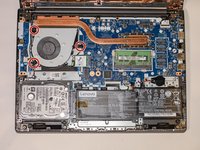
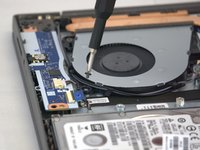
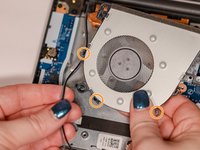
Usando uma chave Phillips #0, remova os três parafusos Phillips de 6 mm que prendem a ventoinha.
-
-
-
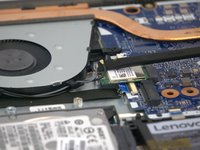
Use a espátula para desconectar os dois cabos de rede sem fio (preto e cinza) da placa de rede sem fio.
-
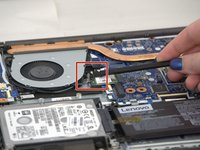
Remova os cabos de rede dos três suportes na ventoinha.
-
-
-
Levante a ventoinha puxando suavemente até que os quatro cabos se desconectem da placa-mãe.
-
-





Para a remontagem de seu dispositivo, siga estas instruções na ordem inversa.
Cancelar: não concluí este guia.
2 outras pessoas executaram este guia.

Equipe

Tennessee Tech University, Team 1-2, Pickering Spring 2024 Membro de Tennessee Tech University, Team 1-2, Pickering Spring 2024
TNTECH-PICKERING-S24S1G2
3 Membros
Autoria de 36 guias
