Ir para o conteúdo principal
Participe da comunidade de reparos - Criar conta

Huawei P9 Lite Battery Replacement

O que você precisa

  1. Huawei P9 Lite Battery Replacement, Back Cover: passo 1, imagem 1 %32 Huawei P9 Lite Battery Replacement, Back Cover: passo 1, imagem 2 %32
    • Use an opening pick to unclip the rear cover, starting from the bottom corner.

    • Work your way around counterclockwise and carefully pry the plastic tabs open one by one.

    Pergunte ao FixBot

    Comentar

  2. Huawei P9 Lite Battery Replacement: passo 2, imagem 1 %32
    • There is adhesive underneath the back cover that holds it to the battery and the metal plate at the top.

    • Be careful with the flex cable at the right hand side.

    • Twist the opening pick to lever the back cover away and loosen it from the adhesive.

    Pergunte ao FixBot

    Comentar

  3. Huawei P9 Lite Battery Replacement: passo 3, imagem 1 %32
    • When the back cover is freed from the adhesive you can pop it off by hand completely.

    Pergunte ao FixBot

    Comentar

  4. Huawei P9 Lite Battery Replacement, Loudspeaker: passo 4, imagem 1 %32 Huawei P9 Lite Battery Replacement, Loudspeaker: passo 4, imagem 2 %32 Huawei P9 Lite Battery Replacement, Loudspeaker: passo 4, imagem 3 %32
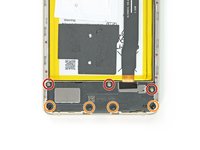
    • On the bottom of the phone remove the following screws:

    • Three 2.9 mm Phillips #00 screws

    • Four 3.8 mm Phillips #00 screws

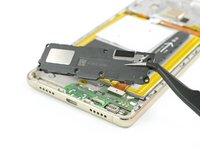
    • Now you can grab the loudspeaker unit and take it out.

    Pergunte ao FixBot

    Comentar

  5. Huawei P9 Lite Battery Replacement, Motherboard Shield: passo 5, imagem 1 %32
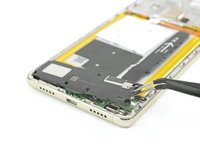
    • Remove the nine Phillips #00 screws that secure the metal shield plate.

    • Some screws may be covered with tamper proof stickers. Remove them to ensure a proper seating for your driver.

    Pergunte ao FixBot

    Comentar

  6. Huawei P9 Lite Battery Replacement: passo 6, imagem 1 %32 Huawei P9 Lite Battery Replacement: passo 6, imagem 2 %32
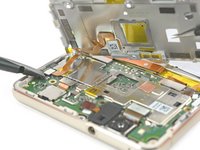
    • Do not remove the shield plate yet, it is attached by a connector and an adhered cable.

    • Use a spudger to disconnect the fingerprint sensor from the motherboard.

    • Peel the NFC antenna cable off of the metal plate.

    Pergunte ao FixBot

    Comentar

  7. Huawei P9 Lite Battery Replacement, Battery: passo 7, imagem 1 %32 Huawei P9 Lite Battery Replacement, Battery: passo 7, imagem 2 %32 Huawei P9 Lite Battery Replacement, Battery: passo 7, imagem 3 %32
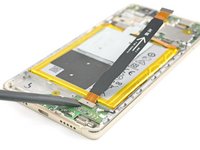
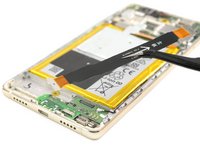
    • Disconnect the motherboard flex cable on both ends and take it away.

    Pergunte ao FixBot

    Comentar

  8. Huawei P9 Lite Battery Replacement: passo 8, imagem 1 %32 Huawei P9 Lite Battery Replacement: passo 8, imagem 2 %32
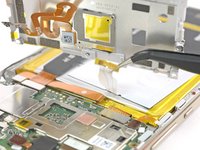
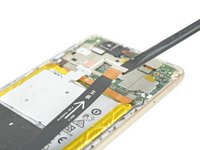
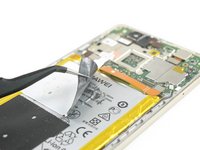
    • Peel off the NFC antenna from the battery.

    • Be careful not to rip or crease the antenna.

    • If you are just removing the battery to get to the display, you can leave the NFC on the battery.

    • Unplug the battery connector.

    Pergunte ao FixBot

    Comentar

  9. Huawei P9 Lite Battery Replacement: passo 9, imagem 1 %32 Huawei P9 Lite Battery Replacement: passo 9, imagem 2 %32 Huawei P9 Lite Battery Replacement: passo 9, imagem 3 %32
    Ferramenta utilizada neste passo:
    Tesa 61395 Tape
    $8.95
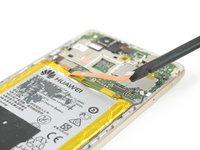
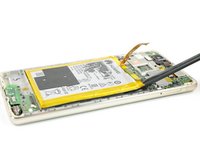
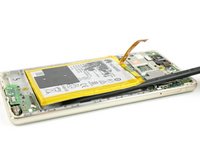
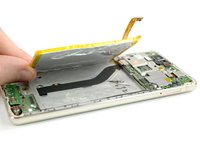
    • Slide the spudger under the battery at the place shown in the picture and pry it loose slowly.

    • Avoid bending the battery and reheat if necessary.

    • Be careful not to damage the display flex cable that runs underneath the battery in the center.

    • When reassembling your phone replace old adhesive with double-sided tape or pre-cut adhesive strips.

    Pergunte ao FixBot

    Comentar

Conclusão

To reassemble your device, follow these instructions in reverse order.

Cancelar: não concluí este guia.

89 outras pessoas executaram este guia.

Tobias Isakeit

Membro desde: 03/31/14

133.676 Reputação

Autoria de 189 guias

Equipe

26Comentários do guia

There is an extra step where you need to remove the cover of the board at the top of the phone in order to remove the NFC antenna which is not described in this guide. Better watch this https://www.youtube.com/watch?v=ADZiL7JK...

Costas Geraniou - Responder Compartilhar

Thanks Costas for the hint. We added the missing step.

Tobias Isakeit - Responder Compartilhar

Very very thanks!

Artur - Responder Compartilhar

Cercando di rimouorere l'adesivo dell'nfc si è rotto, posso assembrale il telefono senza nfc, ovviamente invalidando questa funzione?

Francesco Staiano - Responder Compartilhar

Si, hai ragione: si può riassemblare il telefono senza l’antenna NFC perdendo questa funzione…

Claire Miesch - Responder Compartilhar

Comentar

Visualizações:

Últimas 24 horas: 4

Últimos 7 dias: 17

Últimos 30 dias: 120

Ao todo: 137,394