Essa tradução foi gerada por um programa e ainda não foi revisada por uma pessoa. Falas essa língua? Dá uma olhada.
Introdução
O disco rígido é onde um computador armazena informações permanentemente, o que o torna muito importante. Um disco rígido quebrado ou danificado deve ser substituído para restaurar o funcionamento adequado.
O que você precisa
-
-
-
Vire o notebook de cabeça para baixo e remova os seguintes parafusos usando uma chave Phillips #0:
-
Dois parafusos de 9,5 mm no meio da borda traseira e um parafuso de 9,5 mm na borda direita
-
Dois parafusos de 4,3 mm nos cantos traseiros
-
Um parafuso de 17,5 mm na borda esquerda próximo à unidade de disco óptico
-
Três parafusos de 4,3 mm na borda frontal
 Pergunte ao FixBot
-
-
-
Use a Ferramenta de abertura de plástico para separar a tampa da placa do teclado da tampa inferior. Para fazer isso, insira a Ferramenta de abertura de plástico entre a tampa da placa do teclado e a tampa inferior e, em seguida, deslize pelas bordas para abrir, forçando levemente com a ferramenta.
-
-
-
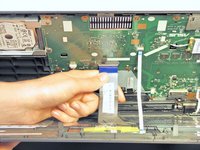
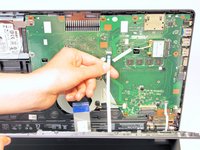
Localize os três cabos flat que conectam a placa de cobertura do teclado à tampa inferior.
-
-
-
-
Vire o laptop para ter acesso aos cabos flat.
-
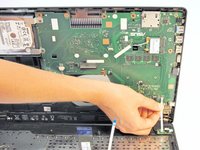
Remova cada cabo flat levantando a pequena aba plástica branca e puxando o cabo gentilmente.
-
-
-
Agora que os cabos flexíveis foram desconectados da tampa inferior, remova cuidadosamente a tampa da placa do teclado. Após a remoção, coloque-a em um local seguro e livre de umidade para que não sofra danos.
-
-
-
-
-
Desaparafuse os três parafusos Phillips #0 de 5,5 mm com a chave Phillips #0.
-
-
-
Depois de remover os parafusos, coloque os dedos nos cantos esquerdos e empurre a unidade de disco rígido em direção à borda direita do notebook (em relação à imagem).
-
-
-
Assim que estiver solto, remova o disco rígido da sua cavidade interna.
-
-




Para a remontagem de seu dispositivo, siga estas instruções na ordem inversa.
Cancelar: não concluí este guia.
48 outras pessoas executaram este guia.

Equipe

Cal Poly, Team 7-22, Regan Spring 2014 Membro de Cal Poly, Team 7-22, Regan Spring 2014
CPSU-REGAN-S14S7G22
5 Membros
Autoria de 160 guias
8Comentários do guia
You mixed up the red and green screws, sizes are wrong.
The red screws are 9.5 not 14.3!
the yellow screws are 4.3 (mixed up with 14.3 ?) not 9.5 !
You do NOT need to remove the ribbons, just use a small screwdriver.
Excellent work !
Same issue as Tony on 09/03/2014
The screw sizings are mixed up. The red screws are 9.5, not 14.3
The yellow screws are 14.3 not 9.5. Please fix the repair guide text
It should be fixed now! Thanks to both of you for the tip. By the way, you can always edit the text yourself. ;)
Thanks for the info!
