Ir para o conteúdo principal
Participe da comunidade de reparos - Criar conta

Anker 2.4G Wireless Mouse Sensor Replacement

O que você precisa

  1. Anker 2.4G Wireless Mouse Sensor Replacement, Sensor: passo 1, imagem 1 %32
    • Using a spudger, carefully pry off the stickers to reveal the location of four screws.

    Pergunte ao FixBot
  2. Anker 2.4G Wireless Mouse Sensor Replacement: passo 2, imagem 1 %32
    • Using your Phillips screwdriver, remove the four screws.

    Pergunte ao FixBot
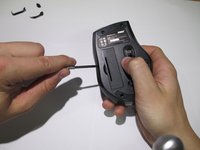
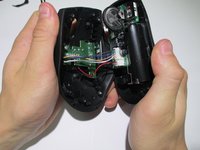
  3. Anker 2.4G Wireless Mouse Sensor Replacement: passo 3, imagem 1 %32 Anker 2.4G Wireless Mouse Sensor Replacement: passo 3, imagem 2 %32
    • Using a spudger, carefully pry apart the upper and lower housing of the mouse.

    • Make sure you are not using too much pressure, as you could warp the plastic.

    Pergunte ao FixBot
  4. Anker 2.4G Wireless Mouse Sensor Replacement: passo 4, imagem 1 %32
    • Disconnect the wires from the white crimping headers.

    • Pull as far up on the wire as possible, but be careful to avoid ripping the wires.

    Pergunte ao FixBot
  5. Anker 2.4G Wireless Mouse Sensor Replacement: passo 5, imagem 1 %32
    • Remove the scroll wheel from the motherboard by pulling it to the left.

    • This may take some force to remove. Make sure to pull it parallel to the board, instead of perpendicularly.

    Pergunte ao FixBot
  6. Anker 2.4G Wireless Mouse Sensor Replacement: passo 6, imagem 1 %32
    Ferramenta utilizada neste passo:
    Anti-Static Wrist Strap
    $7.95
    • Gently lift the motherboard away from the plastic housing.

    • Use an iFixit grounding strap or another antistatic measure to prevent sensitive components from electrostatic discharge during this step.

    Pergunte ao FixBot
  7. Anker 2.4G Wireless Mouse Sensor Replacement: passo 7, imagem 1 %32
    • Desolder the six wires holding the I.C. in place to complete the sensor change.

    • Replace the broken sensor with the new sensor and solder back in place.

    • Make sure none of your solder connections are bridged as this can cause serious damage to your mouse.

    Pergunte ao FixBot
Conclusão

To reassemble your device, follow these instructions in reverse order.

2 outras pessoas executaram este guia.

Ryan

Membro desde: 01/23/14

152 Reputação

Autoria de 1 guia

Equipe

Cal Poly, Team 1-39, Maness Winter 2014 Membro de Cal Poly, Team 1-39, Maness Winter 2014

CPSU-MANESS-W14S1G39

4 Membros

Autoria de 16 guias

0Comentários do guia

Comentar

Visualizações:

Últimas 24 horas: 0

Últimos 7 dias: 12

Últimos 30 dias: 82

Ao todo: 8,362