Ir para o conteúdo principal
Participe da comunidade de reparos - Criar conta

Altec Lansing inMotion iM9 Tweeter Replacement

O que você precisa

  1. Altec Lansing inMotion iM9 Tweeter Replacement, Battery: passo 1, imagem 1 %32
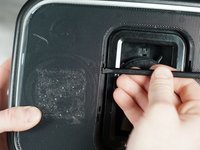
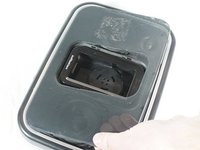
    • Gently push down on the two tabs at the top of the battery door.

    • While holding them down, slowly pull the door towards you.

    Pergunte ao FixBot

    Comentar

  2. Altec Lansing inMotion iM9 Tweeter Replacement: passo 2, imagem 1 %32
    • Once the door is open, use your hand to pull out the four batteries.

    Pergunte ao FixBot

    Comentar

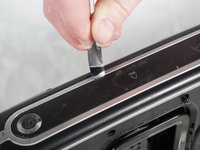
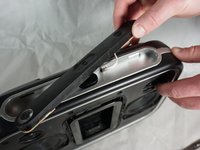
  3. Altec Lansing inMotion iM9 Tweeter Replacement, Volume and Power Buttons: passo 3, imagem 1 %32 Altec Lansing inMotion iM9 Tweeter Replacement, Volume and Power Buttons: passo 3, imagem 2 %32
    • Pry off the control panel on top of the speaker using the metal spudger. You may need to use a lot of force.

    • Start in the middle and work your way around the perimeter.

    Pergunte ao FixBot

    Comentar

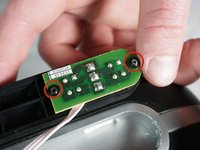
  4. Altec Lansing inMotion iM9 Tweeter Replacement: passo 4, imagem 1 %32 Altec Lansing inMotion iM9 Tweeter Replacement: passo 4, imagem 2 %32
    • Using a Phillips #1 screwdriver, remove the two 7mm screws that hold the volume button circuit board to the control panel.

    • Also remove the single 7mm screw from the power button circuit board on the opposite side.

    • There will be a little plastic piece under the eject button that you can just remove and set aside.

    Pergunte ao FixBot

    Comentar

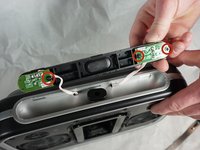
  5. Altec Lansing inMotion iM9 Tweeter Replacement: passo 5, imagem 1 %32 Altec Lansing inMotion iM9 Tweeter Replacement: passo 5, imagem 2 %32
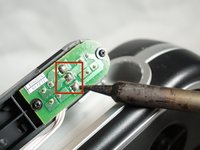
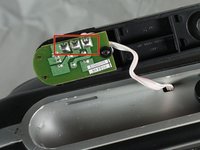
    • Desolder the three solders joints connecting the wires to the volume button circuit board.

    • Do the same to the power button circuit board on the other side (the board with only one screw).

    • Pull out the wires using a lot of force.

    • If you are not familiar or comfortable with soldering, use this guide

    Pergunte ao FixBot

    Comentar

  6. Altec Lansing inMotion iM9 Tweeter Replacement, Case Opening: passo 6, imagem 1 %32 Altec Lansing inMotion iM9 Tweeter Replacement, Case Opening: passo 6, imagem 2 %32
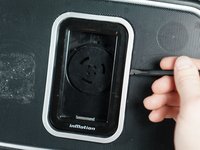
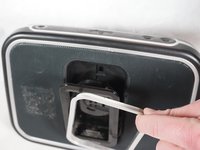
    • Gently pry open the silver plastic lining of the iPod dock using the plastic spudger.

    • It is best to start from the top or bottom, then work your way around if it has not popped out yet.

    • Remove the silver lining.

    Pergunte ao FixBot

    Comentar

  7. Altec Lansing inMotion iM9 Tweeter Replacement: passo 7, imagem 1 %32 Altec Lansing inMotion iM9 Tweeter Replacement: passo 7, imagem 2 %32
    • Pry open the metal mesh by working the plastic spudger around the inside of the mesh.

    • Once loose, lift up the metal mesh.

    Pergunte ao FixBot

    Comentar

  8. Altec Lansing inMotion iM9 Tweeter Replacement: passo 8, imagem 1 %32
    • Remove the fourteen 30mm screws with Phillips #1 Screwdriver.

    • Remove the 7mm screw with the Phillips #1 Screwdriver.

    Pergunte ao FixBot

    Comentar

  9. Altec Lansing inMotion iM9 Tweeter Replacement: passo 9, imagem 1 %32
    • Carefully separate the front and back case plates at a corner of the speaker.

    • Lots of cables are still connected, so be very gentle when separating case plates.

    Pergunte ao FixBot

    Comentar

  10. Altec Lansing inMotion iM9 Tweeter Replacement: passo 10, imagem 1 %32
    • Guide the white button cables through the hole on the top of speaker case.

    Pergunte ao FixBot

    Comentar

  11. Altec Lansing inMotion iM9 Tweeter Replacement: passo 11, imagem 1 %32
    • Use your fingers to peel the glue off of the red and black cables.

    Pergunte ao FixBot

    Comentar

  12. Altec Lansing inMotion iM9 Tweeter Replacement: passo 12, imagem 1 %32
    • Careful not to touch the green capacitors or you might shock yourself.

    Pergunte ao FixBot

    Comentar

  13. Altec Lansing inMotion iM9 Tweeter Replacement, Tweeter: passo 13, imagem 1 %32
    • Remove the speaker cables by desoldering the two solder joints on opposite sides of the tweeter.

    Pergunte ao FixBot

    Comentar

  14. Altec Lansing inMotion iM9 Tweeter Replacement: passo 14, imagem 1 %32
    • To fully remove the tweeter from the device, unscrew the two 7mm screws and the tweeter will be free.

    Pergunte ao FixBot

    Comentar

  15. Altec Lansing inMotion iM9 Tweeter Replacement: passo 15, imagem 1 %32
    • Follow the previous instructions to remove the second tweeter on the opposite side of the speaker.

    Pergunte ao FixBot

    Comentar

Conclusão

To reassemble your device, follow these instructions in reverse order.

Cancelar: não concluí este guia.

Shaun Steele

Membro desde: 02/02/15

279 Reputação

Autoria de 2 guias

Equipe

Cal Poly, Team 17-33, Amido Winter 2015 Membro de Cal Poly, Team 17-33, Amido Winter 2015

CPSU-AMIDO-W15S17G33

4 Membros

Autoria de 7 guias

1Comentário do guia

Where do you buy the replacement tweeters?

Fred Schneider - Responder Compartilhar

Comentar

Visualizações:

Últimas 24 horas: 1

Últimos 7 dias: 11

Últimos 30 dias: 36

Ao todo: 1,315