Ir para o conteúdo principal
Participe da comunidade de reparos - Criar conta

Altec Lansing Mini Lifejacket 2 Battery Replacement

O que você precisa

  1. Altec Lansing Mini Lifejacket 2 Battery Replacement, Back Panel: passo 1, imagem 1 %32 Altec Lansing Mini Lifejacket 2 Battery Replacement, Back Panel: passo 1, imagem 2 %32 Altec Lansing Mini Lifejacket 2 Battery Replacement, Back Panel: passo 1, imagem 3 %32
    • Use the spudger to remove the eight black pins from the front and back of the wire screens.

  2. Altec Lansing Mini Lifejacket 2 Battery Replacement: passo 2, imagem 1 %32 Altec Lansing Mini Lifejacket 2 Battery Replacement: passo 2, imagem 2 %32 Altec Lansing Mini Lifejacket 2 Battery Replacement: passo 2, imagem 3 %32
    • Detach the eight secondary pins from the front and back of the wire mesh plates with a spudger.

    • Removing the secondary pins from the rubber casing is optional.

  3. Altec Lansing Mini Lifejacket 2 Battery Replacement: passo 3, imagem 1 %32 Altec Lansing Mini Lifejacket 2 Battery Replacement: passo 3, imagem 2 %32
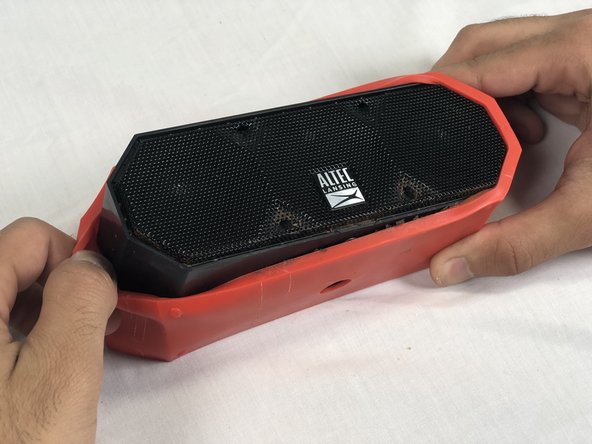
    • Remove both black and orange layers from the speaker body.

  4. Altec Lansing Mini Lifejacket 2 Battery Replacement: passo 4, imagem 1 %32 Altec Lansing Mini Lifejacket 2 Battery Replacement: passo 4, imagem 2 %32 Altec Lansing Mini Lifejacket 2 Battery Replacement: passo 4, imagem 3 %32
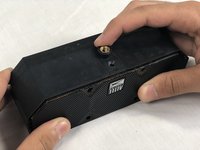
    • Remove the single 7.8mm Phillips #2 screw from the mounting plate located under the device.

    • Slide the mounting plate out to remove it.

  5. Altec Lansing Mini Lifejacket 2 Battery Replacement: passo 5, imagem 1 %32 Altec Lansing Mini Lifejacket 2 Battery Replacement: passo 5, imagem 2 %32
    • Pry off the wire mesh on both sides using a metal spudger.

    • Be gentle to avoid bending the mesh.

  6. Altec Lansing Mini Lifejacket 2 Battery Replacement: passo 6, imagem 1 %32 Altec Lansing Mini Lifejacket 2 Battery Replacement: passo 6, imagem 2 %32
    Ferramenta utilizada neste passo:
    Tweezers
    $4.99
    • Using tweezers, remove the four rubber stoppers in each corner of the rear panel.

  7. Altec Lansing Mini Lifejacket 2 Battery Replacement: passo 7, imagem 1 %32
    • Remove the four 13.7mm Phillips #1 screws located underneath the rubber stoppers.

  8. Altec Lansing Mini Lifejacket 2 Battery Replacement: passo 8, imagem 1 %32
    • Pull the case apart to access the interior components.

  9. Altec Lansing Mini Lifejacket 2 Battery Replacement: passo 9, imagem 1 %32 Altec Lansing Mini Lifejacket 2 Battery Replacement: passo 9, imagem 2 %32 Altec Lansing Mini Lifejacket 2 Battery Replacement: passo 9, imagem 3 %32
    • To remove the back panel, gently pull out its wire harness.

  10. Altec Lansing Mini Lifejacket 2 Battery Replacement, Battery: passo 10, imagem 1 %32 Altec Lansing Mini Lifejacket 2 Battery Replacement, Battery: passo 10, imagem 2 %32 Altec Lansing Mini Lifejacket 2 Battery Replacement, Battery: passo 10, imagem 3 %32
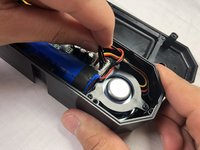
    • Disconnect the battery from the motherboard.

    • The battery is not secured within the case and can be removed after detaching its wiring from the circuit board.

Conclusão

To reassemble your device, follow these instructions in reverse order.

8 outras pessoas executaram este guia.

Stephen Albrecht

Membro desde: 02/14/18

1.053 Reputação

Autoria de 4 guias

Equipe

USF Tampa, Team S3-G2, Nance Spring 2018 Membro de USF Tampa, Team S3-G2, Nance Spring 2018

USFT-NANCE-S18S3G2

4 Membros

Autoria de 4 guias

11Comentários do guia

Where can you get the batteries? Altec Lansing doesn’t carry them.

alanp5 - Responder
Search for MCR18650 battery. They are available.

F Hickisch - Responder

Hickisch, I appreciate your guide on replacing this battery, but I beg to differ that replacement batteries are “available.” I keep getting sent batteries with 3-wire connectors instead of 2-wire. Plz send me a link, plz. Gracias.

rudy.ch.garcia - Responder

Sounds like you need to find another source instead of aliexpress or ebay. Digikey has them with the correct 2 wire connection. It's just a standard 18650 battery with the wires spot welded to the positive and negative terminals. Anything with a 3rd wire is likely meant as a charge sensing wire for a batter that has on board circuitry.

rchuncleskeleton -

for the mini life jacket 3, the motherboard is upside down so you need to remove it to unplug the battery.

Edgar Corral (Tramarius) - Responder

Comentar

Visualizações:

Últimas 24 horas: 4

Últimos 7 dias: 25

Últimos 30 dias: 137

Ao todo: 23,879