Ir para o conteúdo principal
Participe da comunidade de reparos - Criar conta

Alienware AW610M Motherboard Replacement

O que você precisa

  1. Alienware AW610M Motherboard Replacement, Battery: passo 1, imagem 1 %32 Alienware AW610M Motherboard Replacement, Battery: passo 1, imagem 2 %32 Alienware AW610M Motherboard Replacement, Battery: passo 1, imagem 3 %32
    • Power off the mouse and disconnect any wired connections.

  2. Alienware AW610M Motherboard Replacement: passo 2, imagem 1 %32 Alienware AW610M Motherboard Replacement: passo 2, imagem 2 %32
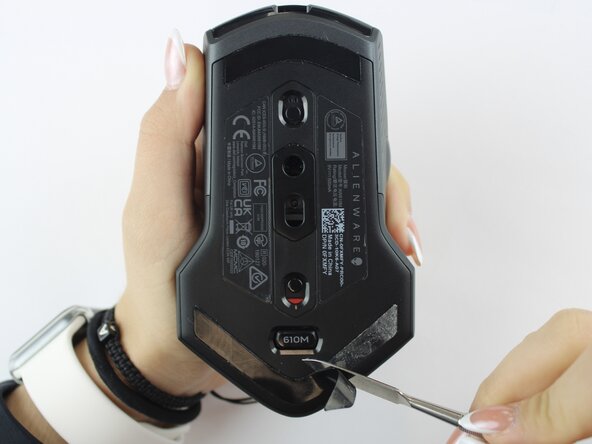
    • Use a spudger to gently lift and remove the old mouse feet.

    • If the feet are sticky, try lifting slowly from one corner to avoid tearing them.

    • Be careful not to scratch the mouse surface or damage the plastic housing.

  3. Alienware AW610M Motherboard Replacement: passo 3, imagem 1 %32 Alienware AW610M Motherboard Replacement: passo 3, imagem 2 %32
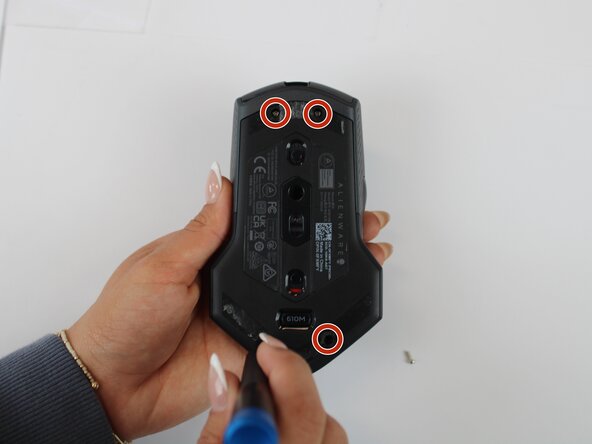
    • Remove the four 6.5 mm screws using a Y1 Tri-Point screwdriver.

  4. Alienware AW610M Motherboard Replacement: passo 4, imagem 1 %32 Alienware AW610M Motherboard Replacement: passo 4, imagem 2 %32
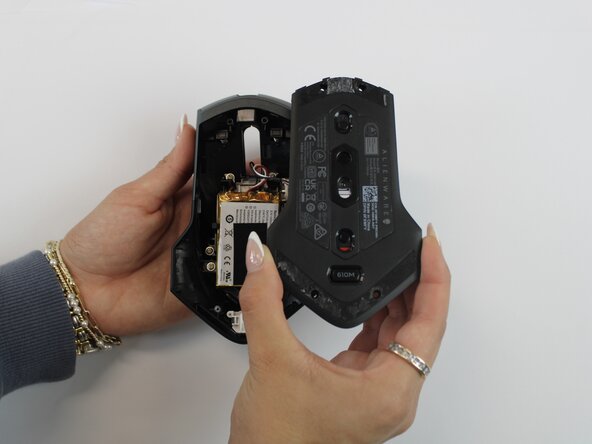
    • Using an opening tool, gently pry apart the two halves of the mouse case. Start at the seam and work your way around until the housing is separated.

    • Don't pull the halves completely apart, as internal wires still connect them.

  5. Alienware AW610M Motherboard Replacement: passo 5, imagem 1 %32 Alienware AW610M Motherboard Replacement: passo 5, imagem 2 %32 Alienware AW610M Motherboard Replacement: passo 5, imagem 3 %32
    • Remove the battery pack inside the mouse.

    • If you are having trouble, use a small flat tool to help ease it out.

    • The battery is lightly glued to the mouse, so ease it out gently to avoid breaking the battery or wiring

  6. Alienware AW610M Motherboard Replacement: passo 6, imagem 1 %32 Alienware AW610M Motherboard Replacement: passo 6, imagem 2 %32
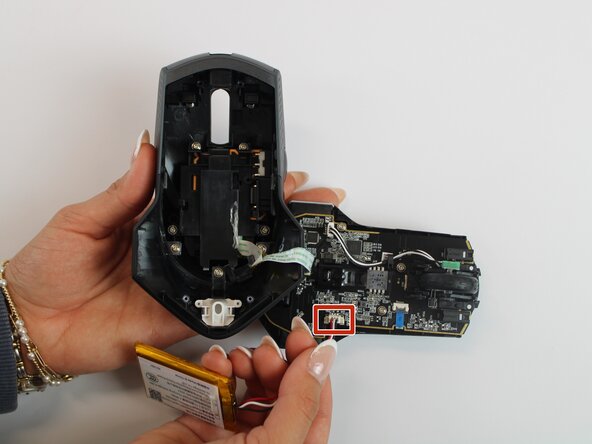
    • Remove the old battery from its spot. Lift the wire connector away from the mainboard to disconnect it.

    • Make sure all wires are inside the mouse before sealing it shut for easy reassembly.

  7. Alienware AW610M Motherboard Replacement, Motherboard: passo 7, imagem 1 %32 Alienware AW610M Motherboard Replacement, Motherboard: passo 7, imagem 2 %32
    • Remove the single 5.4 mm screw using a Phillips #1 screwdriver.

    • Detach the cable connector, and remove the scroll wheel.

    • Gently detach the last connector using your fingers.

    • Be careful when unplugging all connectors to prevent tearing them.

  8. Alienware AW610M Motherboard Replacement: passo 8, imagem 1 %32 Alienware AW610M Motherboard Replacement: passo 8, imagem 2 %32
    • Detach the blue ribbon that connects the motherboard to the shell casing.

    • Using a Phillips #1 screw driver, remove two 5.4 mm screws to detach the motherboard from the base shell casing.

  9. Alienware AW610M Motherboard Replacement: passo 9, imagem 1 %32 Alienware AW610M Motherboard Replacement: passo 9, imagem 2 %32 Alienware AW610M Motherboard Replacement: passo 9, imagem 3 %32
    • Gently detach the motherboard using your fingers.

Conclusão

To reassemble your device, follow these instructions in reverse order.

Sherlyn Herman

Membro desde: 09/24/25

97 Reputação

Autoria de 1 guia

Equipe

Texas Tech, Team 46-4, Johansen Fall 2025 Membro de Texas Tech, Team 46-4, Johansen Fall 2025

TTU-JOHANSEN-F25S46G4

4 Membros

Autoria de 5 guias

0Comentários do guia

Comentar

Visualizações:

Últimas 24 horas: 0

Últimos 7 dias: 8

Últimos 30 dias: 20

Ao todo: 138