

How to fix the black dot
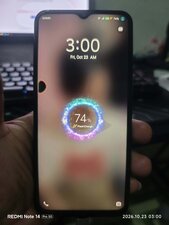
Veja o conteúdo da imagem:
Esta é uma boa pergunta?
Pontuação
0
Rep: 102,4 mil
 161
161
 90
90
 157
157
Marco, I hate to tell you, but that's a failed screen. You can't fix that dot; you'll have to replace the screen. I wasn't able to locate any written, step by step guides like those here on iFixit, but here's a YouTube video that shows you all the steps needed to replace the screen. You'll need a pry tool, a heat source (a hair dryer will do), a small Phillips screwdriver, some 90% or higher concentration isopropyl (rubbing) alcohol, some cotton swabs and glue, something like B7000.
Vivo Y35 Screen Replacement Guide - How to Change Vivo Y35 Display Assembly - YouTube
As you work, take lots of pictures and once you're done you can use them to create your own iFixit guide to that repair. It's easy, fun and will earn the appreciation of the repair community, especially those who come after you with the same problem.
Good luck, and be sure to come back and let us know how it all turns out.
Esta resposta foi útil?
Últimas 24 horas: 3
Últimos 7 dias: 11
Últimos 30 dias: 11
Ao todo: 11

