Ir para o conteúdo principal
Participe da comunidade de reparos - Criar conta

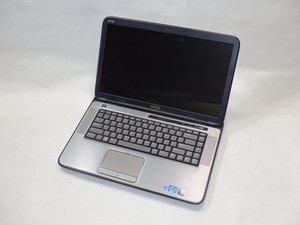
The Dell XPS 15-L502X laptop was manufactured by Dell Inc. It was released in 2011 with a 2nd Gen Intel® Core™ processor.

My laptop isn't displaying an image, only the battery light is on. Wha

My laptop isn't displaying an image, only the battery light is on. What could be the problem?

Update (12/29/25)

dell xps l502xdell xps l502x

Respondido! Ver a resposta Também tenho esse problema

Esta é uma boa pergunta?

Pontuação 0
2 comentários

This question was migrated from https://meta.ifixit.com/Answers.

por

I assume it's plugged in? The battery light being on when plugged in just means it's charging.

Not displaying an image could be many things. Is it also not playing audio, not spinning fans, and not making any other noises? Or is it just the display?

por

Adicionar um comentário

1 resposta

Solução escolhida

Hi @juniosilva

Try a full power refresh and check if this resolves the problem.

  • Disconnect the charger from the laptop if it is connected.
  • Remove the main battery from the laptop.
  • Open the laptop and remove the coin cell battery from the motherboard.

Here's the service manual that will help. Go to p.37 to view the procedure to remove the coin cell battery.

When the coin cell battery is out measure its voltage. If it is <2.5V DC or if the battery is >4-5 years old replace it. The battery model number is stamped on the battery. Not sure if it is a CR2025 or a CR2032 but these are readily available most everywhere e.g. supermarkets.

  • Press and hold the laptop's Power button for a full 30 seconds and then release it.
  • Reinsert the coin cell battery (or its replacement) into the battery holder on the motherboard (+ve side up as marked on the battery)
  • Reassemble the laptop, reinsert the main battery into the laptop, connect the charger to the laptop and turn on the laptop.
  • If it turns on OK there may be a message stating that the date and time are incorrect. This is normal as the BIOS has been reset back to its factory default state by the above procedure. Once the date and time have been corrected, the message won't appear the next time that the laptop is turned on. Also if any user definable BIOS settings have been changed by you to suit whatever system requirements you needed, they will have to be changed back again as well.

Esta resposta foi útil?

Pontuação 1
Adicionar um comentário

Adicionar a sua resposta

Junio Silva será eternamente grato(a).
Visualizações:

Últimas 24 horas: 0

Últimos 7 dias: 4

Últimos 30 dias: 16

Ao todo: 76
