
Ir para o conteúdo principal

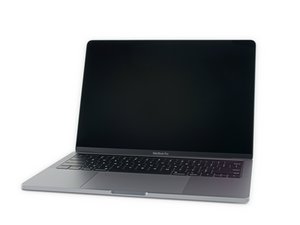
Modelo A2159, EMC 3301. Uma atualização do MacBook Pro de 13" de nível básico. Disponível em Prata e Cinza espacial. Lançado em julho de 2019.

Is my connector lock missing?! How to workaround

Hello!

First time here.

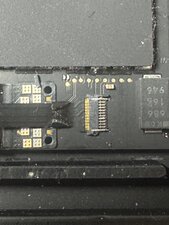
I started to replace the battery on my daughter's 13" MBP A2159 laptop. I got to about the 2nd step - removing the battery daughter board flex cable - and discovered that I either have a different connector (unlikely) or the lock on this one might have broken off when replacing the screen several years ago?

Any advice gratefully received on what to do - how should I get the cable out now? And anything I should do when I connect it again?

Many thanks for the help!
Block Image
Responder a esta pergunta Também tenho esse problema

Esta é uma boa pergunta?

Pontuação 1
Adicionar um comentário

1 resposta

@red24631 yes, it sure looks like it is missing. See step 11 on this guide MacBook Pro 13" Two Thunderbolt Ports 2019 Battery Replacement

You could try and get a replacement connector and see if you can remove that lock from the new one and lever it into the existing connector. If not, then you would need to replace the connector by de-soldering the old one and re-soldering a new one. If you do not have the tools or the experience to solder that, you will need to have someone else do the soldering for you ;-)

The connector is a FF18-10A-R11AD-B-3H and the Apple part number is 518S00014. they are available at places like this (example only, not an endorsement for the seller)

Esta resposta foi útil?

Pontuação 0

2 comentários:

Thanks for the info!

For now, I just pushed it in and it seems fairly tight, so we'll see if it stays. Will have to dig deeper if not.

por

@red24631 awesome! Hope it stays put and will continue to work for you. Repair is War on Entropy

por

Adicionar um comentário

Adicionar a sua resposta

Red será eternamente grato(a).
Visualizações:

Últimas 24 horas: 0

Últimos 7 dias: 1

Últimos 30 dias: 9

Ao todo: 62
