
Ir para o conteúdo principal
Participe da comunidade de reparos - Criar conta

Connection lost for no reason at all.

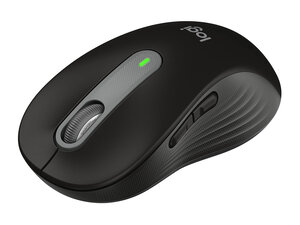
My M650L mouse lost connectivity.
New battery. It just stopped moving in the middle of operation.
To my luck(?) I have another same model, and it functions as expected, on the same laptop.
I had a chat with the Logitech support, and they promised me, they would help, but when all their usual basic guides didn't help, they stopped responding.

Did anyone manage to fix the famous connectivity problem with this mouse?

Responder a esta pergunta Também tenho esse problema

Esta é uma boa pergunta?

Pontuação 1

1 comentário:

Update: After a few weeks, the functional mouse, also lost connectivity.

I got rid of all my logitech mice (in the trash).

I stopped buying Logitech.

por

Adicionar um comentário

1 resposta

What Logitech support might have missed is a broken Bolt usb receiver. Since you have another M650L (let's name it mB) with another bolt receiver (rB), use Logi Options+ app to pair the non working mouse (let's name it mA) with second receiver (rB). Do it other way round as well (mB-->rA). If you can rule out that both receivers are not broken, then probably its a broken mouse. If both mice are working and one of the receivers are broken, you can buy a replacement bolt receiver for around 10 dollars and have two working mice. You can tell this feedback to Logitech and they sometimes can be generous and send you a replacement receiver. If your broken mouse is under warranty, they would do RMA and replacement would be sent. You have to provide them proof of purchase for this. Without this document, they would deny your claim. Sometimes, Logitech could be notorious for not having replacement receivers, then check amazon, ebay and AliExpress for replacement receiver. MAKE SURE TO USE NEW ALKALINE BATTERIES FOR TESTING. I knew various instances with even good battery the mouse refuses to pair. It would pair with new battery only. Reason is, it has to broadcast the pairing wireless and takes more than normal amount of energy for tiny micro controller of the mouse. Let me know the findings.

Esta resposta foi útil?

Pontuação 0

1 comentário:

Before the second mouse lost connectivity too, and I got rid of it, I tried also a few things, among them is what you suggested. It did not restore connectivity.

por

Adicionar um comentário

Adicionar a sua resposta

𐤃𐤅𐤓𐤅𐤍𐤟𐤁𐤋𐤆𐤓 será eternamente grato(a).
Visualizações:

Últimas 24 horas: 4

Últimos 7 dias: 16

Últimos 30 dias: 29

Ao todo: 179