Hi @pooboy
If still not turning on try a full power refresh and check if this resolves the problem. If not it’s a hardware problem on the motherboard.
Here’s how:
Disconnect the charger if connected.
Turn off the laptop (hold power button operated for >4 seconds then release).
Open the laptop and disconnect the main battery from the systemboard.
Remove the RTC coin cell battery from the motherboard. Remember the orientation of the battery (+ve on top - when the battery is out measure its voltage. If it is <2.5V DC replace it. The battery type is printed on the battery e.g. CR2032.
Here’s an image taken from a video for the laptop, showing the location of the RTC battery.
(click on image to enlarge)
Press and hold the Power button for a full 30 seconds and then release it.
Reinsert the RTC coin cell battery (remember the orientation), reconnect the main battery, reassemble the laptop, connect the charger and try turning it on.
If it turns on, check if the battery is charging.
Once charged etc, create a battery report to check the status of the battery. Compare the Design Capacity value versus the Full Charge Capacity value. For a good battery they should be very close to being the same value.


 2
2  1
1 
 1,6 mil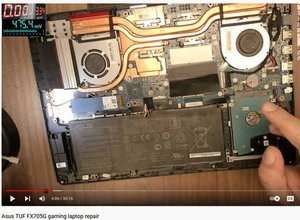



20 comentários
Hi @pooboy,
Does it also do this with the charger connected?
por jayeff
Yes same thing
por Jon
@pooboy
Does the laptop indicate that it is charging when you just connect the charger without trying to turn the laptop on?
If so let it charge for ~1 hour (or until it shows fully charged) and then try turning it on with the charger connected.
por jayeff
@jayeff yes it indicates it, ok I'll try it and get back to you thank you for helping
por Jon
@pooboy
I was just trying to eliminate the battery as a possible cause of the problem.
If the battery is too low (or faulty) then the charger may not be able to do two things at the same time i.e. supply enough power to charge the battery and to run the laptop.
If the laptop turns on after allowing the battery to charge for a while then hopefully it may just have been a too low a battery
por jayeff
Exibir mais 15 comentários