Why isn't my controller connecting/staying connected to the console?
While playing on the Xbox One, the controller randomly disconnects, or won't connect at all. Sometimes when it disconnects it won't reconnect again.
Esta é uma boa pergunta?
Guias de reparo
Aprenda a consertar praticamente qualquer objeto com nossos guias passo a passo.
Aplicativo
Seu ajudante de reparo de bolso.
FixBot
O amigável assistente de reparo com IA.
Reparabilidade
Saiba porque a reparabilidade de produtos é tão importante.
Teardowns
Dê uma espiada no interior dos mais novos dispositivos.
Fórum de Respostas
Compartilhe soluções e obtenha ajuda de um amigo.
Encontre sua comunidade
Encontre equipes, eventos e colegas fixadores.
Ajuda
Ajude a tornar o conhecimento sobre reparos gratuito e acessível a todos.
Right to Repair
Saiba mais sobre o movimento Direito ao reparo e como ser um defensor.
Em destaque
Peças e ferramentas de qualidade cobertas por nossa garantia vitalícia.
Ferramentas
Conheça a grande variedade de ferramentas de precisão.
Peças
Adquira peças cobertas por nossa garantia de qualidade.
Baterias para iPhone
Baterias testadas e garantidas, além de um kit com tudo o que você precisa.
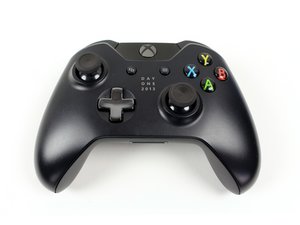
O Controle Sem Fio Xbox 7MN-0001, fabricado pela Microsoft Corporation, é o controle mais utilizado para o console de jogos Xbox, podendo também ser usado em PCs.
While playing on the Xbox One, the controller randomly disconnects, or won't connect at all. Sometimes when it disconnects it won't reconnect again.
If your Xbox One Wireless Controller is not syncing or connecting to your Xbox console, see the Xbox One Wireless Controller Won’t Connect to Console problem page for possible causes and solutions.
There are many reasons you could be having connection problems. First, try replacing the batteries; the controller might not have enough power to connect if your batteries are low. If that doesn't work, check to make sure your controller is in range of the console. There may also be too many controllers trying to connect, or there may be other electronic devices interfering with your connection. Check out the Xbox One Wireless Controller troubleshooting page for more information at Xbox One Wireless Controller Troubleshooting.
10 comentários:
I'm having this probem on pc not console, pressing the synch buttons on the controller and adapter does nothing.
por Travis Breedlove
You might have been using the controller on your pc and it won't connect to your console anymore...simple solution turn the console on with the power button on it and underneath that button you should find a wifi button like the one your controller click on it and you'll see the light on the console blinking press the same button on your controller till it also starts blinking as well then they should both pair and that should solve the problem.
por POJ
SOLUTION:
I've found that most people with this problem have the soft power off option enabled (basically your console never really shuts off but goes into a "sleep" mode) so when you shut off your xbox, every so often the xbox still sees a contoller is connect/ synced even though its not. Unplugging the console and plugging it back in will most likely fix the issue, but if it still persists I recommend a hard reset.
por Frank Furter
POJ, you are a POS. Why bother to comment AT ALL if you don't even bother to read the effing question. Some people shouldnt be allowed to have keyboards.
por mud
My controller loses connection for a split second , noticed my headset says that it is connected when it's already connected . I've lost matches from this and it's driving me nuts
por Nigel Grant
Guys! i think i found the answer! In the Xbox one controller there are 4 tiny little prongs one is super close to the (-) spot on the battery what i think is happening is some voltage from the battery is arcing and messing up/disconnecting the controller i took a small piece of electrical tape and taped over it and haven't had the issue for almost a week now no more random disconnects. This would explain why brand new controllers do it too because its just a bad design flaw.
25 comentários:
Thank you, this worked for me.
All these dumbasses commenting that they have the same problem and not giving a fix...pain in the ass to read thru all of them to find nothing...again, thank you.
por mikey697
%#*@. That totally worked. Had this issue for a LONG time. Thanks pal!
Thank you! We tried everything, contacted Microsoft and nothing. Was not in a good mood about the whole deal. You saved the day!
por Del Del
Would I tape over all these prongs or just the one closest to (-) ?
Been having this problem with two brand new controllers, however they work when connected by usb, thank you
por Cassie Leigh
i know im late in asking questions but we have multiple controllers. and 2 consoles. my controller works on one console. but on the other no controller stays synched any ideas?
por hunter flanagan
I hope this reaches the masses. The problem is on the wifi chip/module, where the black wire plugs into. That connection (small round socket)needs to be re soldered. Msft used cheap solder again like they did on the 360. Look at the chip and you'll see the small round connector im talking about. Hope this helps everyone.
3 comentários:
that could be the problem< its differnt on 360 and xb1 cuz they changed it
por Billy Dimsdale
You mean the usb micro connector?
Recently, I've noticed that this issue happens sometimes after I charge the controller, and I just got it to work after fiffing around with that area, perhaps theres a short near the usb?
por Draegor
Hey buddy thanks alot it's wrking
por malanirvin112
Mine did this frustrating problem and in the end i replaced the wireless/wifi hardware card inside the xbox unit and had no problems since.
They are currently £20.68 on www.consolesand gadgets.co.uk.
Very simple to replace
Daughter has Xbox one.
For the last few months controllers randomly disconnect....... then re connects? When the controllers came back on they've froze. So the batteries have to come out and go back in, to un freeze the controller . This happened again and again usually it's every few minuets.
Happens more on games than apps.
Bought a new controller, thinking that was the problem. No. Same thing happened.
So after reading some posts online, we decided to move the Xbox one a meter or so to the right of where it would usually be. (moved it as far as the wire would let us away from plug sockets and sound bars etc)
Reason we moved it was because the area it was in had many wires. T.V. Xbox360 skyHD box
*There is also a sound bar in that area and the sub woofer sits on the floor near the plug sockets, electrical extention.
Any how, we moved the Xbox One away from all the wires and sound bar. WORKS A TREAT :) , she tried out her older controller. Works great.
All I can say is magnetic fields!
Alright so I tried everything... and still didnt work but then i tried something I didnt see anyone write about.. I had the connection problem where it disconnected mid game and never reconnected only worked with USB.. so what I did was I restarted the whole console while the cable is still on.. once the console turned back on the controller did as well and then I unplugged the cable and ba-bammmm it has been reconnected !!!
3 comentários:
My Xbox one controller will turn on with fresh batteries but won't stay connected it turns off when I hit any buttons after a few seconds and when I try to use USB my controller won't cut on at all this is a farley new system with original remote any ideas on that
This is probably way too late but for future reference, make sure that your controller is up to date. I had the same issue where my controller would connect then disconnect but once I updated my controller (in Xbox accessories app) it fixed itself right away
por Kayla Ogg
So, I need to use a controller that won’t turn on and co operate with my Xbox, to update my controller so that it turns on for more than 2 seconds. How does that work?
por Adam R
Additionally, make sure to re-sync your controller by holding down the sync buttons located on the controller and Xbox One for a few seconds.
For help with this, or other solutions, try the Controller Won't Connect to Console section on the Xbox One Controller Troubleshooting Page.
Just plug it into a micro usb into your console and it'll automatically connect back.
7 comentários:
This will work as long as the controller is plugged in, but I can attest that doing so will not necessarily fix wireless connection issues after disconnecting it.
por Liam Gow
I'm having issues even with the usb connecting the controller
por Corey Blount
Having the same problem. Any ideas. Nothing literally works. It'll stay connected for a minute then disconnect. Nothing is interfering or anything. And not connecting using usb
por Jacob Stoppard
When I plug my USB cable into my Xbox and my controller it connects, but when I unplug it, it disconnects again
por Carson Odor
Same here &&^&^$^ xbox is trash was a ps guy my whole life switched for better fifa players but %#*@ do they make $@$* hardware
Battery pack is probably bad
1 comentário:
I bought new battery packs and controller and it’s not staying connected.
por P1aYer 01O
my controller does the same thing but it happens on any controller and when i play cod and try to aim sometimes my controller disconnects
Rep: 1
I tried everything from pushing the sync buttons to plugging the usb. Even updating the controller, it works when the usb is plug in but as soon as it’s unplugged it stops working
Rep: 1
I found that if you don’t let the controller die. If it dies it will disconnect and you will have to wait an entire week until it reconnects.
Rep: 1
I tried all of the options here. My wireless controllers still wouldn’t stay connected. When connected via USB cable there were no issues but I hate playing with a cable. I came across a YouTube video that showed how to disassemble and reassemble the XBox One and replace the WiFi card. The problem was the XBox One WiFi card was bad and needed to be replaced. I found one on Amazon and paid extra for next day shipping. I was able to remove the small screws with a T8 Torx bit and ratchet screwdriver. I swapped the WiFi card and it is now working perfectly and I don’t have to buy a new Xbox One. So just type in XBox One WiFi card in Amazon. The brand I bought was Onyehn for $14.89 ($2.05 added for tax) and I paid $9.99 extra for next day shipping. I had my own T8 Torx bit and ratchet screwdriver for it. If you don’t you can find them at Lowe’s, Home Depot, Walmart, or any local hardware store or auto parts store. It will be most expensive at auto parts stores so avoid if you can if you want it right away. You can also get it online of course and there are some Xbox One WiFi cards on Amazon that come with them but it’s more expensive than getting them separately. If it’s the original big black Day One style XBox One the WiFi card you need is the small square. If it’s the white XBox One S then the WiFi card you need is the wider rectangle. The YouTube video that helped to disassemble and switch the WiFi card and if the ribbon cable comes off was by Essentialz World. Another video by iFixit helped with reassembling the case more clearly. Hope this helps someone since it saved me from buying a new console and it has been a very long time since I’ve played any games. Remember, this is a last resort if the other options on this thread and updating your firmware on the XBox One for the wireless controllers didn’t work! I actually bought an RF remote for the Xbox One to comfortably watch movies and use the apps sometime after my wireless controllers stopped working. Anyway, have a good day. Let me know if this helped anyone. Peace!
Últimas 24 horas: 2
Últimos 7 dias: 30
Últimos 30 dias: 125
Ao todo: 421,552
28 comentários
Try Charging it to full charge and turn it back on use a usb cord (android would work) and connect controller to the console and turn on the cobtroller it should reconnect normally if it doesn’t work try new batteries for your controller.
por POJ
I had this issue and solved it in a different way. My controller would lose connection after just an hour or two of being off, and the batteries were fine. One day, I got up to make a sandwich, and the xbox magically reconnected. After some trial and error, I found out that interrupting the signal from the controller while it was connecting to the Xbox One makes it reconnect. So now, every time I turn on my controller, I grip the center of it where the signal button and battery pack are, and let go after a couple seconds. It has worked like a charm, 100%, ever since.
por Alec Neu
Alec - You are my hero!!!! I've been fighting this problem since day one. I usually unplug my xbox to get it work again, but you're method fixed it! Thank you!
por Dennis Hammack
Dennis - My dude! So glad it helped!
por Alec Neu
Alec yours a Jenius. ;) Thanks dude!
por Jeffrey Waser
Exibir mais 23 comentários