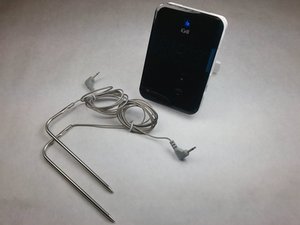
O iGrill não liga
Substitua as pilhas
Verifique se as pilhas estão com carga suficiente. Se as pilhas não estiverem funcionando, você precisará substituí-las.
Verifique a orientação das pilhas
Se as pilhas estiverem com carga suficiente, verifique se elas foram inseridas na orientação correta no dispositivo.
O software ou hardware pode estar com defeito
Uma solução atual para este problema não pode ser resolvida por medidas normais.
Números piscando na tela
Os sensores 1 ou 2 não estão conectados ao dispositivo
Um ou ambos os sensores não estão sendo reconhecidos pelo dispositivo. Se os contatos de metal não estiverem tocando os sensores, talvez você precise ajustá-los.
Números além de 1 e 2 estão piscando na tela
Suas pilhas podem estar com carga baixa ou enfrentando um problema de software. Tente corrigir este problema substituindo as pilhas; caso contrário, a questão pode não ser solucionável por medidas normais.
O iGrill está piscando 8.8.8 ou as luzes LED continuam a piscar
As pilhas estão com carga muito baixa
As pilhas não estão funcionando corretamente ou estão com carga baixa. Substitua as 4 pilhas AA usadas e tente novamente.
Incapaz de conectar ao Bluetooth
Redefina as configurações de Bluetooth
Se o dispositivo não puder ser descoberto por um aparelho de conexão ou se o logotipo azul do Bluetooth não for exibido na tela, você deve redefinir as configurações de Bluetooth. Pressione e segure os botões de mais e menos, pressione o botão LIGA, então repita. Em seguida, mantenha todos os três botões pressionados até ouvir um bipe longo e constante; após o bipe, solte os botões.
Pode haver problemas com seu dispositivo
Tente emparelhar o dispositivo que você deseja conectar ao seu iGrill com outro aparelho. Os problemas de conectividade podem estar no dispositivo que inicia o emparelhamento.
Não há áudio saindo do meu iGrill
Verifique o componente de áudio
Certifique-se de que a peça de áudio interna esteja soldada corretamente.

Equipe

IUPUI, Team 3-4, Harley Spring 2016 Membro de IUPUI, Team 3-4, Harley Spring 2016
IUPUI-HARLEY-S16S3G4
4 Membros
Autoria de 48 guias

14 comentários
IGrill2 paired with my iPad but won't show up on my iPhone. Both have the Weber App. I initially paired with iPad and installed new firmware. When trying to pair with Iphone, the pairing icon flashes for about a second in the upper right of the app, then goes away. In Bluetooth settings, it shows up on my ipad but not on iPhone. I also have the mini, which shows up on both devices no problem. What do I need to do?
Steve - Responder Compartilhar
They can only pair with one device at a time.
Greg Millar - Responder Compartilhar
I've always had trouble getting mine to pair reliably. Here is is, Thanksgiving, and it refuses to pair.
fiedlerh - Responder Compartilhar
So what does
"Software or Hardware Problem
Acurrent solution to this problem [not turning on] is not available by normal measures" mean, exactly?
My iGrill does. It turn on. Batteries are good and are correctly oriented. What are the abnormal means I can try?
This is very frustrating...
andreraiche - Responder Compartilhar
i think its just a bit temperamental, mine constantly said bluetooth stopped working, i just kept trying to turn off the app and turn it on again - I could see that my phone (android) was pairing in the device settings, so i unpaired it to see if the app would pair it - eventually after about 10 times turning on and off various things it worked. frustrating. also why does the app have a sales pitch for a device i already have? just makes the app more confusing and less intuitive.
Mathew Williams - Responder Compartilhar