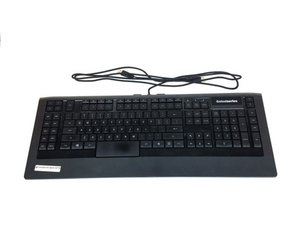
Wiki contribuído por estudante
Uma equipe incrível de estudantes do nosso programa de educação fez esta wiki.
Esta página de resolução de problemas o ajudará a diagnosticar problemas com o seu SteelSeries Apex 64145.
As teclas não estão respondendo
Algumas ou todas as teclas não respondem quando pressionadas.
Porta USB com defeito
Conecte o teclado em outra porta USB do seu computador. Existe a possibilidade de que a porta do computador esteja danificada ou não esteja reconhecendo o dispositivo corretamente. Caso ela esteja danificada, consulte este guia de substituição Substituição do conector da porta USB do SteelSeries Apex 64145
Driver corrompido
Se o computador não detectar o teclado assim que ele for conectado, tente instalar a versão atualizada do driver ou uma versão anterior funcional no site da SteelSeries usando este link.
Teclas quebradas
Se as teclas sofreram danos físicos (rachaduras, arranhões, deslocamento), consulte o nosso guia de substituição sobre como trocar teclas quebradas. Substituição de teclas do SteelSeries Apex 64145
As luzes LED não estão acesas
Nenhuma luz aparece no teclado quando conectado.
LED queimado
Você precisará comprar novas luzes LED e realizar a substituição. Consulte o nosso guia sobre como trocar LEDs queimados e qual tipo de LED comprar. Substituição do LED do SteelSeries Apex 64145
O teclado parece instável e desequilibrado
Os suportes de borracha estão faltando ou danificados.
Os suportes atuais estão muito gastos/danificados
Substitua os suportes gastos pelos que vieram na caixa do teclado. Consulte o nosso guia sobre como trocar os suportes. Substituição do suporte de borracha do SteelSeries Apex 64145
Uma das minhas teclas está presa
As teclas não voltam para a posição original após serem pressionadas.
A tecla está suja
Com cuidado, faça alavanca na tecla para cima até que ela saia e, em seguida, lave-a bem com água em temperatura ambiente. Deixe a tecla secar e, depois, pressione-a suavemente de volta na posição no teclado.
O teclado não é reconhecido no meu computador
O teclado não aparece entre os dispositivos no computador ou não é exibido no SteelSeries Engine.
Conectado à porta USB errada
O teclado pode estar conectado a um tipo de porta USB que está com problemas de reconhecimento. Por exemplo, se o teclado estiver conectado a uma porta USB 2.0, tente conectá-lo a uma porta USB 3.0. Certifique-se de que ambos os conectores USB do teclado estejam conectados ao mesmo tipo de porta USB.
Driver corrompido ou ausente
Certifique-se de que o driver atual esteja atualizado e instalado corretamente no seu computador. Acesse o site da SteelSeries para obter instruções sobre como baixar o software usando este link.

Equipe

USF Tampa, Team S1-G1, Nance Spring 2017 Membro de USF Tampa, Team S1-G1, Nance Spring 2017
USFT-NANCE-S17S1G1
4 Membros
Autoria de 60 guias

4 comentários
PART-1
The problem I am having is that a few keys are not triggering anymore
the keys are as follows:
(the period key, greater-than key, question mark key, right shift key & finally the quotation mark key) I might have to get the plastic circuit sheets to replace the ones I have. because it seems that part of the plastic circuit sheets might be damaged some how. I was playing a video game and then poof out of no where all the lights on the keyboard went out and keyboard stopped responding
I unplugged the keyboard and even tested it on another computer and it didnt want to go back on
so i opened the keyboard to check if something burnt out, I cleaned everything with rubbing alcohol and let it dry. put everything back together and boom keyboard started to function only to have the keys mentioned above not working I re-opened the keyboard several times to make sure nothing was pinching anything.
Twsted - Responder Compartilhar
PART-2
i even tested it by just pressing the circuit allocated connections from the 3 plastic circuits sheets under the membrain sheet within the within the keyboard and it would not type those keys out,
but it does it for all the other keys. So im sure the plastic circuit sheets are damaged for some odd reason hoping that if I call or email Steelseries, that I can purchased a new set of circuit sheets from them.
This is my favorite keyboard as I do LOVE chiclets keyboards
I wish Steelseries would make a newer version of this APEX-350 without taking away ANY of the sets of keys or layout it already has , but rather improve on it. and have every key lit up individually colored - I can only wish
If Steelseries could make a Chiclet `mechanical` keyboard that would be insane :)
like a APEX-350 MARK-II mechanical keyboard, I would be first in line to buy it.
Twsted - Responder Compartilhar
I have a problem so I left on holiday 3 weeks ago my keyboard apex pro tkl 2023 wireless was fine but when I came home it would not work at all . The plugs are in everything is in but won’t work at all. The led wouldn’t turn on , it doesn’t even show the menu pad . Won’t show anything when I’m charging it either . Can somebody help ?
Geek - Responder Compartilhar
some of my keys f9-f12 light up orange and my keyboard just stops working
Kayston Phillips - Responder Compartilhar