Wiki contribuído por estudante
Uma equipe incrível de estudantes do nosso programa de educação fez esta wiki.
A caixa de som não conecta via Bluetooth
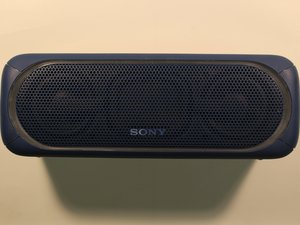
Você está com problemas na conectividade Bluetooth da sua caixa de som Sony.
A sua caixa de som está conectada a outro dispositivo
Certifique-se de que todos os outros dispositivos na área estejam desconectados da caixa de som e com o Bluetooth desativado. Depois, tente conectar-se à caixa de som novamente.
Você não sabe como ativar a funcionalidade Bluetooth da sua caixa de som
Para conectar via Bluetooth, primeiro certifique-se de que a caixa de som esteja carregada e ligada. Além disso, certifique-se de que o dispositivo ao qual você está tentando conectar a caixa de som esteja carregado e que a funcionalidade Bluetooth esteja ativada. Em seguida, pressione e segure o botão de pareamento na caixa de som até que o indicador luminoso de Bluetooth comece a piscar. No dispositivo Bluetooth ao qual você está tentando se conectar, selecione "SRS-XB40" como a opção da caixa de som. Se for solicitada uma senha, digite "0000". Se a conexão for bem-sucedida, o indicador luminoso de Bluetooth na caixa de som permanecerá aceso.
Não é possível redefinir a caixa de som Sony
Você não sabe como redefinir o seu dispositivo.
Você não sabe como redefinir a sua caixa de som
O botão de redefinição está localizado sob a tampa de borracha na parte traseira da caixa de som. Abra a tampa e pressione o botão "RESET" com um alfinete, um clipe de papel ou um objeto pontiagudo. Após pressionar "RESET", ligue a sua caixa de som normalmente. Se ela não ligar, entre em contato com o seu revendedor Sony local.
O áudio da caixa de som não está soando normal
Sua(s) caixa(s) de som tem saída de áudio baixa ou inexistente.
Conexão ruim
Se estiver usando uma conexão com cabo auxiliar, certifique-se de que o cabo esteja conectado firmemente tanto na caixa de som quanto no dispositivo de áudio que você está usando. Se estiver usando uma conexão Bluetooth, tente desconectar e reconectar à caixa de som. Se nenhuma dessas opções funcionar, consulte o manual do usuário ou o revendedor Sony local.
Interferência wireless
Para melhorar a qualidade da reprodução, tente mudar a posição do seu dispositivo ou desligar outras conexões sem fio. Além disso, você pode tentar se distanciar o máximo possível de micro-ondas e outros dispositivos Bluetooth.
A caixa de som descarrega rapidamente
Sua caixa de som Sony descarrega rapidamente após uma carga completa.
A bateria não mantém a carga
A autonomia da bateria é estimada em 12 horas, mas pode variar dependendo do seguinte: temperatura ambiente, condições de uso e nível de volume. Se o indicador luminoso CHARGE laranja não acender durante o carregamento, verifique o seguinte: certifique-se de que o cabo micro-USB esteja firmemente conectado ao adaptador USB CA. Certifique-se de que o adaptador USB CA esteja firmemente conectado à caixa de som e à tomada de parede. Se você tentou essas recomendações e o seu dispositivo ainda não liga, talvez seja necessária assistência técnica para a bateria.
As luzes de LED não ligam
As suas luzes de LED não funcionam como anunciado.
Você não sabe como ligar as luzes
Uma vez que a caixa de som esteja ligada, você pode ligar e desligar a função de iluminação mantendo o botão "EXTRA BASS - LIGHT" pressionado por cerca de 3 segundos.

Equipe

University of Alabama, Team S1-G1, Bedsole Spring 2018 Membro de University of Alabama, Team S1-G1, Bedsole Spring 2018
UA-BEDSOLE-S18S1G1
4 Membros
Autoria de 72 guias

17 comentários
I lost my charger..then I bought a different charger with six set of different voltage..so I'm charging my speaker with a 9v ac adapter and my speaker won't even charge..orange light keeps going on n off..what should I do
Safai Lio - Responder Compartilhar
Hey man i had the same problem at first, you just got to make sure you put it at the proper voltage. These speakers take 5V or less. So turn it to something lower than that such as 4.5 or 3. it will t ake longer but it will work.
E N - Responder Compartilhar
My SRS XB40 just won't hold a connection. After pairing it doesn't output music and drops almost immediately. This is happening with the phone. I have tried phone with other BT speakers and works just fine so this isn't the phone.
With a laptop I have to pair it every time and it holds the connection which is strange but I have to pair it everytine. I have tried to both initialise and rest but nothing. Is the Bluetooth module in the speaker dead? When I connect with a 3.5mm jack it works fine. Speaker charges fine. I've scratched everywhere online and no one seems to be experiencing this.
Mustafa Ziraba - Responder Compartilhar
Is it possible that when the battery is dead, i mean realy dead,
the whole speaker won´t work anymore. Even with an external powersupply.
(charge lamp lights up, when put it on, it lights up for about 5 sek. then it changes automatically back into charching mode)
I just want to checkout first if fixing is an option for me. I dont have the knowledge to target electrical problems…
Thanks
tobi_hofer - Responder Compartilhar
Is it possible that when the battery is dead, i mean really dead,
the whole speaker won´t work anymore. Even with an external power supply.
(charge lamp lights up, when put it on, it lights up for about 5 sec. then it changes automatically back into charging mode)
I just want to checkout first if fixing is an option for me. I don’t have the knowledge to target electrical problems…
Thanks
tobi_hofer - March 23
__________________________________________
This is exactly the same problem I’m having with my XB40. In my case at least, from what I’ve read of other people’s similar problem, I think I may have burned out something inside when attempting to charge the speaker with what I now suspect may have been an inappropriate charger, one that didn’t properly match up in regards to voltage and/or amperage. Not sure what I can do at this point.
tcny05 - Responder Compartilhar