Wiki contribuído por estudante
Uma equipe incrível de estudantes do nosso programa de educação fez esta wiki.
O dispositivo não liga
O dispositivo não consegue carregar ou ligar.
Cabo de carregamento com defeito
Certifique-se de que as conexões do cabo estejam firmes no dispositivo e na tomada. Se a luz de carregamento não acender, o carregador está com defeito. Considere substituir o carregador.
Bateria com defeito
Se a luz de carregamento do dispositivo estiver acesa, mas o dispositivo não carregar ou não permanecer ligado enquanto estiver desconectado da tomada, a bateria está com defeito. Substitua a bateria usando este guia.
Qualidade de foto e vídeo distorcida
O vídeo ou a imagem estão distorcidos, desfocados ou descoloridos.
Lente da câmera suja
Inspecione a lente da câmera quanto a detritos ou manchas. Se encontrar manchas, limpe a lente da câmera com um limpa-vidros. Se encontrar detritos sob a lente, siga este guia para remover a lente e limpar o seu interior.
Lente da câmera danificada
Inspecione a lente da câmera quanto a lascas, rachaduras ou arranhões. Se encontrar algum destes problemas, use este guia para substituir a lente.
Baixa qualidade de áudio
Você tem dificuldade em ouvir o áudio durante a reprodução do vídeo.
Microfone sujo
Se uma gravação reproduzir áudio com qualidade distorcida, limpe o microfone do dispositivo com uma lata de ar comprimido.
Alto-falante/microfone com defeito
Se a limpeza do microfone com ar comprimido não resolver o problema, considere substituir o alto-falante do dispositivo usando este guia.
O dispositivo está superaquecendo
O dispositivo desliga aleatoriamente ou exibe uma mensagem de superaquecimento na tela.
Bateria superaquece
Se sentir que a sua bateria está ficando muito quente ou superaquecendo, remova a bateria seguindo este guia. Com a bateria removida, deixe-a esfriar até a temperatura ambiente antes de tentar usá-la novamente.
Cartão SD não está processando rápido o suficiente
Geralmente, o dispositivo pode sofrer um aumento de temperatura ao gravar fotos e vídeos no cartão SD. Se o cartão SD estiver extremamente quente ou superaquecendo, considere comprar um novo cartão SD.
Exposição ambiental
Se o seu dispositivo estiver em uma área quente ou seca que cause exposição excessiva ao calor, leve-o para um local onde ele possa esfriar.
Incapaz de conectar a outros dispositivos
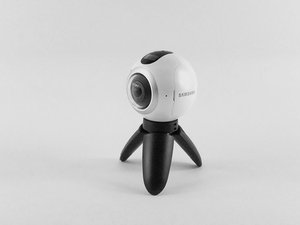
A Samsung Gear 360 não conecta corretamente a outros dispositivos.
Reconecte através do aplicativo Samsung Gear
Abra o aplicativo Gear 360 no seu smartphone. O Bluetooth e o Wi-Fi Direct do seu telefone serão ativados automaticamente. Basta tocar em conectar e seguir as instruções na tela para concluir a conexão. Se falhar, tente reiniciar o dispositivo e verifique as configurações de Bluetooth para garantir que a visibilidade esteja ativada.
A Samsung Gear 360 trava durante a operação
Remova a bateria e insira-a novamente. Isso geralmente reinicia a câmera, mas tem acontecido com muita frequência para o meu gosto.
O recurso de time-lapse não captura fotos no intervalo definido
Não encontrei uma solução para este problema.

Equipe

USF Tampa, Team S3-G5, Sullivan Spring 2017 Membro de USF Tampa, Team S3-G5, Sullivan Spring 2017
USFT-SULLIVAN-S17S3G5
4 Membros
Autoria de 84 guias

28 comentários
I have new gear 360 2017. It turns on andconnects.. ...until I put in the sd card.. then it won't turn on.
rob hoy - Responder Compartilhar
If the Samsung 360 will not turn on. Plug it into your power source and hold down the power button and the menu button at the same time, for fifteen seconds. This worked for my 360.
Mary Kelly - Responder Compartilhar
Think I might have stumbled upon a solution of sorts: I had problems connecting my Gear 360 camera with the Gear 360 (New) app on my Samsung S6. No help from tech support, as usual. So, after bumbling around, I thought I'd
1. Uninstall Samsung Accessory Service (in the app manager).
2. I also uninstalled the Gear 360 app.
3. Unpaired the Gear 360 camera on Bluetooth.
4. Re-started everything.
5. Re-installed just the Gear 360 app on my phone.
6. Attempted to re-connect the Gear 360 camera from within the app.
7. I believe this would trigger the app to automatically install the proper Samsung Accessory Service app.
8. The app started to connect properly to the camera.
Now, the app still isn't impressive but at least that got the camera to connect to the phone app.
Good luck.
bastogne97 - Responder Compartilhar
Just had the same problem, but i was able to fix it by reformatting the SD Card.
To check if this is the problem just remove the sd card and see if it turns on. If it does and says "No SD Card" try putting it back in and if it turns off again then you should reformat the SD Card to exFat32 on your computer. It worked for me and maybe it could work for you as well.
W Marketing Group - Responder Compartilhar
I just bought the Gear 360 (2017) and paired it with my Galaxy S8+ .. it took a couple of photos using the phone and the Gear 360 (new) app. Then on taking the third photo it got stuck on "Capturing". No matter what i do it will not take photos now. I restarted it , the phone nothing happens. the shutter button on the camera also doesnt not works. if i reset it using the app, it will take a couple of photos and then the same issue.
any suggestion guys ?
Craig - Responder Compartilhar