

Meu Problema
Water was spilled on the keyboard and the MBA no longer would boot (i.e., turn on).
Minha Solução
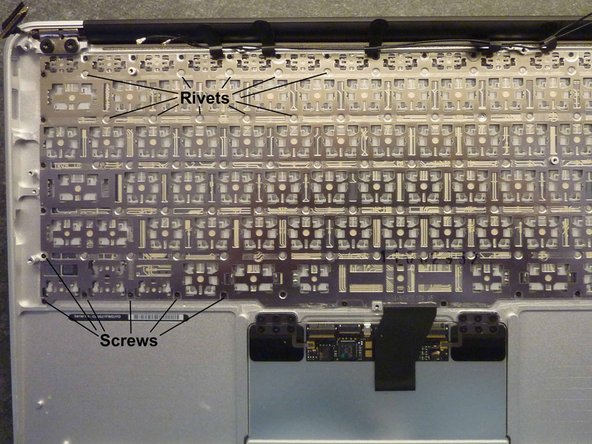
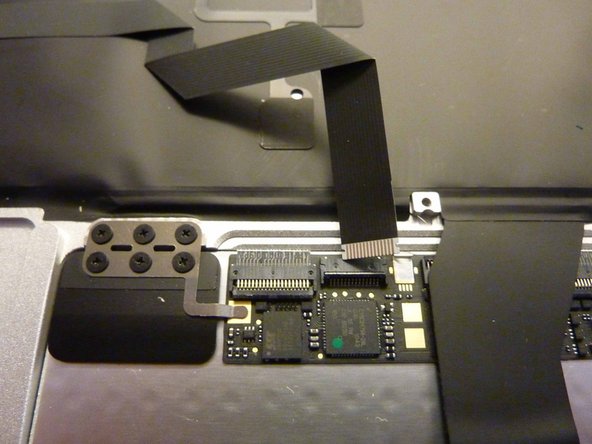
No luck (still will not turn on), but the guide for disassembly was excellent (Installing Macbook Air 11" Mid 2011 Upper Case); thank you very much. Disassembly and reassembly took about 45 minutes. The guide ends before keyboard "removal," which actually cannot be accomplished. The backlighting module (with a black plastic sheet over all of it (presumably to seal the keyboard from the interior components) is affixed with adhesive to the underside of the keyboard module; both were removed (carefully pulled off) after disconnecting the trackpad ribbon cable from the ZIF socket on the underside of the trackpad. The periphery of the keyboard module is screwed to the upper case with a gazillion 000 phillips head screws, but just about all of the interior nodes of the lattice of the keyboard frame are riveted to the upper case (i.e., the keyboard module is inextricably affixed to the upper case and cannot be removed or replaced).
Meu Conselho
If you spill on the keyboard, don't bother to disassemble. Wipe up what you can, leave the lid open to let it air dry (maybe try a fan), and hope for the best. The 54 Bit Driver Kit was perfect for the disassembly/reassembly exercise.


0 comentários