Ir para o conteúdo principal
Participe da comunidade de reparos - Criar conta

why! N650DU RAM Memory

O que você precisa

  1. why! N650DU RAM Memory, The Batteries: passo 1, imagem 1 %32 why! N650DU RAM Memory, The Batteries: passo 1, imagem 2 %32 why! N650DU RAM Memory, The Batteries: passo 1, imagem 3 %32
    • Unlock the button without spring

    • Slide the battery up while unlocking the button with spring

  2. why! N650DU RAM Memory, Access to major components: passo 2, imagem 1 %32 why! N650DU RAM Memory, Access to major components: passo 2, imagem 2 %32 why! N650DU RAM Memory, Access to major components: passo 2, imagem 3 %32
    • Unscrew the two large screws circled in red

    • Unscrew the two small screws circled in green

    • Slide the plate down and lift the

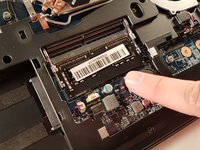
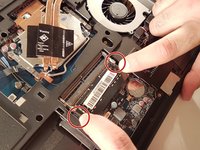
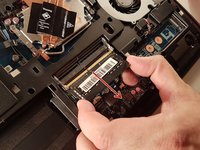
  3. why! N650DU RAM Memory, RAM memory: passo 3, imagem 1 %32 why! N650DU RAM Memory, RAM memory: passo 3, imagem 2 %32 why! N650DU RAM Memory, RAM memory: passo 3, imagem 3 %32
    • Spread the two arms holding the RAM bar

    • Remove the RAM card

Conclusão

To reassemble your device, follow the instructions in reverse order.

Um agradecimento especial a esses tradutores:

fr en

100%

irlanda está nos ajudando a consertar o mundo! Quer contribuir?
Comece a traduzir ›

Felice Suglia

Membro desde: 06/15/13

33.562 Reputação

Autoria de 283 guias

0Comentários do guia

Comentar

Visualizações:

Últimas 24 horas: 0

Últimos 7 dias: 6

Últimos 30 dias: 12

Ao todo: 417