Ir para o conteúdo principal
Participe da comunidade de reparos - Criar conta

ZTE Lever Battery Replacement

O que você precisa

  1. ZTE Lever Battery Replacement, Battery: passo 1, imagem 1 %32
    • Remove the SD card and the Sim card from the device.

    • The Sim and SD cards are not shown here as our device did not come with them.

  2. ZTE Lever Battery Replacement: passo 2, imagem 1 %32 ZTE Lever Battery Replacement: passo 2, imagem 2 %32
    • Use an iFixit opening tool to separate the back from the device.

  3. ZTE Lever Battery Replacement: passo 3, imagem 1 %32 ZTE Lever Battery Replacement: passo 3, imagem 2 %32
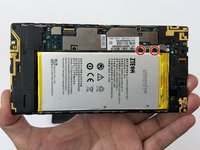
    • Remove the two 1.6mm Phillips #0 screws from the battery plug cover.

    • Remove the cover.

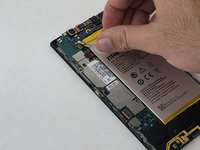
  4. ZTE Lever Battery Replacement: passo 4, imagem 1 %32 ZTE Lever Battery Replacement: passo 4, imagem 2 %32
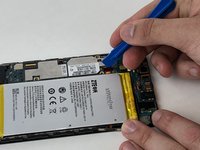
    • Disconnect the battery cable from the motherboard with a plastic opening tool.

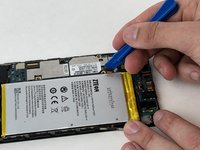
  5. ZTE Lever Battery Replacement: passo 5, imagem 1 %32
    • Use your hands, or a plastic opening tool, to pry the battery from the phone.

Conclusão

To reassemble your device, follow these instructions in reverse order.

Uma outra pessoa concluiu este guia.

Michael Gonzalez

Membro desde: 01/29/18

501 Reputação

Autoria de 4 guias

Equipe

USF Tampa, Team S5-G2, Passmore Spring 2018 Membro de USF Tampa, Team S5-G2, Passmore Spring 2018

USFT-PASSMORE-S18S5G2

3 Membros

Autoria de 12 guias

0Comentários do guia

Comentar

Visualizações:

Últimas 24 horas: 2

Últimos 7 dias: 9

Últimos 30 dias: 25

Ao todo: 1,222