Ir para o conteúdo principal
Participe da comunidade de reparos - Criar conta

Yujin Robot iCLEBO Arte Battery Replacement Guide

O que você precisa

  1. Yujin Robot iCLEBO Arte Battery Replacement Guide, Battery: passo 1, imagem 1 %32 Yujin Robot iCLEBO Arte Battery Replacement Guide, Battery: passo 1, imagem 2 %32 Yujin Robot iCLEBO Arte Battery Replacement Guide, Battery: passo 1, imagem 3 %32
    • Locate and unscrew the two 15mm screws with a Phillips #2 screwdriver.

  2. Yujin Robot iCLEBO Arte Battery Replacement Guide: passo 2, imagem 1 %32 Yujin Robot iCLEBO Arte Battery Replacement Guide: passo 2, imagem 2 %32 Yujin Robot iCLEBO Arte Battery Replacement Guide: passo 2, imagem 3 %32
    • Remove both screws shown by rotating them counter-clockwise.

  3. Yujin Robot iCLEBO Arte Battery Replacement Guide: passo 3, imagem 1 %32
    • Remove the battery compartment's lid.

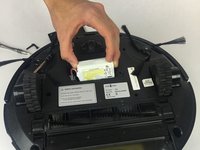
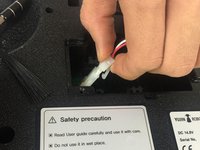
  4. Yujin Robot iCLEBO Arte Battery Replacement Guide: passo 4, imagem 1 %32 Yujin Robot iCLEBO Arte Battery Replacement Guide: passo 4, imagem 2 %32
    • Slide the battery out, and disconnect it from the robot by squeezing the tab on the power cable.

    • If you pull too hard on the connector without properly squeezing the tab, something will break.

Conclusão

To reassemble your device, follow these instructions in reverse order.

Uma outra pessoa concluiu este guia.

Trent Bingel

Membro desde: 02/28/17

437 Reputação

Autoria de 4 guias

Equipe

USF Tampa, Team S2-G3, Nance Spring 2017 Membro de USF Tampa, Team S2-G3, Nance Spring 2017

USFT-NANCE-S17S2G3

4 Membros

Autoria de 14 guias

1Comentário do guia

Tried 2 different new batteries and still won’t charge

desrn55 - Responder Compartilhar

Comentar

Visualizações:

Últimas 24 horas: 1

Últimos 7 dias: 8

Últimos 30 dias: 22

Ao todo: 3,016