Ir para o conteúdo principal
Participe da comunidade de reparos - Criar conta

Xbox One Elite Controller (Model 1698) Motherboard Replacement

O que você precisa

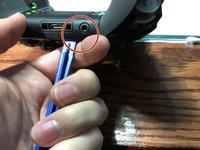
  1. Xbox One Elite Controller (Model 1698) Motherboard Replacement, Show me the Screws!: passo 1, imagem 1 %32 Xbox One Elite Controller (Model 1698) Motherboard Replacement, Show me the Screws!: passo 1, imagem 2 %32
    • You can remove the side panels with a pry tool.

    • You don't need to remove the rubber. The rubber on this controller was already bad.

    Pergunte ao FixBot
  2. Xbox One Elite Controller (Model 1698) Motherboard Replacement, Removing the back panel screws: passo 2, imagem 1 %32
    • Remove the 5 Torx Security Bit (TR9) screws.

    Pergunte ao FixBot
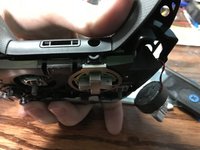
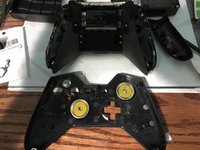
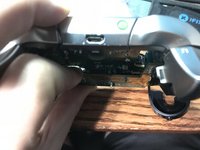
  3. Xbox One Elite Controller (Model 1698) Motherboard Replacement, Popping that back panel off: passo 3, imagem 1 %32 Xbox One Elite Controller (Model 1698) Motherboard Replacement, Popping that back panel off: passo 3, imagem 2 %32 Xbox One Elite Controller (Model 1698) Motherboard Replacement, Popping that back panel off: passo 3, imagem 3 %32
    • Pry the panel next to the 3.5mm port.

    • Be careful to not rip the ribbon shown in the next step.

    Pergunte ao FixBot
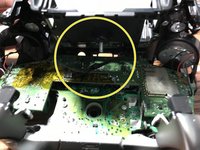
  4. Xbox One Elite Controller (Model 1698) Motherboard Replacement, Warning Carefully remove the ribbon: passo 4, imagem 1 %32 Xbox One Elite Controller (Model 1698) Motherboard Replacement, Warning Carefully remove the ribbon: passo 4, imagem 2 %32
    • Be careful to not rip the ribbon cable.

    • You can pop the connector up to remove the ribbon easily.

    • Ribbon Cable

    Pergunte ao FixBot
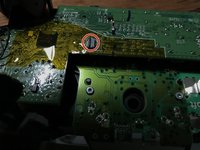
  5. Xbox One Elite Controller (Model 1698) Motherboard Replacement, Screws on controller motherboard: passo 5, imagem 1 %32
    • Remove the 2 Torx (T6) screws.

    Pergunte ao FixBot
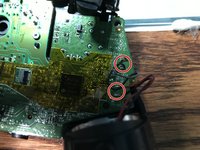
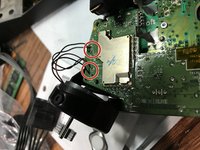
  6. Xbox One Elite Controller (Model 1698) Motherboard Replacement, Desolder wires from motherboard: passo 6, imagem 1 %32 Xbox One Elite Controller (Model 1698) Motherboard Replacement, Desolder wires from motherboard: passo 6, imagem 2 %32
    • Desolder the 4 wires on each side, these control the vibrations and the RT LT.

    Pergunte ao FixBot
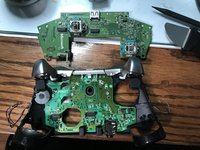
  7. Xbox One Elite Controller (Model 1698) Motherboard Replacement, Remove the motherboard: passo 7, imagem 1 %32 Xbox One Elite Controller (Model 1698) Motherboard Replacement, Remove the motherboard: passo 7, imagem 2 %32
    • Pull up from the "top" side of the controller on the daughterboard.

    Pergunte ao FixBot
Conclusão

To reassemble your device, follow these instructions in reverse order.

9 outras pessoas executaram este guia.

EasyAsABC123

Membro desde: 01/22/10

2.557 Reputação

Autoria de 5 guias

1Comentário do guia

50 minutes? half of that tops

glenn.fowell - Responder Compartilhar

Comentar

Visualizações:

Últimas 24 horas: 3

Últimos 7 dias: 33

Últimos 30 dias: 154

Ao todo: 19,177