Introdução
This guide is mandatory in order to replace other parts of your rotary tool.
O que você precisa
-
-
-
-
While pressing the spindle lock button, unscrew the collet nut and remove it along with the brass collet.
-
-
-
To remove the front panel, pry the device apart while holding the device with the other hand.
-

 Pergunte ao FixBot


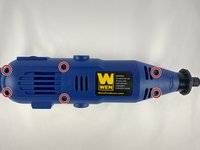
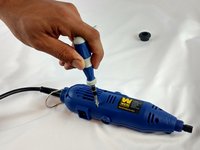


To reassemble your device, follow these instructions in reverse order.
Cancelar: não concluí este guia.
2 outras pessoas executaram este guia.

Equipe

USF Tampa, Team 12-1, Eyestone Spring 2016 Membro de USF Tampa, Team 12-1, Eyestone Spring 2016
USFT-EYESTONE-S16S12G1
4 Membros
Autoria de 6 guias
