Ir para o conteúdo principal
Participe da comunidade de reparos - Criar conta

VTech InnoTab Max Cover Replacement

O que você precisa

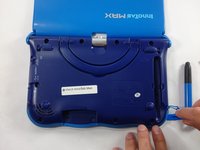
  1. VTech InnoTab Max Cover Replacement, Cover: passo 1, imagem 1 %32 VTech InnoTab Max Cover Replacement, Cover: passo 1, imagem 2 %32 VTech InnoTab Max Cover Replacement, Cover: passo 1, imagem 3 %32
    • Remove all screw caps from the back panel using a metal spudger.

    Pergunte ao FixBot

    Comentar

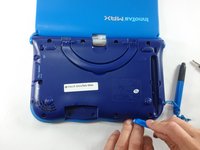
  2. VTech InnoTab Max Cover Replacement: passo 2, imagem 1 %32 VTech InnoTab Max Cover Replacement: passo 2, imagem 2 %32 VTech InnoTab Max Cover Replacement: passo 2, imagem 3 %32
    • Next remove all of the now uncovered screws.

    • If there is a cartridge in the device make sure to remove it.

    Pergunte ao FixBot

    Comentar

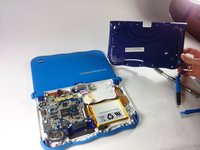
  3. VTech InnoTab Max Cover Replacement: passo 3, imagem 1 %32 VTech InnoTab Max Cover Replacement: passo 3, imagem 2 %32
    • Now that all of the screws have been removed, pry the back cover off using a plastic opening tool.

    Pergunte ao FixBot

    Comentar

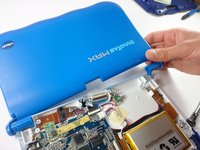
  4. VTech InnoTab Max Cover Replacement: passo 4, imagem 1 %32 VTech InnoTab Max Cover Replacement: passo 4, imagem 2 %32
    • Here you can see the back cover has been fully removed and you can now access the front cover.

    • To remove the front cover, remove the springs holding the pictured brackets in place, then pull it away.

    Pergunte ao FixBot

    Comentar

Conclusão

To reassemble your device, follow these instructions in reverse order.

Cancelar: não concluí este guia.

Uma outra pessoa concluiu este guia.

Equipe

USF Tampa, Team S5-G5, Lacy Spring 2017 Membro de USF Tampa, Team S5-G5, Lacy Spring 2017

USFT-LACY-S17S5G5

3 Membros

Autoria de 10 guias

0Comentários do guia

Comentar

Visualizações:

Últimas 24 horas: 0

Últimos 7 dias: 7

Últimos 30 dias: 34

Ao todo: 972