Ir para o conteúdo principal
Participe da comunidade de reparos - Criar conta

Turtle Beach Pure Air Battery Replacement

O que você precisa

  1. Turtle Beach Pure Air Battery Replacement, Bottom Cover: passo 1, imagem 1 %32 Turtle Beach Pure Air Battery Replacement, Bottom Cover: passo 1, imagem 2 %32
    • Power off the mouse by moving the power switch to the center.

    Pergunte ao FixBot
  2. Turtle Beach Pure Air Battery Replacement: passo 2, imagem 1 %32 Turtle Beach Pure Air Battery Replacement: passo 2, imagem 2 %32
    • Peel back the mouse feet.

    • Remove the three 1.6mm screws using a JIS #000 screwdriver.

    • Remove the single 1.6mm screws using remove using a 1.3 mm hex screwdriver.

    Pergunte ao FixBot
  3. Turtle Beach Pure Air Battery Replacement: passo 3, imagem 1 %32 Turtle Beach Pure Air Battery Replacement: passo 3, imagem 2 %32
    • Carefully remove the bottom cover of the mouse.

    • Be cautious of the cable connecting the bottom cover to the rest of the mouse.

    Pergunte ao FixBot
  4. Turtle Beach Pure Air Battery Replacement: passo 4, imagem 1 %32 Turtle Beach Pure Air Battery Replacement: passo 4, imagem 2 %32 Turtle Beach Pure Air Battery Replacement: passo 4, imagem 3 %32
    • Disconnect the ribbon cable securing the upper shell to the motherboard.

    • Lift the locking clip to release the cable from its connector.

    Pergunte ao FixBot
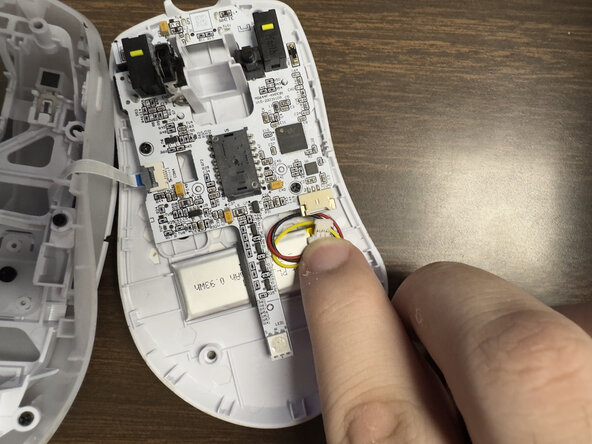
  5. Turtle Beach Pure Air Battery Replacement, Motherboard: passo 5, imagem 1 %32 Turtle Beach Pure Air Battery Replacement, Motherboard: passo 5, imagem 2 %32 Turtle Beach Pure Air Battery Replacement, Motherboard: passo 5, imagem 3 %32
    • Carefully disconnect the battery clip from the motherboard socket by softly pulling the bottom of the clip.

    Pergunte ao FixBot
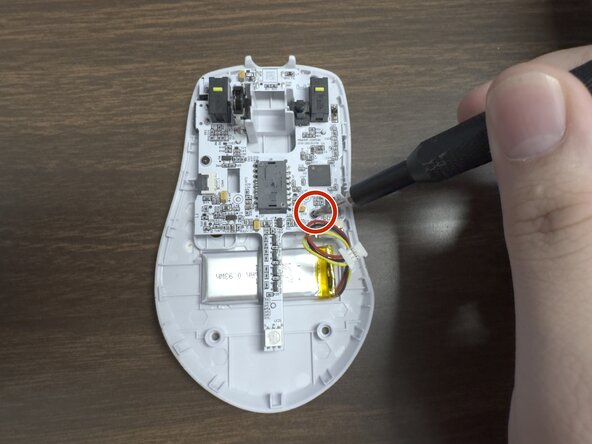
  6. Turtle Beach Pure Air Battery Replacement: passo 6, imagem 1 %32 Turtle Beach Pure Air Battery Replacement: passo 6, imagem 2 %32
    • Remove the two 1.6 mm screws on the middle left and lower right sides with a JIS000 screwdriver to disconnect the motherboard from the lower shell.

    Pergunte ao FixBot
  7. Turtle Beach Pure Air Battery Replacement: passo 7, imagem 1 %32 Turtle Beach Pure Air Battery Replacement: passo 7, imagem 2 %32
    • Gently lift the motherboard out of the housing.

    Pergunte ao FixBot
  8. Turtle Beach Pure Air Battery Replacement, Battery: passo 8, imagem 1 %32 Turtle Beach Pure Air Battery Replacement, Battery: passo 8, imagem 2 %32 Turtle Beach Pure Air Battery Replacement, Battery: passo 8, imagem 3 %32
    • Carefully pry up the battery.

    • Prying the battery may take a bit of force since it is glued to the plastic.

    Pergunte ao FixBot
Conclusão

To reassemble your device, follow these instructions in reverse order.

0Comentários do guia

Comentar

Visualizações:

Últimas 24 horas: 10

Últimos 7 dias: 14

Últimos 30 dias: 17

Ao todo: 114