Ir para o conteúdo principal
Participe da comunidade de reparos - Criar conta

The Claw "Claw" Replacement

O que você precisa

  1. The Claw  "Claw" Replacement, Top Cover: passo 1, imagem 1 %32
    • Place The Claw machine in the up-right position with the control knobs facing you.

    Pergunte ao FixBot

    Comentar

  2. The Claw  "Claw" Replacement: passo 2, imagem 1 %32
    • Turn The Claw machine upside-down placing the top cover on the surface of your work area.

    Pergunte ao FixBot

    Comentar

  3. The Claw  "Claw" Replacement: passo 3, imagem 1 %32
    • Remove all ten 6mm phillips #1 screws underneath the top cover using your #1 phillips head screwdriver.

    • It is helpful to choose a clear, well lit work space. There are multiple tiny screws that are easy to lose.

    Pergunte ao FixBot

    Comentar

  4. The Claw  "Claw" Replacement: passo 4, imagem 1 %32
    • Turn The Claw machine back to the upright position with controls facing you.

    Pergunte ao FixBot

    Comentar

  5. The Claw  "Claw" Replacement: passo 5, imagem 1 %32
    • Remove the top cover of The Claw machine.

    Pergunte ao FixBot

    Comentar

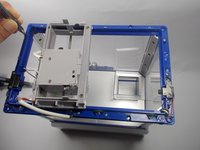
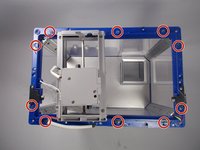
  6. The Claw  "Claw" Replacement: passo 6, imagem 1 %32 The Claw  "Claw" Replacement: passo 6, imagem 2 %32
    • Remove the ten 6 mm phillips #1 screws from the top flange.

    Pergunte ao FixBot

    Comentar

  7. The Claw  "Claw" Replacement: passo 7, imagem 1 %32
    • Lift the flange upward and off to the side of the machine.

    • There is enough wire connecting the flange to the machine that you will not need to cut the wire. The flange can be moved off to the side of the machine while you are working.

    • Cutting or ripping out the wire will cause damage to the machine so try not to put much tension on the wire.

    Pergunte ao FixBot

    Comentar

  8. The Claw  "Claw" Replacement, Claw: passo 8, imagem 1 %32
    • Once you have removed the top cover of the claw you can easily access the claw and you will see that the claw is attached by two small chains.

    • Locate the small rings that attach the chain to the plastic claw.

    Pergunte ao FixBot

    Comentar

  9. The Claw  "Claw" Replacement: passo 9, imagem 1 %32
    Ferramenta utilizada neste passo:
    Tweezers
    $4.99
    • Using the precision tweezers or small needle nose pliers, gently widen the small rings enough so that they can be removed from the claw.

    • Replace the claw one ring at a time. The chain needs to be attached to the new claw in the same configuration. One side of the chain opens the claw and the other side is just a hanging support.

    Pergunte ao FixBot

    Comentar

Conclusão

To reassemble your device, follow these instructions in reverse order.

Cancelar: não concluí este guia.

2 outras pessoas executaram este guia.

Alain Pierre

Membro desde: 03/22/16

1.188 Reputação

Autoria de 9 guias

Equipe

7Comentários do guia

Where do I buy a new grabber thing

Oliver Chew - Responder Compartilhar

The 1st joystick that moves the claw forward and back doesn’t work.

Michelle Bianchini - Responder Compartilhar

What if the chain won't go down as it deep as it used to be?

Mira DIP - Responder Compartilhar

Can you reconnect the white cord in picture above in step 6 connecting the claw on top and bottom

Greg Sturges - Responder Compartilhar

My chain fell off and I dont know how to fix

Kathellyn Da silva - Responder Compartilhar

Comentar

Visualizações:

Últimas 24 horas: 8

Últimos 7 dias: 37

Últimos 30 dias: 146

Ao todo: 11,847