Essa tradução foi gerada por um programa e ainda não foi revisada por uma pessoa. Falas essa língua? Dá uma olhada.
O que você precisa
-
-
-
Remova a capa traseira aplicando pressão e deslizando-a em direção à parte superior do celular.
 Pergunte ao FixBot
-
-
-
-
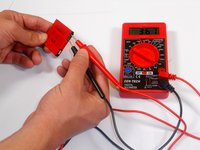
Use um multímetro para testar a voltagem da bateria.
-
Insira a ponta de prova preta na entrada de aterramento (ground) do multímetro e a ponta de prova vermelha na entrada V(ohm)mA.
-
Coloque as pontas de prova vermelha e preta nas duas placas de metal externas, cada uma em lados opostos da bateria, conforme mostrado.
-
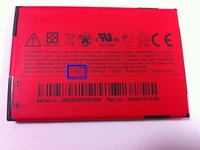
Verifique se a voltagem exibida no multímetro corresponde à voltagem definida na bateria, que geralmente é de 3,7 V.
-
-


Para a remontagem de seu dispositivo, siga estas instruções na ordem inversa.
Cancelar: não concluí este guia.
Uma outra pessoa concluiu este guia.

Equipe

Cal Poly, Team 9-64, Walters Spring 2011 Membro de Cal Poly, Team 9-64, Walters Spring 2011
CPSU-WALTERS-S11S9G64
5 Membros
Autoria de 108 guias
2Comentários do guia
Hello one the question was tablet not telephone and it's really vague how you guys explain these things you need to go to work on your site
yes,not tablet with battery removal difficult
