Introdução
This replacement guide provides step by step instructions with pictures to help replace your Sony Vaio PCG-3C2L battery. You may need to replace your battery if your laptop is failing to power on or if it is not holding a charge. To complete this replacement, an iFixit Opening Tool can be used, but it is optional.
Always check to make sure you have the correct battery. You can find replacement batteries here.
O que você precisa
-
-
Turn your computer over so the bottom is facing up.
-
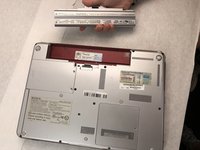
The battery should be in the top on the back of the computer.
 Pergunte ao FixBot
-
-
-
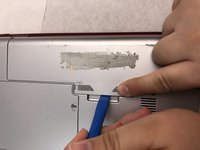
Initially, the "lock" button should be pushed all the way to the left. To unlock the battery, move the lock button from the left to the right.
-
-
-
-
After unlocking the battery, hold the "release" button and push to the left.
-
-
-
Keep the "release" button pressed.
-
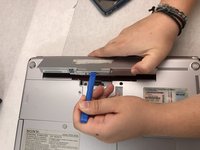
Use the iFixit opening tool (or your hands) to lift the battery up.
-


To reassemble your device, follow these instructions in reverse order.

Equipe

Embry-Riddle Aeronautical University, Team S8-G3, Salas Fall 2019 Membro de Embry-Riddle Aeronautical University, Team S8-G3, Salas Fall 2019
ERAU-SALAS-F19S8G3
4 Membros
Autoria de 12 guias
