Introdução
This guide will help users replace the battery on their Sony Tablet S. This requires a Phillips #0 and #000 screw driver, as well as a spudger and some plastic opening tools.
O que você precisa
-
-
-
Use a plastic opening tool to remove the two rubber grips on the back of the tablet.
 Pergunte ao FixBot
-
-
-
Flip the tablet over and use a plastic opening tool to pry the casing away from the top of the screen. Push the back cover off.
-
-
-
Once the casing is off, remove the nine 5mm Phillips #0 screws shown.
-
-
-
-
Remove the white ribbon cable by pulling the blue tab straight up out of the socket and then peeling up the tape securing it to the tablet.
-
-
-
Remove the copper ribbon cable by gently using a spudger to pry it up from its socket.
-
-
-
Slide the bottom grey cover piece away from the body and remove it.
-
-
-
Remove the five 4mm Phillips #000 screws.
-
Remove the two 5mm Phillips #000 screws holding the charger in place.
-
-
-
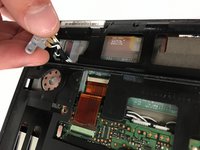
Position the charging port at an angle so you can thread it through the opening as you remove the black plastic cover from the back of the tablet.
-
-
-
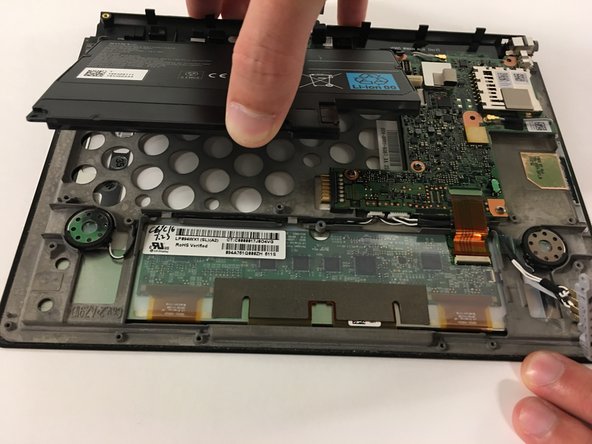
Use a spudger to lift the zero insertion force connector latch for the long ribbon cable to the right of the battery, then pull the cable loose from its socket.
-
-
-
Remove the three 5mm Phillips #0 screws securing the original battery.
-
-






To reassemble your device, follow these instructions in reverse order.
Cancelar: não concluí este guia.
4 outras pessoas executaram este guia.

Equipe

USF Tampa, Team 3-5, Passmore Fall 2016 Membro de USF Tampa, Team 3-5, Passmore Fall 2016
USFT-PASSMORE-F16S3G5
3 Membros
Autoria de 5 guias
1Comentário do guia
To change polarizer sticker of the screen, is it necessary to remove battery, motherboard etc. or I can just go with removing the adhesive of the bezel? Even after removing the bezel adhesive, is it easy to replace the sticker without damaging the lcd or digitizer?
