Ir para o conteúdo principal
Participe da comunidade de reparos - Criar conta

Sony Alpha NEX-C3 Control Wheel Replacement

O que você precisa

    1. Sony Alpha NEX-C3 Control Wheel Replacement, Top Panel: passo 1, imagem 1 %32
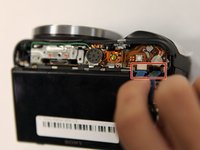
      • Turn the camera off by sliding the power switch.

      Pergunte ao FixBot
      Comentar

    2. Sony Alpha NEX-C3 Control Wheel Replacement: passo 2, imagem 1 %32
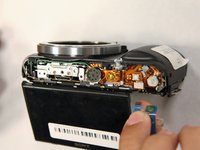
      • Use a Phillips head 000 screwdriver to remove the 4.0mm screw inside the USB port.

      Pergunte ao FixBot
      Comentar

    3. Sony Alpha NEX-C3 Control Wheel Replacement: passo 3, imagem 1 %32
      • Use a Phillips head 000 screwdriver to remove the one 4.0mm screw on the side opposite of the USB port near the shutter button.

      Pergunte ao FixBot

      Comentar

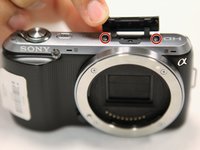
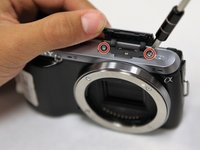
    4. Sony Alpha NEX-C3 Control Wheel Replacement: passo 4, imagem 1 %32 Sony Alpha NEX-C3 Control Wheel Replacement: passo 4, imagem 2 %32
      • Open the flap at the top of the camera.

      • Use a Phillips head 000 screwdriver to remove the two 4.0mm screws inside.

      Pergunte ao FixBot

      Comentar

    5. Sony Alpha NEX-C3 Control Wheel Replacement: passo 5, imagem 1 %32
      • Gently lift off the top panel with your hands.

      Pergunte ao FixBot

      Comentar

    1. Sony Alpha NEX-C3 Control Wheel Replacement, Back Panel: passo 6, imagem 1 %32
      • Use a Phillips head 000 screwdriver to remove the 4.0mm screw at the side opposite of the USB port.

      Pergunte ao FixBot

      Comentar

    2. Sony Alpha NEX-C3 Control Wheel Replacement: passo 7, imagem 1 %32 Sony Alpha NEX-C3 Control Wheel Replacement: passo 7, imagem 2 %32
      • Use a Phillips head 000 screwdriver to remove the three 4.0mm screws on the bottom of the camera.

      Pergunte ao FixBot

      Comentar

    3. Sony Alpha NEX-C3 Control Wheel Replacement: passo 8, imagem 1 %32
      • Tilt up the LCD screen.

      • Use a Phillips head 000 screwdriver to remove the two coarse 4.0mm screws near the bottom of the camera.

      Pergunte ao FixBot

      Comentar

    4. Sony Alpha NEX-C3 Control Wheel Replacement: passo 9, imagem 1 %32
      • Gently pry off the back panel, by wiggling it around the LCD screen.

      Pergunte ao FixBot

      Comentar

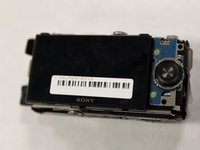
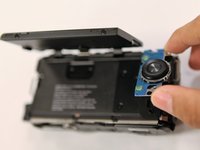
    1. Sony Alpha NEX-C3 Control Wheel Replacement, Control Wheel: passo 10, imagem 1 %32 Sony Alpha NEX-C3 Control Wheel Replacement, Control Wheel: passo 10, imagem 2 %32
      • Tilt up the LCD screen.

      • Grab the silver plate, and gently pry it up.

      Pergunte ao FixBot

      Comentar

    2. Sony Alpha NEX-C3 Control Wheel Replacement: passo 11, imagem 1 %32 Sony Alpha NEX-C3 Control Wheel Replacement: passo 11, imagem 2 %32
      • Gently pinch blue ribbon cable, and pull it out of the port.

      Pergunte ao FixBot

      Comentar

Conclusão

To reassemble your device, follow these instructions in reverse order.

Cancelar: não concluí este guia.

3 outras pessoas executaram este guia.

Equipe

0Comentários do guia

Comentar

Visualizações:

Últimas 24 horas: 1

Últimos 7 dias: 10

Últimos 30 dias: 55

Ao todo: 4,456