Introdução
The battery can wear over time and no longer hold a charge, and then requires to be replaced.
-
-
-
-
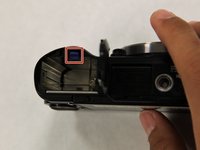
Push back the blue tab in the battery port.
-
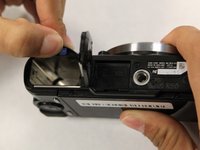
Afterwards, the battery should pop up. Remove it with your hands.
-

 Pergunte ao FixBot


Conclusão
To reassemble your device, follow these instructions in reverse order.

Equipe

UC Santa Barbara, Team S1-G1, Weedon Fall 2017 Membro de UC Santa Barbara, Team S1-G1, Weedon Fall 2017
UCSB-WEEDON-F17S1G1
3 Membros
Autoria de 13 guias
