Essa tradução foi gerada por um programa e ainda não foi revisada por uma pessoa. Falas essa língua? Dá uma olhada.

Substituição da tela LCD da Samsung TL220

Lesley e 3 outros colaboradores
Última atualização em 18 de ago de 2026
Visualizações: 1,2 mil
Visualizar Estatísticas:
- Últimas 24 horas:
- 3
- Últimos 7 dias:
- 18
- Últimos 30 dias:
- 87
- Ao todo:
- 1.189
Comentários: 0
Ninguém deixou comentários sobre este guia. Você será o primeiro?
Go to guide commentsConcluído: 2 3
2 pessoas marcaram este guia como "concluído". Será você o próximo?
3· pessoas marcaram este guia como "concluído". Incluindo você — ótimo trabalho!
Favorites: 0 1
Ninguém favoritou (e se inscreveu) neste guia como favorito. Você será o primeiro?
1 pessoa marcou como favorito (e assinou) este guia — você!
Despedaçar
As etapas neste guia devem se dividir e serem feitas em uma série de guias de pré-requisito.
Melhor Introdução
Melhore este guia, completando ou revendo a sua introdução.
O que você precisa
Ferramentas


-
-
-
Comece desenroscando os sete parafusos externos da câmera. Há um em cada canto e três na parte inferior.
 Pergunte ao FixBot
-
-
-
Agora, abra cuidadosamente a carcaça traseira com a ferramenta de abertura iFixit.
-
-
-
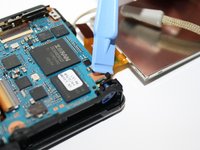
Com a tampa traseira removida, afaste delicadamente a tela LCD.
-
Em seguida, remova os três parafusos internos para retirar a carcaça interna.
-
-
-
Desencaixe os quatro conectores que prendem as fitas de filme de cobre alaranjadas.
-
Em seguida, puxe cuidadosamente as três fitas de filme com a ferramenta de abertura iFixit.
-
-
-
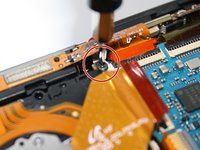
Remova o parafuso localizado acima da tira de filme central. Ele prende o quadro superior no lugar.
-
-
-
-
Em seguida, solte o conector para liberar a fita adesiva e então você poderá substituir a sua tela LCD.
-
-




Para a remontagem de seu dispositivo, siga estas instruções na ordem inversa.
Cancelar: não concluí este guia.
2 outras pessoas executaram este guia.


