Ir para o conteúdo principal
Participe da comunidade de reparos - Criar conta

Samsung Rogue OLED Screen Replacement

O que você precisa

  1. Samsung Rogue OLED Screen Replacement, Battery: passo 1, imagem 1 %32 Samsung Rogue OLED Screen Replacement, Battery: passo 1, imagem 2 %32
    • Before disassembling your Samsung Rogue, make sure it is powered off.

    • With your thumbs, push down on the back cover of your phone and slide it away from the camera.

    Pergunte ao FixBot

    Comentar

  2. Samsung Rogue OLED Screen Replacement: passo 2, imagem 1 %32 Samsung Rogue OLED Screen Replacement: passo 2, imagem 2 %32
    • You can now remove the battery by prying it up with your finger.

    Pergunte ao FixBot

    Comentar

  3. Samsung Rogue OLED Screen Replacement, Motherboard: passo 3, imagem 1 %32
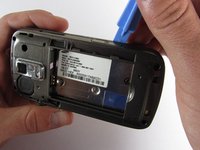
    • Use a plastic opening tool to carefully pry the back cover surrounding the camera up from the phone.

    Pergunte ao FixBot

    Comentar

  4. Samsung Rogue OLED Screen Replacement: passo 4, imagem 1 %32
    • Remove the five 3.4mm Philips screws securing the backing of the phone.

    Pergunte ao FixBot

    Comentar

  5. Samsung Rogue OLED Screen Replacement: passo 5, imagem 1 %32 Samsung Rogue OLED Screen Replacement: passo 5, imagem 2 %32 Samsung Rogue OLED Screen Replacement: passo 5, imagem 3 %32
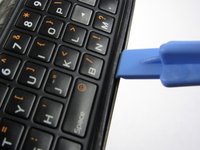
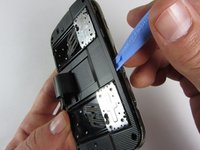
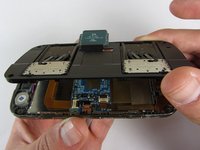
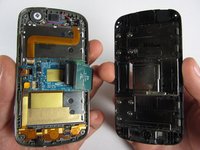
    • Use a plastic opening tool to carefully pry off the back cover.

    • Make sure you are prying along the edge and not between the two halves of the phone that slide away from each other.

    • Be careful to not drop the volume changing piece, for it can easily slip out.

    Pergunte ao FixBot

    Comentar

  6. Samsung Rogue OLED Screen Replacement: passo 6, imagem 1 %32
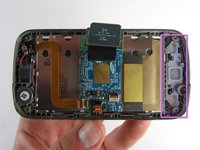
    • Remove the two 3.45 mm Philips screws below the white sticker.

    Pergunte ao FixBot

    Comentar

  7. Samsung Rogue OLED Screen Replacement: passo 7, imagem 1 %32 Samsung Rogue OLED Screen Replacement: passo 7, imagem 2 %32
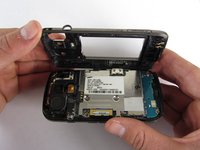
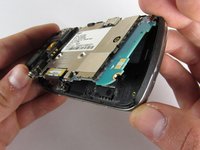
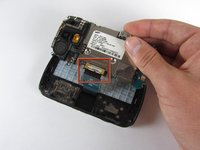
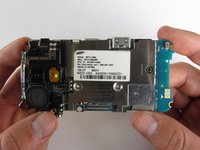
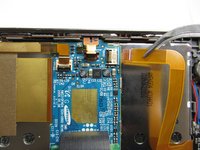
    • Carefully lift the motherboard up from the bottom edge.

    • The film of wires is still attached to the motherboard, so do not completely remove the motherboard just yet or you may damage it.

    Pergunte ao FixBot

    Comentar

  8. Samsung Rogue OLED Screen Replacement: passo 8, imagem 1 %32 Samsung Rogue OLED Screen Replacement: passo 8, imagem 2 %32
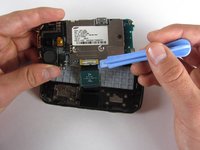
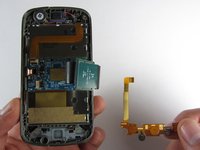
    • Use a plastic opening tool to disconnect the film from the motherboard.

    Pergunte ao FixBot

    Comentar

  9. Samsung Rogue OLED Screen Replacement, OLED Screen: passo 9, imagem 1 %32
    • Remove the eight 1.7mm Philips screws above the keyboard.

    Pergunte ao FixBot

    Comentar

  10. Samsung Rogue OLED Screen Replacement: passo 10, imagem 1 %32
    • Carefully remove the keyboard frame from the sliding mechanisms underneath.

    Pergunte ao FixBot

    Comentar

  11. Samsung Rogue OLED Screen Replacement: passo 11, imagem 1 %32
    • Remove the five 3.0mm Philips screws around the outside of the sliding mechanisms.

    Pergunte ao FixBot

    Comentar

  12. Samsung Rogue OLED Screen Replacement: passo 12, imagem 1 %32 Samsung Rogue OLED Screen Replacement: passo 12, imagem 2 %32 Samsung Rogue OLED Screen Replacement: passo 12, imagem 3 %32
    • Use a plastic opening tool to pry off the upper slide plate.

    • Be careful of the film of wires when taking off the upper slide plate.

    Pergunte ao FixBot

    Comentar

  13. Samsung Rogue OLED Screen Replacement: passo 13, imagem 1 %32 Samsung Rogue OLED Screen Replacement: passo 13, imagem 2 %32 Samsung Rogue OLED Screen Replacement: passo 13, imagem 3 %32
    Ferramenta utilizada neste passo:
    Tweezers
    $4.99
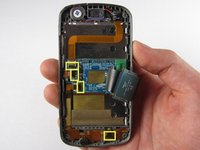
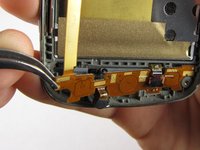
    • Use tweezers to open the four black gates by putting them in the "up" position.

    • With the same tweezers, carefully pull out the orange strips from the four specified gates.

    Pergunte ao FixBot

    Comentar

  14. Samsung Rogue OLED Screen Replacement: passo 14, imagem 1 %32 Samsung Rogue OLED Screen Replacement: passo 14, imagem 2 %32
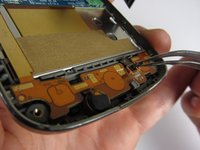
    • Using tweezers, gently remove the bottom orange strip from the device

    Pergunte ao FixBot

    Comentar

  15. Samsung Rogue OLED Screen Replacement: passo 15, imagem 1 %32 Samsung Rogue OLED Screen Replacement: passo 15, imagem 2 %32
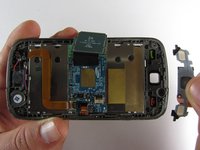
    • In this procedure, the rubber function key pad can easily fall out, so it would be best to take it out and set it safely aside.

    Pergunte ao FixBot

    Comentar

  16. Samsung Rogue OLED Screen Replacement: passo 16, imagem 1 %32 Samsung Rogue OLED Screen Replacement: passo 16, imagem 2 %32 Samsung Rogue OLED Screen Replacement: passo 16, imagem 3 %32
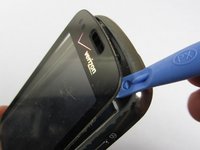
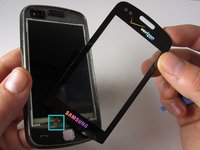
    • Starting at the top, use a plastic opening tool to pry open the protective screen on the front of the phone.

    • One of the strips you pulled out of a gate from a previous step is attached to the screen at the bottom. Be careful not to damage it when you are taking off the screen.

    • The protective screen is glued underneath the edges, so it will be a little more difficult to get off.

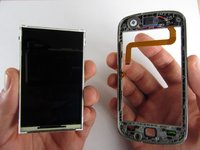
    • Keep your hand underneath the OLED screen at all times because it easily falls out once the protective screen detaches.

    Pergunte ao FixBot

    Comentar

Conclusão

To reassemble your device, follow these instructions in reverse order.

Cancelar: não concluí este guia.

Uma outra pessoa concluiu este guia.

Equipe

Cal Poly, Team 7-32, Maness Spring 2012 Membro de Cal Poly, Team 7-32, Maness Spring 2012

CPSU-MANESS-S12S7G32

4 Membros

Autoria de 20 guias

0Comentários do guia

Comentar

Visualizações:

Últimas 24 horas: 0

Últimos 7 dias: 13

Últimos 30 dias: 38

Ao todo: 2,603